

Last updated: October 28, 2026
Quick Answer
Otter.ai, Fireflies.ai, and Fathom all record, transcribe, and summarize meetings automatically, but they are no longer simple notetakers. Otter now pushes into pre-meeting briefings and post-meeting document drafting through its new Meeting Agents. Fireflies leans hardest into multilingual accuracy and a 200+ skill AI assistant. Fathom keeps things simpler with a ChatGPT-style chat interface and now sits inside Superhuman’s ecosystem. Pick based on how much workflow automation your team actually needs, not just transcription quality.
Key Takeaways
- All three tools join Zoom, Google Meet, and Microsoft Teams automatically through calendar integration.
- Fireflies claims around 99% transcription accuracy in English and 95% across other languages, covering 100+ languages.[1]
- Otter’s new Meeting Agents add pre-meeting briefs, live in-call coaching, and automatic drafting of contracts or CRM updates.[2]
- Fathom offers a free plan with paid tiers starting near $15 per month, a simpler pricing structure than Fireflies’ multi-tier model.[3]
- Fathom is now part of Superhuman, shifting its positioning toward integrated email-plus-meeting productivity.
- Small teams with light meeting volume often do fine with free plans; sales and CS teams usually need paid tiers for CRM sync.
- None of these tools guarantee legal-grade accuracy, so compliance-heavy teams should verify recordings manually.
What Does Each of These Tools Actually Do
Otter.ai, Fireflies.ai, and Fathom all record audio from your calls, generate a transcript, write a summary, and pull out action items without you lifting a pen. The difference in 2026 is how far each one goes beyond that core job.
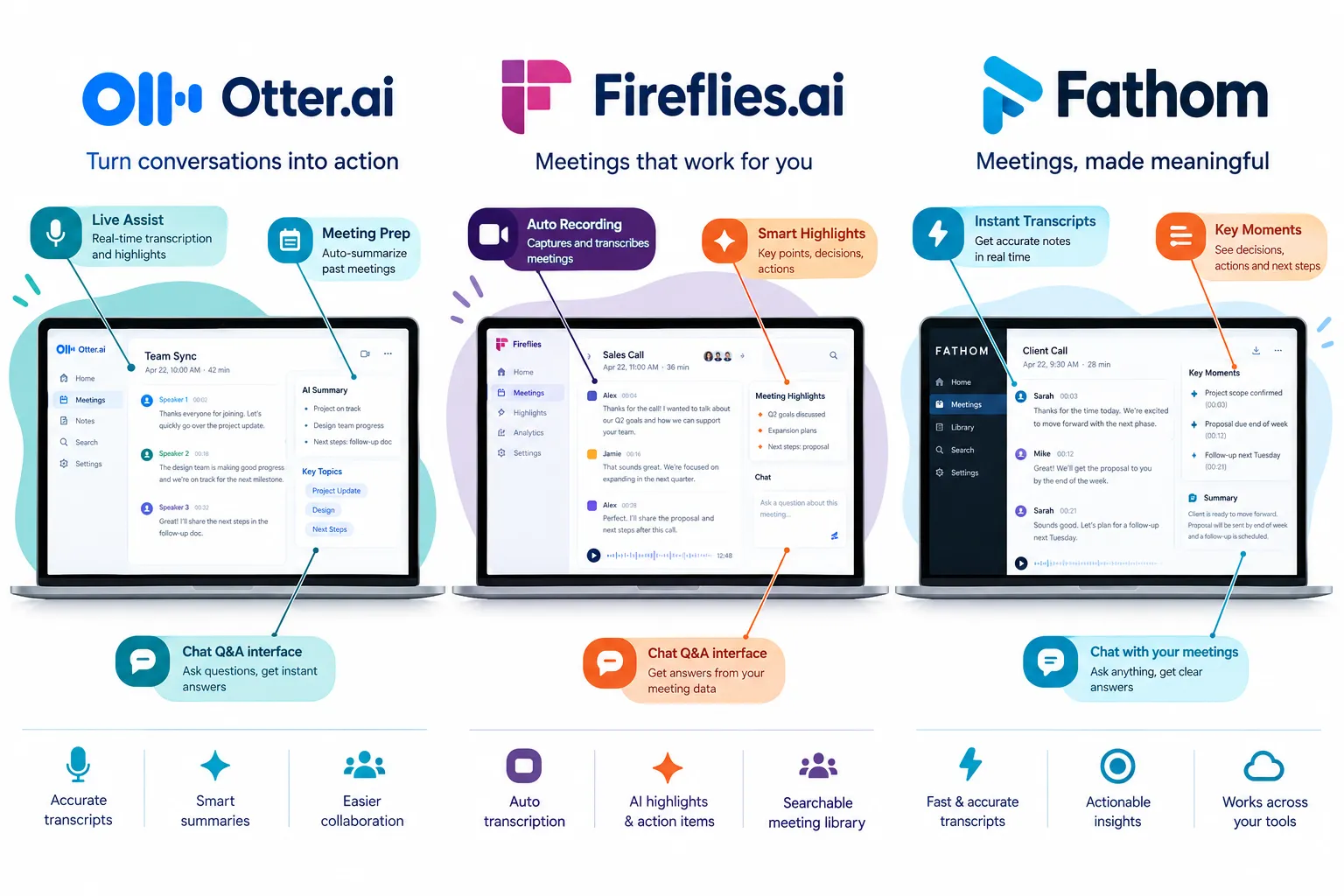
Otter has repositioned itself as a “conversational knowledge and workflow platform” with its October 2026 Otter Meeting Agents release.[2] Its Work Mode builds pre-meeting briefs from past conversations and open action items, while drafting proposals or CRM updates right after the call ends.[2] Live Assist sits quietly inside your Zoom or Teams window giving real-time coaching during the call itself.[2]
Fireflies describes itself as an AI notetaker that captures, transcribes, summarizes, and makes meetings searchable from one workspace, covering live calls, in-person conversations, and uploaded files.[4] Its newer AI Personal Assistant bundles a Daily Digest, Meeting Prep briefs, task tracking, and over 200 AI Skills into one dashboard.[5]
Fathom stays focused on capturing calls across Zoom, Google Meet, Teams, Slack huddles, and in-person meetings, then layering a chat-style interface on top so you can ask questions about what was said.[6] If you want a tool that behaves more like asking ChatGPT about your meeting, Fathom’s interface is built exactly for that.
If you are mapping out a broader AI adoption strategy for your marketing or sales team, it helps to understand how AI search and AI tools are reshaping workflows before picking individual software.
Otter.ai vs Fireflies.ai: Which One Is Better
Otter wins if you want deep post-meeting automation like drafting contracts and CRM entries; Fireflies wins if multilingual accuracy and a wide library of AI skills matter more to your team. There is no single “better” answer; it depends on your workflow.
Choose Otter if:
- You need pre-meeting briefs pulled automatically from past calls and connected apps.[2]
- Your team wants in-call coaching prompts during live Zoom or Teams calls.[2]
- You regularly draft contracts, offer letters, or proposals right after calls.
Choose Fireflies if:
- Your meetings happen in multiple languages and you need consistent accuracy.
- You want a Daily Digest summarizing recent meetings automatically each morning.[5]
- You rely on Slack, CRM, or email integrations as part of a daily AI assistant.[1]
A common mistake is picking a tool purely on transcription quality alone. Both platforms transcribe well enough for most business use; the real difference shows up in what happens after the transcript is generated.
How Much Does Fathom Cost Compared to the Others
Fathom offers a free plan plus paid tiers starting around $15 per month, which is simpler and generally cheaper to start with than Fireflies’ multi-tier pricing structure.[3] Otter also runs a freemium model, with enterprise-level rollout of its newest Meeting Agents features happening immediately while wider paid-tier access follows in the weeks after launch.[2]
Fireflies’ pricing page lists several tiers covering transcript capture across Google Meet, Teams, Zoom, and other conferencing apps, with AI features layered on top of each tier rather than a single flat starting price. This makes a direct dollar-for-dollar comparison tricky, since what counts as “included” varies by plan and by how many AI credits each feature consumes.
If your team runs fewer than 20 meetings a month, Fathom’s free plan or entry tier is usually enough. Heavier users doing dozens of sales calls a week will likely need a paid tier on any of the three tools to unlock CRM sync and higher AI usage limits.
Which AI Meeting Assistant Has the Most Accurate Transcripts
Fireflies publishes specific accuracy figures: roughly 99% in English and 95% across other supported languages, spanning 100+ languages total.[1] Otter and Fathom don’t publish comparable public accuracy benchmarks in their current documentation, so Fireflies currently has the most transparent accuracy claim among the three.
That said, published accuracy numbers are self-reported by the vendor, not independently audited in the source material reviewed here. Treat them as a directional signal rather than an absolute guarantee, especially with heavy accents, overlapping speakers, or poor audio quality.
Common mistake: assuming accuracy stays constant across languages. Fireflies’ own numbers show a clear gap between English (99%) and other languages (95%), so international teams should test with their actual working languages before committing.
Do They All Integrate With Zoom and Microsoft Teams
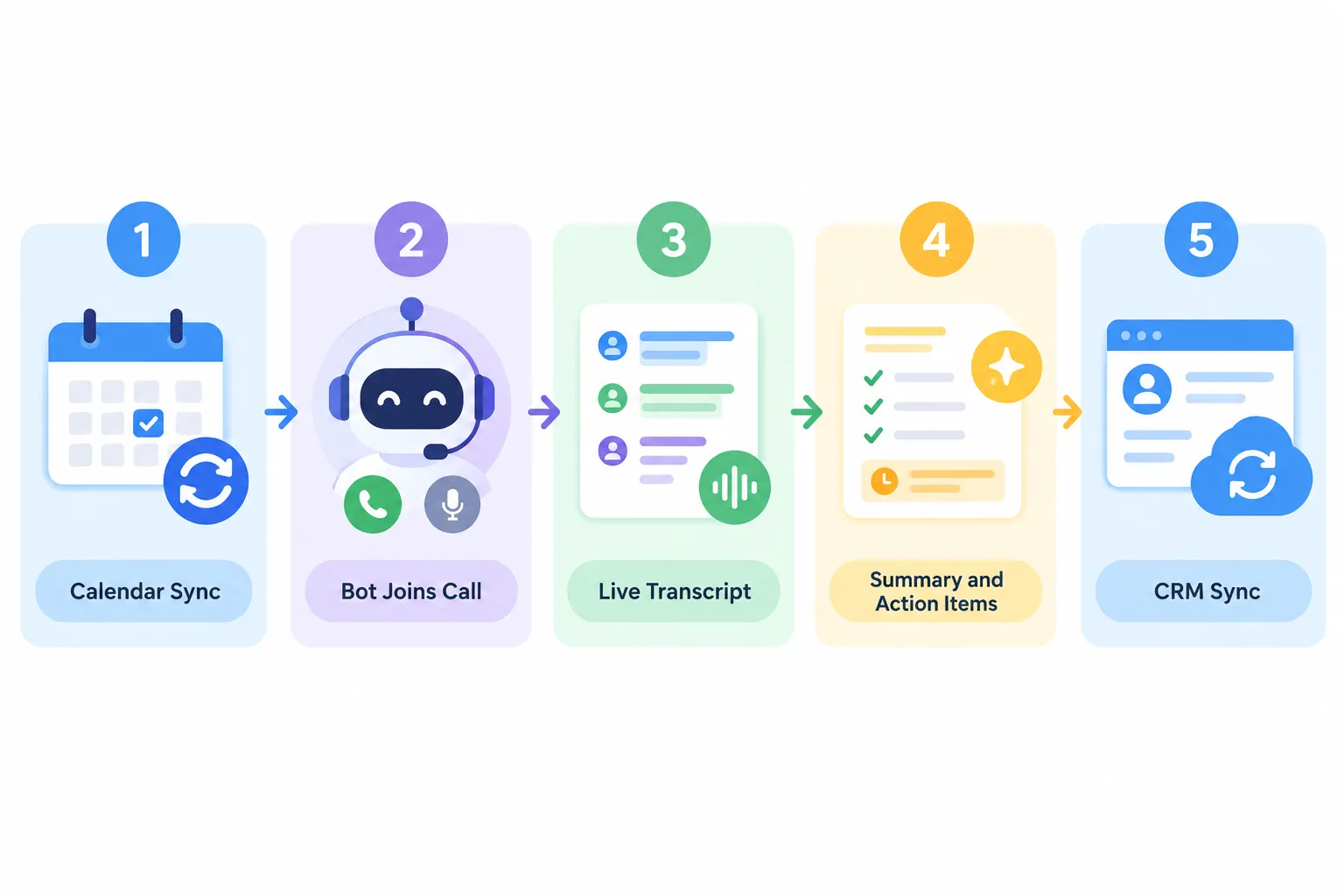
Yes. Otter, Fireflies, and Fathom all connect with Zoom and Microsoft Teams, along with Google Meet, through calendar-based scheduling that lets each tool’s bot join calls automatically.[2][4][6]
Fireflies extends further by also supporting Webex and in-person meetings captured via desktop or mobile apps.[4] Otter’s Live Assist works inside Zoom, Teams, and Google Meet as a private in-call prompt.[2] Fathom covers Zoom, Google Meet, Teams, and Slack huddles, plus in-person meetings.[6]
Edge case: if your organization blocks third-party bots from joining calls for security reasons, you may need the “take notes without a bot” option. Fireflies offers this through its desktop app’s device-audio capture feature, which skips the visible bot entirely.[7]
Are These Tools Worth the Cost for Small Teams
Yes, for most small teams running client calls or weekly standups, the time saved on manual note-taking usually justifies the free or entry-level paid plan. The math changes once your team scales past a handful of meetings weekly, since AI credit limits and feature caps on free tiers get restrictive fast.
A freelancer or 2-3 person agency doing client calls a few times a week can likely run entirely on free tiers across any of these three tools. A 10-person sales team doing dozens of calls weekly will almost certainly need paid plans to unlock CRM sync, Meeting Prep, and higher transcription limits.
If you’re building out your business processes alongside tools like this, it’s worth reviewing broader digital marketing fundamentals so your team’s software stack matches your actual growth stage rather than guessing.
Why Isn’t My Meeting Recording Automatically Transcribed
The most common reasons are a missing calendar connection, the bot failing to receive meeting invite permissions, or the call happening on a platform the tool doesn’t support by default. Each tool needs calendar access and explicit permission to join calls before it can record anything automatically.
Quick troubleshooting checklist:
- Confirm your calendar (Google or Outlook) is connected to the assistant’s account settings.
- Check that the meeting invite includes a visible video conferencing link (Zoom/Teams/Meet), not just a phone number.
- Verify the bot wasn’t removed or denied entry by a meeting host or waiting-room setting.
- For in-person meetings, confirm you manually started a recording session through the mobile or desktop app.
- Check your AI credit usage; some features like Fireflies’ Daily Digest and Meeting Prep consume credits and may pause once limits are hit.[5]
What Other AI Meeting Assistants Should I Consider
Beyond these three, Fathom’s recent move to become part of Superhuman is worth watching closely, since it signals a trend of meeting assistants merging into broader productivity suites rather than staying standalone. Fireflies has also started positioning itself directly against this shift, publishing comparison content framed as “Fireflies vs Superhuman” in response to the Fathom-Superhuman deal.
If your team already lives inside a specific email or CRM ecosystem, it may make more sense to check whether that platform has its own native AI meeting layer before adding a fourth separate tool. Stacking too many AI assistants often creates more notification noise than it solves.
Can They Transcribe Meetings in Languages Other Than English
Yes. Fireflies explicitly supports transcription in over 100 languages, with roughly 95% accuracy outside English compared to 99% in English.[1] Otter and Fathom’s public documentation reviewed here focuses primarily on English-language meeting support, without the same published multilingual accuracy breakdown.
If your team regularly runs meetings in Hindi, Spanish, Mandarin, or other non-English languages, Fireflies’ published multilingual accuracy claim makes it the stronger documented option among the three as of this writing.
Which One Is Best for Sales Calls vs Team Meetings
Fireflies and Otter both lean toward sales and client-facing use cases through Meeting Prep briefs and CRM-style automation, while Fathom’s simpler chat interface fits general team meetings and quick post-call Q&A just as well.
- Sales calls: Fireflies’ Meeting Prep auto-generates briefs on attendees, their companies, and relevant email threads once your calendar is connected. Otter’s Work Mode does something similar, pulling past customer conversation history before the call.[2]
- Internal team meetings: Fathom’s straightforward capture-and-chat model works well when you just need quick recaps and action items without heavy CRM automation.[6]
- Customer support or coaching-heavy teams: Both Otter’s Live Assist and Fireflies’ Live Assist provide real-time in-call suggestions, which helps newer reps stay on script.[2][8]
How Much Time Can You Actually Save Using These Tools
The realistic time savings come from skipping manual note-taking and reducing the time spent searching old meetings for context, though none of the vendor materials reviewed here publish a specific hours-saved statistic you can cite with confidence. Treat “time saved” claims from marketing pages as directional rather than measured fact unless a vendor names a methodology.
What you can reasonably expect in practice: less time rewriting notes after calls, faster handoffs between team members through searchable transcripts, and quicker meeting prep since briefs are generated automatically instead of manually researched.
What Features Am I Missing If I Don’t Use One of These
Without an AI meeting assistant, you lose automatic transcripts, searchable meeting history, auto-generated action items, and increasingly, pre-meeting briefs and in-call coaching prompts that Otter and Fireflies now offer by default.[2][5] You also lose the ability to quickly ask a chat-style assistant “what did we agree on in that call three weeks ago” the way Fathom’s interface allows.[6]
For solo freelancers or very small teams, manual notes may still be fine. For anyone managing client relationships across multiple calls a week, skipping these tools usually means losing details that matter later.
Do I Need These for Legal or Compliance Reasons
No single source reviewed here confirms these tools meet specific legal or compliance certifications, so teams in regulated industries should verify recording consent laws and data handling policies directly with each vendor before relying on them for compliance purposes. Recording consent requirements vary by state and country, and that responsibility sits with your organization, not the software vendor.
If your work involves healthcare, legal, or financial compliance, treat these assistants as productivity tools first and confirm separately with your compliance or legal team whether the specific transcript handling and storage practices meet your regulatory obligations.
Can You Use Multiple Tools at the Same Time
Yes, technically you can run more than one assistant on the same call, but most teams find it unnecessary and occasionally disruptive since multiple bots joining the same meeting can clutter the participant list and confuse attendees. If you’re testing tools before committing, it’s more practical to trial them on separate meetings rather than stacking them simultaneously.
A reasonable approach: run a two-week trial period where different team members or meeting types use different tools, then compare transcripts, summaries, and ease of use side by side before standardizing on one.
Frequently Asked Questions
Is Otter.ai, Fireflies.ai, or Fathom free to use? All three offer free plans with limited features. Fathom’s free plan is paired with paid tiers starting around $15 per month.[3] Otter and Fireflies also run freemium models with paid tiers unlocking higher usage limits and advanced AI features.
Does Fathom still exist as a standalone product after joining Superhuman? Yes, as of the September 2026 announcement, Fathom continues operating as an AI meeting partner while being integrated into Superhuman’s broader productivity ecosystem.
Can Fireflies join in-person meetings, not just video calls? Yes. Fireflies supports in-person meeting capture through its desktop and mobile apps, in addition to live video call integrations.[4]
What is Otter’s Work Mode? Work Mode is Otter’s feature that builds automated pre-meeting briefs from past conversations and drafts documents like proposals or CRM updates right after a call ends.[2]
Does Fireflies support more languages than Otter or Fathom? Based on published documentation, Fireflies explicitly claims support for over 100 languages with stated accuracy figures, which is more detailed than what Otter or Fathom publish publicly.
What is Live Assist? Live Assist is a real-time, in-call coaching feature available on both Otter and Fireflies, offering suggestions and answers privately during a live Zoom, Teams, or Google Meet session.[2][8]
Which tool is easiest for a first-time user? Fathom’s chat-style interface is generally considered the most straightforward to pick up, since it mirrors familiar chatbot interactions rather than requiring users to learn multiple dashboard sections.[6]
Do these tools replace a human note-taker completely? For most routine meetings, yes. For high-stakes legal or compliance discussions, a human should still verify critical details rather than relying solely on automated transcripts.
Conclusion
Otter, Fireflies, and Fathom have all moved past basic transcription into genuine workflow automation, and the right pick depends on your team’s actual pain point. Choose Otter if pre-meeting briefs and post-call document drafting matter most. Choose Fireflies if multilingual accuracy and a wide AI skill library fit your daily operations. Choose Fathom if you want the simplest chat-based way to question your meeting history, especially now that it’s backed by Superhuman’s infrastructure.
Start with a free plan on whichever tool matches your biggest bottleneck, run it for two to three weeks across real meetings, and compare the summaries and action items against what you’d normally write by hand. For broader guidance on evaluating AI tools and building smarter marketing workflows, explore Sameer Digital’s digital marketing resources and AI marketing automation guidance to keep making informed decisions as these tools keep evolving.
References
- AI Assistants. fireflies.ai.
- Otter Rethinks the Meeting New AI Preps You Coaches You and Follows Through. otter.ai.
- Pricing. fathom.ai.
- 1193528158 What Is Fireflies AI. guide.fireflies.ai.
- 5237088951 AI Personal Assistant Daily Digest Meeting Prep Tasks and More. guide.fireflies.ai.
- Overview. fathom.ai.
- 1208704416 Getting Started with the Fireflies Desktop App. guide.fireflies.ai.
- Live Assist. fireflies.ai.