

Last updated: October 28, 2027
Quick Answer
The best AI tools for podcasts depend on your production workflow. Descript is a strong choice for solo creators and narrative shows that want transcript-based editing and AI-assisted content creation. Adobe Podcast is ideal for creators who need fast and simple audio enhancement. Riverside is better suited to interview and panel podcasts that require reliable remote recording and automatic social clip creation.
There is no single tool that works best for every podcaster. The right choice depends on how many people are involved in your show, the quality of your raw audio, and whether you need editing, recording, audio cleanup, or social content creation.
Key Takeaways
- Descript lets creators edit podcast audio like a text document.
- Adobe Podcast focuses on quick AI-powered audio enhancement and noise reduction.
- Riverside is designed for remote recording, multi-guest podcasts, and automatic clip creation.
- All three platforms offer AI features that can simplify podcast production.
- Descript is generally best for editing-heavy workflows.
- Adobe Podcast is a practical option for fast audio cleanup.
- Riverside is a strong choice for remote interviews and panel discussions.
What Are the Best AI Tools for Podcasts?
The best AI tools for podcasts help creators save time across recording, editing, audio enhancement, transcription, and content repurposing. Three of the most useful platforms for these tasks are Descript, Adobe Podcast, and Riverside.
Each tool solves a different podcasting challenge. Descript focuses on transcript-based editing and AI-assisted production. Adobe Podcast helps improve speech quality with minimal editing effort. Riverside combines remote recording with AI-powered editing and clip generation.
Before choosing a platform, consider your biggest production bottleneck. If editing takes too long, a transcript-based tool may help. If your recordings sound noisy, an audio enhancement tool may be the better choice. If you regularly interview remote guests, reliable multi-track recording should be your priority.
What Does Descript Actually Do for Podcast Editing?
Descript is one of the best AI tools for podcasts for creators who want to edit audio through text. Instead of working entirely on a traditional audio timeline, you can edit the transcript and remove the matching audio at the same time.
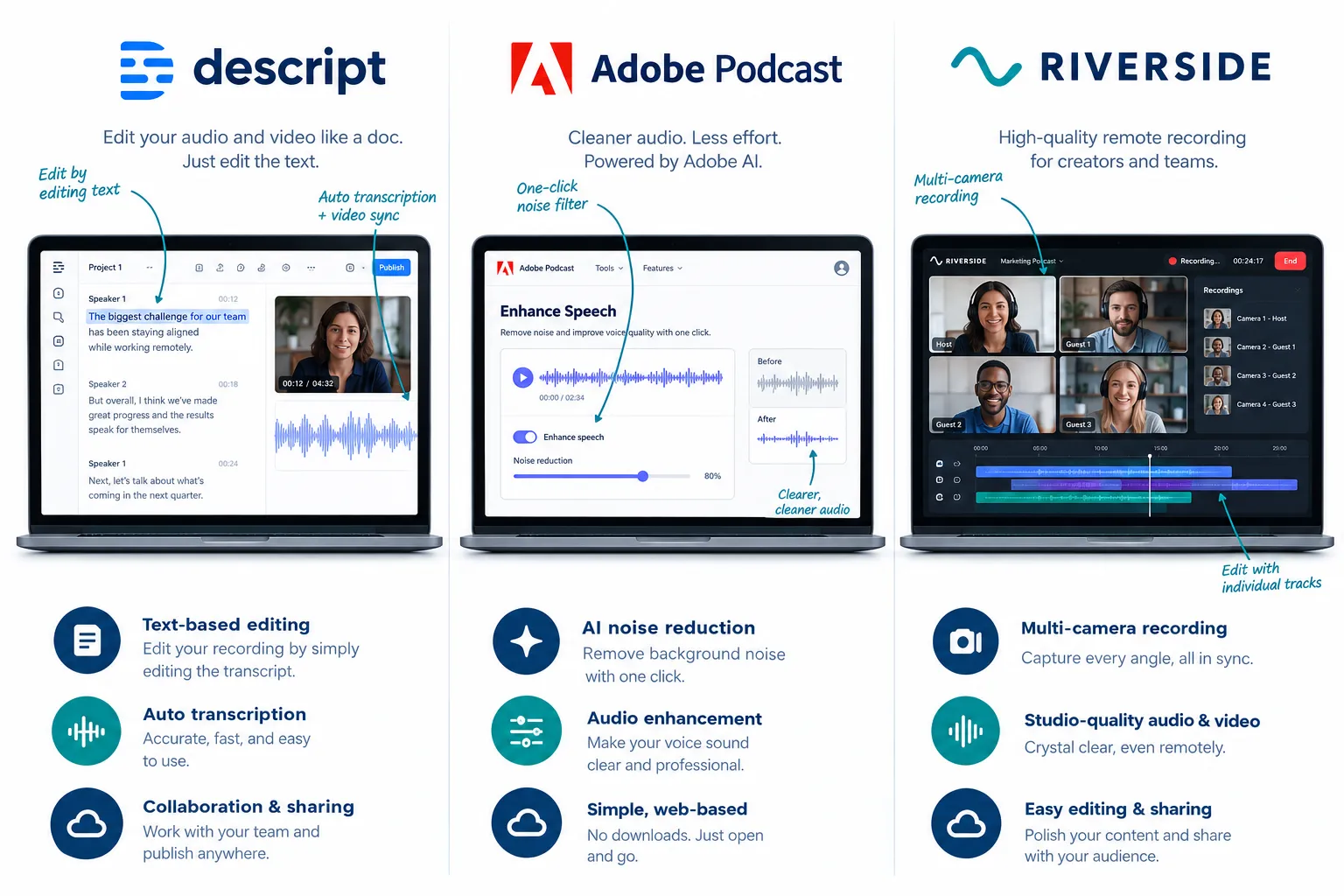
This approach can save time when cutting rambling sections, retakes, filler words, and unnecessary pauses. For many creators, editing a transcript feels more familiar than learning a traditional audio editor.
Beyond basic editing, Descript supports multiple audio formats and includes AI-powered tools for tasks such as generating episode titles, show notes, translations, and rough edits.
Choose Descript if:
- You publish content in multiple languages.
- You edit podcasts independently.
- You prefer text-based editing.
- Your episodes require significant restructuring.
- You want AI assistance with show notes and content creation.
How Much Does Descript Cost vs Adobe Podcast Per Month
Adobe Podcast’s core speech enhancement is free, while Descript runs on a freemium model with paid tiers unlocking more transcription hours, export quality, and Underlord features. Adobe’s free tier allows up to 4 hours of enhancement per day with a 1 GB file size limit, which covers most individual episodes comfortably [2][3].
Descript’s pricing structure is different because you’re paying for an editing and production platform, not just a clean-up filter. If your show needs heavy multilingual generation, voice correction, or AI co-editing, that cost difference is justified. If you only need clean speech with no editing, Adobe Podcast’s free plan already does the job.
A practical rule: if your monthly workflow is “record, clean audio, publish,” Adobe Podcast’s free tier may be all you need. If your workflow includes rewriting scripts, cutting takes, or generating notes, Descript’s paid tiers pay for themselves in saved editing time.
For creators comparing the best AI tools for podcasts, it is important to look beyond price and consider how much production time each platform can save.
Can Riverside Remove Background Noise Automatically
Riverside includes AI-powered editing and audio tools as part of its broader podcast production workflow. However, its main strength is remote recording rather than deep audio restoration.
Riverside is particularly useful for podcasts with multiple guests because it focuses on capturing separate, high-quality recordings from each participant. It also offers tools such as Magic Clips, which can identify highlight moments and turn longer recordings into shorter social media content.
This makes Riverside one of the best AI tools for podcasts that rely heavily on interviews, panel discussions, and content repurposing.
For extremely noisy recordings, however, creators may still benefit from using a dedicated audio enhancement tool after recording.
Which AI Podcast Tool Is Easiest for Beginners?
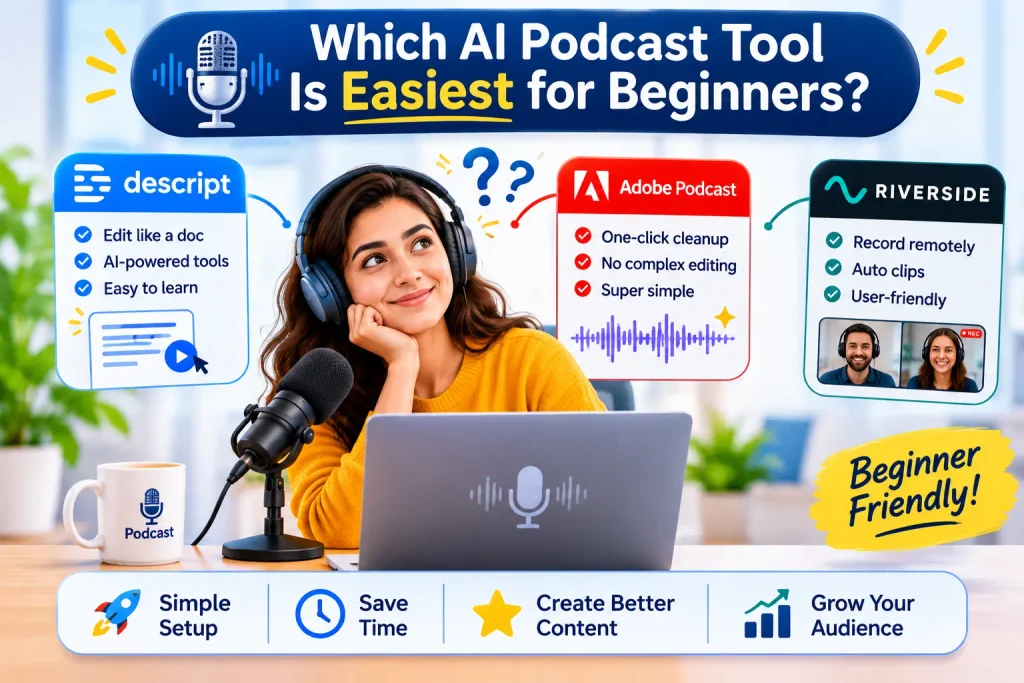
For complete beginners, Adobe Podcast is often the easiest starting point because its audio enhancement workflow requires very little technical knowledge.
You upload an audio file, allow the AI to process it, and download the improved version.
Descript requires slightly more learning, but its document-style editing interface can feel intuitive for anyone familiar with a word processor. Riverside sits between the two, offering a relatively simple recording experience while providing additional features for editing and clip creation.
If you are new to podcasting:
- Riverside: Best for remote recording with guests.
- Adobe Podcast: Best for simple audio cleanup.
- Descript: Best for learning AI-assisted editing.
Does Adobe Podcast Have Transcription and Editing
Adobe Podcast has moved beyond a pure clean-up tool into a fuller web platform that includes automatic transcription, remote recording, and AI-assisted editing features [2][5][6]. This positions it closer to a lightweight production suite rather than just a noise filter.
The March 2026 update added advanced source separation inside Enhance Speech, letting creators independently adjust speech, background noise, and music, plus download isolated stems for each [7]. That’s a meaningful upgrade for anyone remixing audio or working with background music beds.
Adobe’s FAQ is clear that Enhance Speech works on whatever spoken language is present but doesn’t translate or generate new speech, it cleans existing audio [8]. So transcription and editing exist, but the heavy creative rewriting that Descript offers isn’t part of Adobe’s approach.
If your goal is simply to make recorded speech sound cleaner and more professional, Adobe Podcast remains a practical choice among the best AI tools for podcasts.
Why Choose Descript Over Riverside for Podcasting
Pick Descript over Riverside when your show is scripted, heavily edited, or needs multilingual output, because Descript’s transcript-first workflow and Underlord AI are built for rewriting and language generation, not just recording [1]. Riverside is stronger when the priority is capturing multiple remote guests reliably and turning that session into social clips fast .
A quick decision rule: if you spend more time rewriting and restructuring than recording, go Descript. If you spend more time scheduling guests and repurposing clips for social media, go Riverside.
Neither tool is strictly better, they solve different production bottlenecks. A narrative true-crime podcast benefits from Descript’s editing control. A weekly interview show benefits from Riverside’s recording stability and clip automation.
Free Alternatives to Descript for Podcast Editing
Adobe Podcast’s Enhance Speech is the most practical free alternative if your main need is removing noise and cleaning voice quality, not full editing [2][3][4]. Audacity remains a free open-source option for manual timeline editing, though it lacks AI-driven transcript editing or filler-word detection.
If budget is the main constraint, a realistic free stack looks like this:
- Record with your phone or a basic USB mic.
- Clean audio with Adobe Podcast’s free Enhance Speech tier (up to 4 hours/day, 1 GB per file) [2][3].
- Manually trim in Audacity or your phone’s built-in editor.
- Export and upload directly to your podcast host.
This stack won’t match Descript’s automatic filler-word removal, but it gets a usable episode published at zero cost.
When choosing the best AI tools for podcasts, remember that you do not always need one platform to do everything. A combination of specialized tools can sometimes be more effective.
Can You Remove Filler Words Like Um and Uh Automatically
Yes, Descript specifically advertises one-click removal of filler words and background noise as part of its core editing toolkit [1]. Because editing happens at the transcript level, the AI can detect “um,” “uh,” and similar fillers in the text and cut the matching audio automatically.
Adobe Podcast and Riverside don’t market dedicated filler-word removal the same way; Adobe focuses on noise and voice clarity [4][8], while Riverside focuses on recording quality and highlight extraction. If filler-word cleanup is your top priority, Descript is the more direct fit among the three.
Edge case: automatic filler removal sometimes cuts words that were intentional pauses for emphasis. Always do a quick listen-through after automated cleanup before publishing.
If removing filler words is one of your biggest editing challenges, Descript is one of the strongest options among the best AI tools for podcasts.
Does Riverside Work Without Internet Connection

No, Riverside requires an internet connection to start and manage a recording session, since it’s a browser-based platform for remote, multi-guest capture. However, Riverside records each participant’s audio and video locally on their own device during the session, which protects against data loss if someone’s connection drops mid-recording.
This local-recording-plus-cloud-sync approach is a deliberate design choice for interview podcasts: even a shaky internet connection on a guest’s end shouldn’t ruin their final audio quality, because the high-resolution file uploads separately once the session ends.
Best AI Podcast Editor for Solo Podcasters
For someone recording and editing alone, Descript is generally the strongest fit among the three because its transcript-based workflow, filler-word removal, and AI co-editor reduce manual timeline work significantly [1]. Solo creators rarely need Riverside’s multi-guest recording infrastructure, and Adobe Podcast alone doesn’t offer the rearranging and script tools a solo editor often wants.
That said, if a solo podcaster only records short, simple voice notes and wants zero learning curve, Adobe Podcast’s free Enhance Speech tier might be the faster path from raw file to publish-ready audio [4][6].
Does Riverside Work Without an Internet Connection?
Riverside is designed as a browser-based platform for remote recording, so an internet connection is required to start and manage a session.
However, its local recording approach helps protect the quality of each participant’s recording. This is particularly valuable for remote interviews, where a temporary connection issue could otherwise affect the final episode.
For podcasters who regularly record with guests in different locations, this recording approach is one reason Riverside is considered one of the best AI tools for podcasts focused on remote production.
Can I Export Directly to Spotify From These Tools
Descript supports direct publishing to popular podcast hosting services from within its platform, which can simplify getting an episode from edit to live [1]. Riverside similarly positions itself around end-to-end publishing and distribution after recording and editing. Adobe Podcast, by contrast, is focused on audio enhancement rather than distribution, so you’ll typically export the cleaned file and upload it to your host or Spotify for Podcasters separately [2][4].
If one-click publishing matters to your workflow, weigh that alongside editing style when choosing between Descript and Riverside.
What Are Common Mistakes People Make With Descript
The biggest mistake is treating Descript purely as a transcription tool and skipping the AI editing features that actually save time, like automatic filler-word cuts and Underlord-generated show notes [1]. Another common error is not reviewing AI-suggested cuts before export, automated edits occasionally remove context that changes meaning.
A third mistake: ignoring file format compatibility. Descript supports WAV, MP3, AAC, AIFF, M4A, and FLAC, so importing an unsupported format can cause avoidable friction early in a project [1].
Is Adobe Podcast Worth the Price Compared to Free Options
For creators who only need speech clean-up, Adobe Podcast’s free tier already covers most needs, making the paid Premium tier worth it mainly for heavier daily usage beyond the 4-hour cap or larger files above 1 GB [2][3]. If your show records long-form episodes (3+ hours) or multiple shows per day, the premium plan removes those limits.
For light solo podcasters publishing a 30-45 minute weekly episode, the free tier is usually sufficient, and paying extra wouldn’t add real value yet.
How Do I Fix Audio Sync Issues in Riverside
Audio sync issues in Riverside usually stem from inconsistent internet speed during a session, which can momentarily affect the live preview even though local recordings stay accurate. The fix is almost always in post: re-sync tracks during export, since Riverside uploads each participant’s local high-quality file separately from the live stream.
The best way to choose between the best AI tools for podcasts is to test them with a real episode. Your own workflow will quickly reveal which platform saves you the most time.
Practical steps:
- Finish the recording and let all local files upload fully before editing.
- Check each guest’s track individually rather than trusting the live preview timing.
- Use Riverside’s built-in alignment tools to nudge tracks if small offsets appear.
- Re-export and listen to a short section before publishing the full episode.
Can You Publish Podcasts Directly From These Tools?
Some podcast production platforms offer publishing and distribution features that can help simplify the journey from editing to publishing.
Descript and Riverside provide broader production workflows that can reduce the number of tools needed to prepare content for distribution. Adobe Podcast is more focused on audio enhancement, so creators may need to export their finished file and upload it through their preferred podcast hosting platform.
Publishing features are worth considering when comparing the best AI tools for podcasts, especially if you want to reduce repetitive steps in your production process.
Comparison at a Glance
| Feature | Descript | Adobe Podcast | Riverside |
|---|---|---|---|
| Editing style | Transcript-based | One-click enhancement | Timeline + Magic Clips |
| Best for | Solo, scripted, multilingual shows | Quick audio clean-up | Interview/panel shows |
| Filler word removal | Yes, automatic [1] | Not a core feature | Not a core feature |
| Works offline | No | Browser-based, needs upload | Needs internet to start |
| Social clip generation | Limited | No | Yes, Magic Clips |
| Free tier | Limited | Yes, 4 hrs/day, 1GB/file [2][3] | Limited |
FAQ
Is Descript better than Adobe Podcast for podcast editing? Descript offers full editing and AI rewriting, while Adobe Podcast focuses on clean-up only. Choose Descript for editing control, Adobe Podcast for quick noise removal [1][4].
Does Adobe Podcast cost money? Adobe Podcast’s Enhance Speech is free up to 4 hours per day and 1 GB per file; a premium tier exists for heavier usage [2][3].
Can Riverside record multiple guests remotely? Yes, Riverside is built around remote multi-guest recording with local backup for each participant.
Does Descript support filler-word removal? Yes, Descript can automatically detect and remove filler words like “um” and “uh” as part of transcript-based editing [1].
Is Adobe Podcast language-specific? No, Enhance Speech works on whatever spoken language is present but doesn’t translate between languages [8].
Which tool is best for interview podcasts? Riverside is generally the strongest fit for interview and panel shows due to its remote recording and Magic Clips features.
Can I download isolated audio tracks from Adobe Podcast? Yes, the March 2026 update added stem downloads for speech, noise, and music separately [7].
Conclusion
Picking between Descript, Adobe Podcast, and Riverside comes down to your actual production pattern, not which tool has the flashiest AI label. If you edit alone and want to rewrite your show like a document, Descript gives you that control. If you just need clean, professional-sounding voice audio without learning an editor, Adobe Podcast’s free tier gets you there fast. If your show depends on remote guests and you want ready-made social clips after every episode, Riverside fits that workflow best.
Try the free tiers of all three with one real episode before committing to a paid plan. That hands-on test tells you more about fit than any feature list. For more practical guidance on AI tools, content workflows, and growing your online presence, explore our AI content repurposing workflow guide and our content marketing resources for next steps on turning podcast content into wider reach. You can also check our AI content repurposing for professionals guide if you plan to turn episodes into blog posts and social clips, and our keyword research guide if you want your show notes to rank in search as well.
References
- Podcasting. descript.com.
- Enhance. podcast.adobe.com.
- Enhance Speech V2. podcast.adobe.com.
- Enhancespeech. podcast.adobe.com.
- Enhance Speech. podcast.adobe.com.
- Record Your Podcast for Free. podcast.adobe.com.
- Whats New in Adobe Podcast March 2026. podcast.adobe.com.
- Adobe Podcast FAQ. helpx.adobe.com.