

Last updated: October 4, 2026
A customer three blocks from your shop just asked Gemini “where can I get a last-minute haircut nearby” and never typed a single search query into Google.com. That shift is why Google Business Profile optimization is no longer a nice-to-have side project. It is the primary data source feeding Search, Maps, and AI assistants about whether your business actually exists, is open, and is worth trusting [2].
Quick Answer
Google Business Profile optimization means keeping your business name, address, phone number, hours, categories, services, photos, and reviews complete, accurate, and active so Google’s algorithms and AI systems can confidently recommend you in Search, Maps, and “near me” results. In 2027, this also means feeding clean, consistent data to Gemini and AI Overviews, which now pull directly from your profile to answer local queries [2][7]. Businesses that update their profile weekly and respond to reviews consistently see stronger placement in local AI-generated answers than those that set it up once and forget it.
Key Takeaways
- Google Business Profile is now treated as a live data layer for Search, Maps, and Gemini, not a static directory listing [2].
- Gemini can read, edit, and update your profile directly, turning AI into an active co-manager of your listing [7][8].
- Google’s March and May 2026 core updates increased the ranking weight of profile completeness and review quality [10].
- Community Q&A has been phased out in favor of AI-generated “Ask” answers, changing how customer questions get answered [1][6].
- NAP consistency (Name, Address, Phone) across the web remains a foundational trust signal for local rankings.
- Fabricated AI-written content describing experiences you did not have violates Google’s 2026 policy guidance and can trigger suspension.
- “Near me” and voice-style queries increasingly surface AI summaries first, pulled from your categories, services, and reviews [9].
- Monthly maintenance, not a one-time setup, is what sustains visibility in 2027’s AI-driven local search environment.
What Is a Google Business Profile and Why Does It Matter for Local SEO
A Google Business Profile (GBP) is the free listing that controls how your business appears on Google Search, Google Maps, and Google Assistant-style tools. It matters for local SEO because it is now one of the main sources Google’s AI systems cite when answering local questions, not just a box that shows up in the right-hand panel [2].
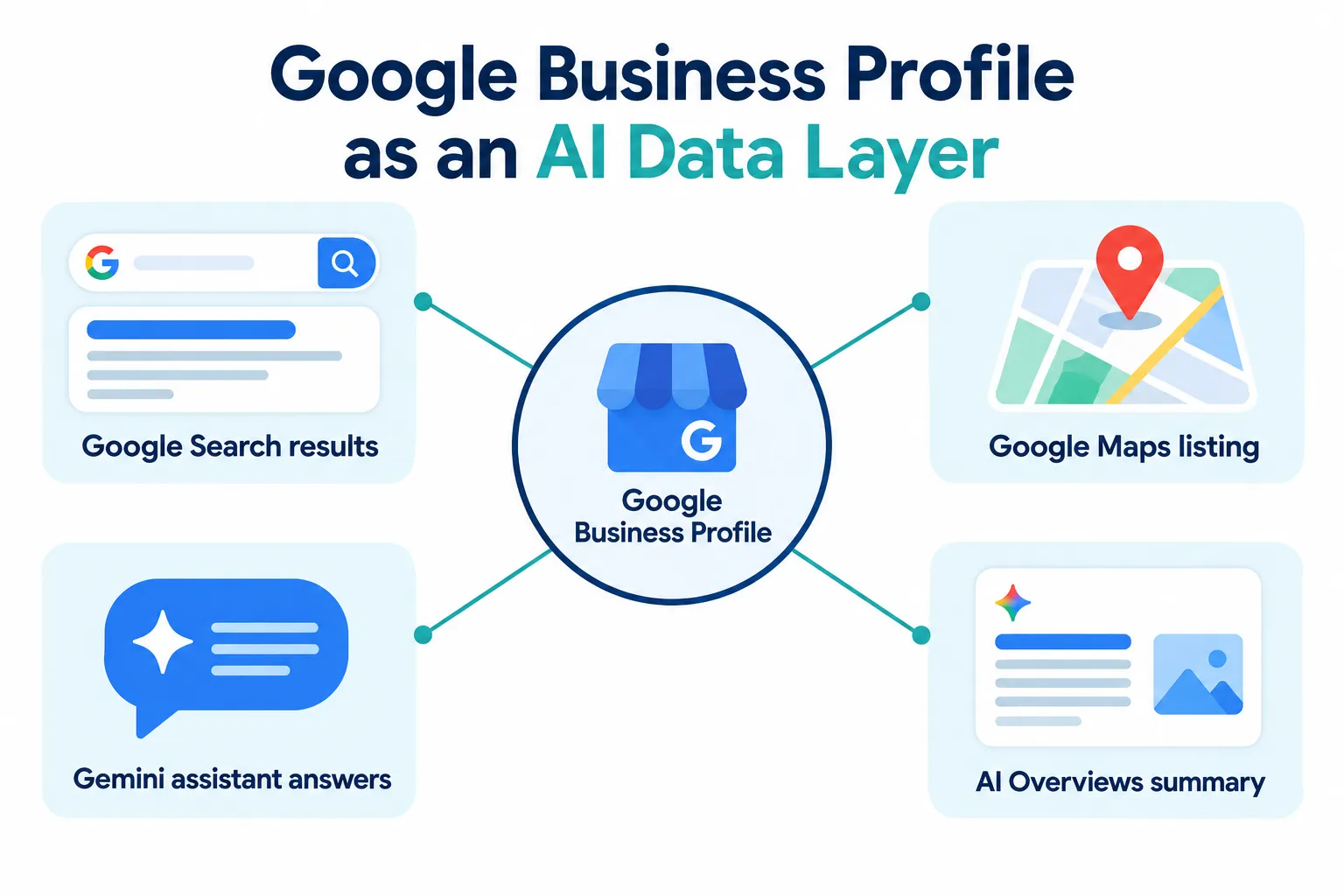
Here’s what changed heading into 2027: Google has publicly positioned GBP as a data layer that feeds Search, Maps, and Gemini simultaneously [2]. That means one inaccurate phone number or outdated service list no longer just confuses a human reader scrolling Maps. It can cause an AI assistant to give a wrong answer to a customer asking “is this place open right now,” which erodes trust fast.
Who needs this: any brick-and-mortar or local service business, including clinics, salons, restaurants, retailers, contractors, and mobile service providers. Who doesn’t need it as urgently: purely online businesses with no physical location or service area, though even many e-commerce brands now benefit from a service-area profile.
Common mistake: treating GBP as a one-time listing instead of an ongoing content channel. Profiles that go quiet for months lose relevance signals even if the original information was accurate.
Google Business Profile vs Google My Business: What’s the Difference
Google Business Profile is the current name for what used to be called Google My Business (GMB). Google rebranded and restructured the tool in 2021, shifting management from a standalone app to direct control through Google Search and Maps [5].
The practical differences business owners should know:
| Aspect | Google My Business (old) | Google Business Profile (current) |
|---|---|---|
| Management | Separate app required | Managed inside Search and Maps directly |
| Core function | Static directory listing | Live data layer feeding AI and Maps [2] |
| Customer Q&A | Community-driven Q&A | AI-generated “Ask” answers replacing community Q&A [1][6] |
| AI integration | None | Gemini can edit and manage listings [7][8] |
If you still see the term “Google My Business” in an old blog post or a vendor’s pitch, it is referring to the exact same underlying product you manage today as Google Business Profile.
How Do I Claim and Verify My Google Business Profile
You claim a Google Business Profile by searching your business name on Google, clicking “Own this business,” and completing Google’s verification process, which is usually done by phone, email, video, or postcard. Verification confirms to Google that you are the legitimate owner, which unlocks editing rights over your listing.
Steps to claim and verify:
- Search your business name and address on Google or go to Google Business Profile Manager.
- Click “Claim this profile” or “Own this business” if a listing already exists.
- If no listing exists, create a new one with your exact legal business name, category, and address.
- Choose a verification method: phone, email, video recording of your location, or postcard mail.
- Complete verification within the time window Google provides (postcard can take 5 to 14 days).
- Once verified, immediately fill in hours, phone, website, and category before doing anything else.
Edge case: multi-location businesses or franchises should use Business Profile bulk management tools rather than claiming each location individually, since Gemini-based management now supports multi-location accounts more smoothly than it did a year ago [3].
Common mistake: letting an employee or agency verify the profile under their personal Google account with no documented access transfer. If that person leaves, you can lose control of your listing.
Google Business Profile Optimization Best Practices for 2027
Google Business Profile optimization in 2027 means total profile completeness plus consistent activity, because Google’s core updates in March and May 2026 specifically increased the ranking weight given to profile completeness and review quality [10]. A half-filled profile with great reviews will now underperform a fully completed profile with moderate reviews.
The practices that matter most right now:
- Fill every available field. Attributes, services, products, hours (including holiday hours), and payment methods all feed Google’s entity understanding of your business.
- Keep NAP consistent everywhere. Your Name, Address, and Phone number must match exactly across your website, GBP, social profiles, and directory listings. Inconsistency confuses Google’s matching algorithms and weakens local relevance.
- Connect your website properly. Link to a page that matches your GBP category and location, not just your homepage, especially for multi-location businesses.
- Treat local relevance as an ongoing signal. Proximity, category match, and activity level all factor into whether you appear in local results, not just star ratings.
- Avoid AI-fabricated content. Google’s 2026 policy guidance allows AI-assisted drafting of descriptions and posts but prohibits publishing fabricated customer experiences or services you don’t actually offer.
Decision rule: if you only have time for one optimization task this month, choose completing every profile field over writing another post. Completeness is now a stronger ranking lever than posting frequency [10].
How to Write Effective Business Descriptions for Google Business Profile
An effective Google Business Profile description clearly states what you do, where you do it, and who you serve, written in plain language within the 750-character limit. It should read like a concise answer to “what is this business and why should I choose it,” because that is effectively what AI Overviews and Gemini will extract from it [6].
A strong structure looks like this:
- Opening sentence: state the business type and primary service area (example: “Family-owned dental clinic serving downtown Austin since 2012”).
- Middle section: list two or three core services or specialties in natural language, not a keyword dump.
- Closing sentence: include a soft call to action or differentiator, such as same-day appointments or walk-in availability.
Avoid stuffing the description with repeated keywords like “best dentist Austin cheap dentist Austin affordable dentist.” Google’s systems read this as manipulation, and it reads poorly to human customers too. Write one clean sentence naturally mentioning your service and city, then move on.
What Keywords Should I Use in Google Business Profile
Use keywords that describe your specific services, your city or neighborhood, and the exact problems customers search for, placed naturally in your business description, services list, and posts. Avoid keyword stuffing anywhere in the profile, since Google’s 2026 quality signals penalize unnatural repetition rather than rewarding it [10].
Practical keyword sources:
- Pull exact phrases from your Google Search Console queries if you manage a website.
- Check what competitors list in their “Services” section for your category.
- Use neighborhood names, not just city names, if you serve a specific district.
- Match the language customers actually use, such as “emergency plumber” instead of “licensed plumbing technician,” if that’s how people search.
Example: a mobile dog groomer in Denver might use “mobile dog grooming Denver,” “pet grooming at home,” and “dog nail trim near me” across the description, services, and a monthly post, rather than repeating one phrase everywhere.
How to Optimize Google Business Profile Photos and Videos
Photos and videos should show your real location, staff, products, and work in natural lighting, uploaded regularly and geotagged when possible, because Google’s 2026 API updates place heavier emphasis on review imagery and visual freshness as ranking signals [9]. Stock photos and generic graphics underperform authentic images.
Priority shot list for most local businesses:
- Exterior storefront photo showing signage, taken in daylight.
- Interior shots showing the actual customer experience (waiting area, dining room, retail floor).
- Team photos that put a human face on the business.
- Product or service “in action” photos, such as a finished haircut, a plated dish, or a completed repair.
- Short video walkthroughs (30 to 60 seconds) showing the space and a quick introduction.
If video marketing feels unfamiliar, our guide on making YouTube videos people actually want to watch covers the same principles that apply to short GBP video uploads. For image file optimization fundamentals, see how alt text helps both people and search engines understand visual content.
Common mistake: uploading a burst of 30 photos once a year instead of a steady trickle of 3 to 5 new photos monthly. Steady uploads signal an active, trustworthy business.
How Often Should I Post on Google Business Profile
Posting one to two times per week is a reasonable cadence for most small businesses, with more frequent posts during promotions, seasonal changes, or events. Posting frequency matters less than posting consistency and relevance, especially since Google’s AI-generated summaries now pull from recent, specific content rather than generic filler [6].
Good post content includes:
- New product or menu arrivals
- Limited-time offers or seasonal hours
- Behind-the-scenes updates or new staff introductions
- Short answers to questions you frequently get asked in person
Decision rule: if you can’t commit to weekly posts, commit to at least one meaningful update per month tied to an actual business change, such as new hours or a new service, rather than posting filler content just to appear active.
How to Get More Reviews on Google Business Profile
You get more reviews by asking satisfied customers directly, at the right moment, through a simple shareable link, and by making it easy with QR codes or text follow-ups. Review quality now carries more ranking weight following Google’s 2026 core updates, so volume alone is not enough; recency and detail matter too [10].

Effective tactics:
- Ask in person right after a positive interaction, not days later by email.
- Send a direct review link via text message within 24 hours of service completion.
- Train staff to mention reviews naturally, such as “if you have a minute, a Google review really helps us.”
- Display a QR code at checkout counters or on receipts.
- Never offer discounts or incentives in exchange for reviews, which violates Google’s policies and can get reviews removed.
Example: a dental clinic that texts a review link to every patient immediately after checkout, rather than relying on email follow-ups days later, typically sees a noticeably higher response rate because the experience is still fresh.
How to Respond to Negative Reviews on Google Business Profile
Respond to negative reviews promptly, calmly, and specifically, acknowledging the customer’s concern without being defensive, and move detailed resolution to a phone call or email when possible. A thoughtful public response often matters more to future customers than the negative review itself.
A workable response template:
- Thank the reviewer for the feedback, even if you disagree with parts of it.
- Acknowledge the specific issue they raised without making excuses.
- Briefly state what you did or will do to address it.
- Invite them to continue the conversation offline (phone number or email).
- Keep the tone professional even if the review feels unfair.
Edge case: if a review violates Google’s policies (fake, spam, off-topic, or contains hate speech), flag it for removal through GBP’s reporting tool rather than arguing publicly, since public arguments rarely help and can look worse to future readers.
Common mistake: ignoring negative reviews entirely. An unanswered one-star review sitting for months signals neglect to both customers and Google’s quality systems.
Does Google Business Profile Help With “Near Me” Searches
Yes. Google Business Profile is the primary data source powering “near me” results on both Search and Maps, and in 2027 it also feeds AI-generated summaries that answer proximity-based questions like “what’s open near me right now” [9]. Accurate hours, categories, and service areas directly determine whether you surface in these results.
Google Maps Platform has continued investing in AI-powered hyperlocal “nearby search” features and destination bundles, meaning Maps increasingly groups and summarizes nearby options rather than just listing them [9]. “Ask Maps” style AI summaries now draw heavily from profile categories, attributes, and review content to decide which businesses to mention by name.
What influences near-me visibility most:
- Correct primary and secondary categories (choose the most specific option available)
- A complete service area or precise address pin
- Current hours, including holiday adjustments
- Review recency and specificity (reviews mentioning location-based details help)
- Proximity to the searcher at the moment of the query, which you cannot control directly but can maximize relevance for
Decision rule: if your business serves a radius rather than a single storefront, set a defined service area in your profile instead of leaving it blank, since an undefined service area weakens your eligibility for nearby AI summaries.
Google Business Profile Optimization for Restaurants vs Service Businesses
Restaurants should prioritize menu accuracy, food photos, and reservation or ordering links, while service businesses should prioritize service lists, service-area settings, and booking or quote request links. Both need the same foundation of accurate NAP data and active reviews, but the content priorities differ.
| Focus Area | Restaurants | Service Businesses (plumbers, salons, clinics) |
|---|---|---|
| Primary content | Menu items, dish photos, hours including kitchen close times | Service list, pricing ranges where appropriate, booking links |
| Photos | Food, interior, plating | Completed work, staff, equipment, before/after shots |
| Reviews focus | Food quality, ambiance, service speed | Reliability, professionalism, problem resolution |
| Posts | Specials, new menu items, events | Seasonal service reminders, availability updates |
Google’s 2026 feature rollouts introduced AI-generated menus and summary feeds, meaning restaurant menu data uploaded directly into GBP now feeds AI dish descriptions automatically, so keeping menu items current matters more than ever [1][6]. Service businesses should similarly keep their “Services” section itemized rather than relying on a single vague category.
Common Mistakes People Make With Google Business Profile
The most damaging mistakes are inconsistent NAP data across the web, choosing a broad category instead of the most specific one available, and letting the profile sit untouched for months. Any one of these weakens the trust and relevance signals Google uses to decide whether to recommend you [10].
Full mistake list to check against your own profile:
- Using a different phone number or address format on your website than on GBP
- Selecting “Restaurant” when “Thai Restaurant” or “Vegan Restaurant” is more accurate
- Leaving the “Services” section empty or generic
- Buying fake reviews or offering incentives for reviews
- Publishing AI-generated descriptions that describe services or experiences you don’t actually provide, which violates 2026 policy guidance on fabricated content
- Forgetting to update holiday hours, causing “closed when marked open” complaints
- Never uploading new photos after initial setup
- Ignoring the messaging feature and leaving customer questions unanswered for days
Common mistake worth repeating: many business owners set up their profile once at launch and never return to it. In an environment where AI systems reward recency and completeness, a stale profile is a liability, not a neutral asset.
How Long Does It Take to See Results From Google Business Profile Optimization
Most businesses begin noticing measurable changes in visibility within 4 to 8 weeks of consistent optimization, though full ranking shifts after a major update can take longer to stabilize. Results depend heavily on how incomplete the original profile was and how competitive the local category is.
Rough timeline expectations:
- Week 1 to 2: profile completeness improvements (categories, hours, services) typically show up in how your listing displays, even before rankings shift.
- Week 3 to 6: fresh photos, posts, and new reviews start influencing engagement metrics Google tracks.
- Week 6 to 12: ranking position changes become more visible, especially in competitive categories.
Edge case: a brand-new profile with zero reviews and a competitive category (like “dentist” in a large city) will take longer to gain traction than a niche service business in a smaller market. Patience combined with consistent monthly activity outperforms sporadic bursts of effort.
Step-by-Step Google Business Profile Optimization Checklist
Use this checklist as your baseline setup, then revisit it quarterly to catch drift.
- Claim and verify your profile with the correct legal business name.
- Choose the most specific primary category available, plus relevant secondary categories.
- Enter complete, accurate NAP data matching your website exactly.
- Set accurate regular hours and update holiday hours proactively.
- Write a clear 750-character description following the opening, middle, closing structure.
- List every service or product you actually offer, with short descriptions.
- Upload at least 10 authentic photos covering exterior, interior, team, and work samples.
- Link to the most relevant website page, not just your homepage.
- Set up messaging and respond to new inquiries within 24 hours.
- Request reviews from your five most recent satisfied customers.
- Publish your first post announcing something current and specific.
- Audit your NAP consistency across your website, social profiles, and top directories.
Monthly Google Business Profile Management Routine
Treat GBP as a living channel with a recurring monthly routine rather than a project you finish once.
- Weekly: publish one update or offer post; respond to any new reviews within 48 hours.
- Biweekly: upload 2 to 3 new photos or a short video.
- Monthly: review and reply to all outstanding reviews; check hours for upcoming holidays; audit messaging responsiveness.
- Quarterly: re-check NAP consistency across directories; review your category selection against new category options Google may have added; evaluate whether your AI Overviews and AI Mode visibility has shifted using tools like the Google Search Console AI Performance report.
Businesses that don’t have internal bandwidth for this cadence often choose to outsource their SEO and local listing management to a specialist rather than let the profile go stale. If you’re trying to understand how AI Mode and AI Overviews differ in what they pull from local listings, our breakdown of Google AI Mode vs AI Overviews explains the distinction in more depth, and our comparison of GEO, AI search optimization, and AEO is useful background for understanding why entity coherence across your profile now matters as much as traditional ranking factors.
Frequently Asked Questions
Is Google Business Profile free to use? Yes, creating, verifying, and managing a Google Business Profile is free. Google does not charge for a standard listing, posts, or responding to reviews.
Can I have more than one Google Business Profile for the same business? No, duplicate profiles for the same location violate Google’s guidelines and typically harm visibility rather than help it. Use one verified profile per physical or service-area location.
Does Gemini actually edit my Google Business Profile automatically? Gemini can now manage and update profile details directly through conversational commands, including multi-location accounts, but changes still require your authorization as the profile owner [7][8].
What happened to the Q&A section on Google Business Profile? Google retired the community-driven Q&A feature and replaced it with AI-generated “Ask” answers that pull from your profile content and reviews to answer common customer questions automatically [1][6].
Will AI-written descriptions get my profile penalized? AI-assisted drafting of descriptions and posts is allowed under Google’s 2026 policy guidance, but publishing fabricated customer experiences, fake services, or invented details is prohibited and can lead to suspension.
How many photos should a small business upload to start? Aim for at least 10 photos covering your exterior, interior, team, and products or services at setup, then add 2 to 5 new photos monthly to keep the profile active.
Does responding to every review actually affect ranking? Review responsiveness is one of several quality signals Google’s 2026 core updates weighted more heavily, and it also directly affects customer trust and conversion, independent of any ranking impact [10].
Should restaurants and service businesses use the same optimization strategy? No, restaurants should prioritize menu accuracy and food photography while service businesses should prioritize detailed service lists and service-area settings, though both need consistent NAP data and active review management.
Conclusion
Google Business Profile optimization in 2027 comes down to one core idea: Google’s AI systems now treat your profile as a live, trusted data source, not a static directory card. That means accuracy, completeness, and consistent activity matter more than clever tricks or one-time fixes [2][10].
Start this week with three actions: audit your NAP consistency across your website and directories, fill in every empty field on your profile, and request reviews from your five most recent customers. Then commit to the monthly routine outlined above. The businesses that treat their profile as an ongoing conversation with both customers and AI systems will keep showing up in “near me” results, Maps summaries, and Gemini answers, while the ones that set it up once and walked away will quietly fade out of view.
References
[1] Google Business Profile Guide Every Feature 2026 – https://www.digitalapplied.com/blog/google-business-profile-guide-every-feature-2026 [2] Google Business Profile Is Now A Data Layer That Feeds Ai Maps And Search – https://ppc.land/google-business-profile-is-now-a-data-layer-that-feeds-ai-maps-and-search/ [3] Google Business Profile In Gemini Now Works For Multi Location Accounts – https://ppc.land/google-business-profile-in-gemini-now-works-for-multi-location-accounts/ [4] Gemini Features For Businesses – https://blog.google/innovation-and-ai/products/gemini-app/gemini-features-for-businesses/ [5] Google My Business – https://birdeye.com/blog/google-my-business/ [6] Local Seo 2026 Google Business Profile Ai Guide – https://www.digitalapplied.com/blog/local-seo-2026-google-business-profile-ai-guide [7] Gemini Google Business Profile – https://9to5google.com/2026/06/10/gemini-google-business-profile/ [8] Gemini Now Manages Your Google Business Profile With A Single Tap – https://ppc.land/gemini-now-manages-your-google-business-profile-with-a-single-tap/ [9] 08 2026 – https://developers.google.com/maps/innovators/newsletters/08-2026 [10] Local Seo Core Updates Gbp Strategy May 2026 – https://www.digitalapplied.com/blog/local-seo-core-updates-gbp-strategy-may-2026