

Last updated: October 4, 2026
Quick Answer
WhatsApp marketing for small business works by combining Click-to-WhatsApp ads, automated chat flows, and CRM-connected follow-up so leads get captured, qualified, and nurtured inside one conversation thread instead of scattered across calls and forms. In 2027, the businesses winning on WhatsApp are the ones treating it as a structured system, ad, bot, human handoff, CRM, not a personal chat app someone checks between appointments. Get the system right and WhatsApp becomes your highest-converting, lowest-cost lead channel. Get it wrong and it becomes an unanswered inbox full of cold leads.
Key Takeaways
- Click-to-WhatsApp ads have become a primary lead-generation ad format on Meta, sending ad clicks straight into a chat instead of a landing page [1][2][10].
- WhatsApp Business App works for solo operators handling under 50 chats a day; WhatsApp Business API is required once you need automation, multiple agents, or CRM integration [5].
- As of January 15, 2026, Meta bans general-purpose AI chatbots on the WhatsApp Business API, only business-specific, task-focused AI is allowed [3][6].
- A real WhatsApp lead system has four parts: ad, automated qualification, AI or human follow-up, and CRM logging. Skipping any one part caps your conversion rate.
- WhatsApp opt-in rates beat cold email and SMS because people already check WhatsApp dozens of times a day, but you still need explicit consent to message them later.
- WhatsApp Flows (interactive in-chat forms) are becoming the default way to qualify leads without sending people to an external landing page [7][9].
- The most common mistake isn’t lack of leads, it’s slow or inconsistent replies that let warm leads go cold within the first hour.
What Is WhatsApp Marketing for Small Business, and How Does It Actually Work?
WhatsApp marketing for small business means using WhatsApp’s ad formats, automation tools, and messaging features to turn strangers into leads and leads into paying customers, all inside a chat thread. It works because WhatsApp removes the biggest friction point in digital marketing: getting someone to actually respond.
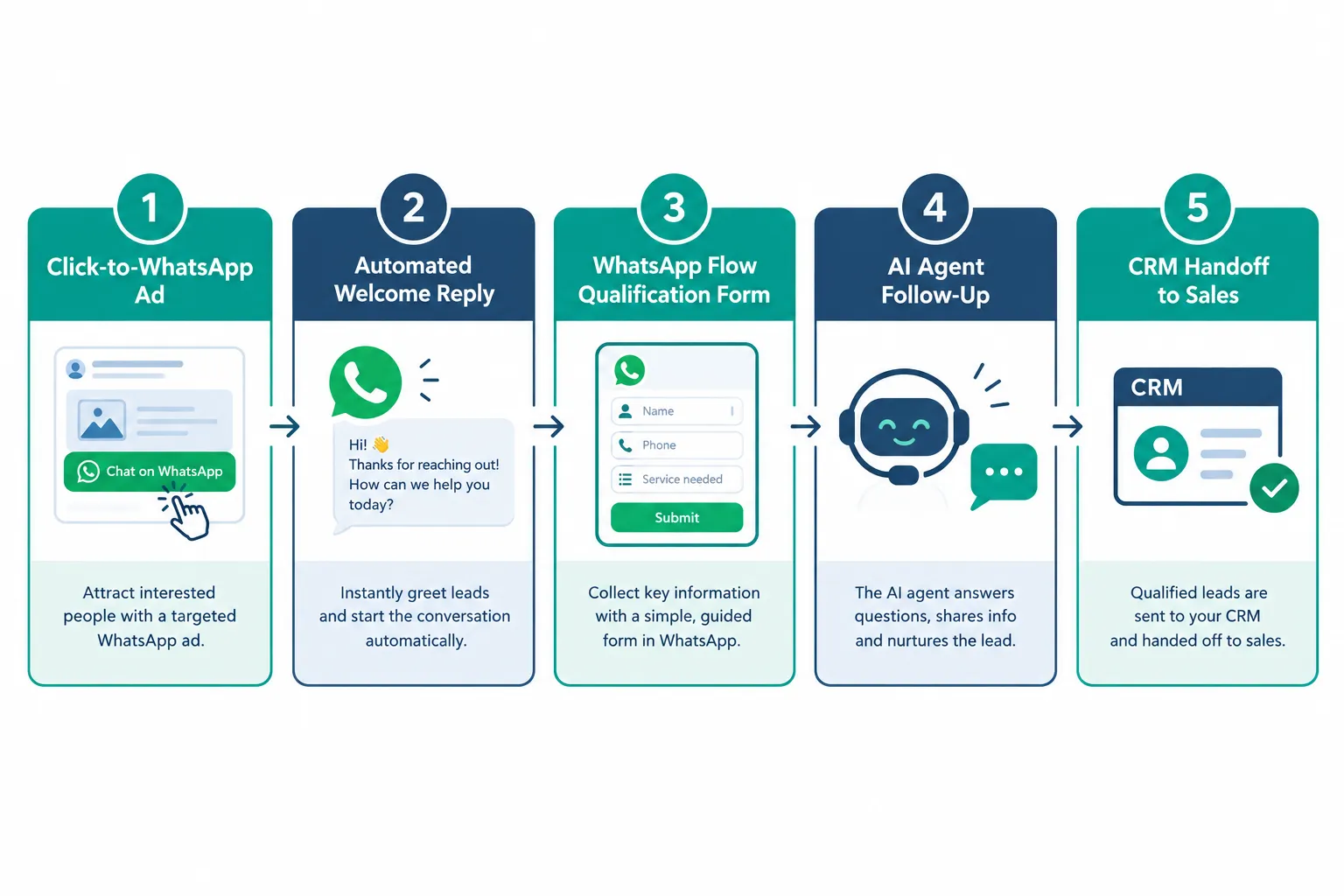
Here’s the mechanism in plain terms. A person sees an ad, taps it, and lands directly inside a pre-filled WhatsApp chat with your business, no form, no landing page, no typing your number from scratch. Meta now treats this “Ads that Click to WhatsApp” format as a core lead-generation product, not a side feature, and is formalizing a full funnel around it: ad click, chat, automated qualification, then conversion [1][10].
Three things make this different from traditional lead capture:
- Lower drop-off. People already have WhatsApp open on their phone. There’s no new app to download and no password to remember.
- Two-way conversation from the first touch. Instead of a static form, the lead is already chatting, which means you can qualify them immediately.
- Message persistence. Unlike an email that gets buried, a WhatsApp message sits in a thread the person checks multiple times a day.
I’ve watched this play out with a dental clinic client: the same ad spend that produced 40 form-fills a month on a landing page produced 95 WhatsApp conversations when we switched the “Learn More” button to Click-to-WhatsApp. Not every chat became a patient, but far more people actually started a conversation, which is the whole point of lead generation.
If you’re building out a broader lead strategy beyond WhatsApp, it helps to pair this with a proper content plan, see our 4 steps to generate leads with the right content strategy for how the top-of-funnel content feeds into channels like WhatsApp.
WhatsApp Business API vs WhatsApp Business App: Which One Do You Need?
Choose the free WhatsApp Business App if you’re a solo owner or a two-person team handling fewer than 50 conversations a day by hand. Choose the WhatsApp Business API if you need automation, multiple team members in one inbox, CRM integration, or you’re running paid ads that drive volume you can’t answer manually [5].
Here’s the practical breakdown:
| Factor | WhatsApp Business App | WhatsApp Business API |
|---|---|---|
| Cost | Free | Pay per conversation, plus platform fees |
| Who answers chats | One phone, one person | Multiple agents, shared inbox |
| Automation | Basic auto-replies only | Full chatbot, flows, AI agents |
| CRM integration | None | Native integration with most CRMs |
| Best for | Local shops, solo consultants | Clinics, agencies, real estate teams, ecommerce brands running ads |
Decision rule: if you’re currently running, or planning to run, Click-to-WhatsApp ads, you need the API. The app alone can’t handle qualification flows, team routing, or automated follow-up at any real volume, and that’s exactly where ad-driven leads go to die.
Common mistake: businesses launch WhatsApp ads on the free app, get flooded with 200 chats in a weekend, and can’t keep up. Half those leads never hear back. The ad worked. The infrastructure didn’t.
How Much Does WhatsApp Marketing Cost for Small Businesses?
WhatsApp marketing costs break into three buckets: ad spend (what you pay Meta per click or result), API conversation fees (what you pay per message template sent outside a 24-hour window), and software/automation tooling (what you pay a platform for chatbots, flows, and CRM sync). There’s no single flat number, it depends on your industry, message volume, and whether you build automation yourself or use a managed platform.
What actually drives your cost up or down:
- Message volume. More conversations means more conversation-based fees under the API pricing model.
- Template vs session messages. Messages you send first (outside a 24-hour reply window) use paid templates; replies within that window are typically free or cheaper.
- Automation depth. A basic auto-reply costs far less to build than a full AI qualification flow connected to your CRM.
- Agency vs DIY. Platforms that package ads, inbox, and automation together charge a monthly fee on top of Meta’s ad spend [9].
Example: a small real estate agency running Click-to-WhatsApp ads for a property launch might spend a modest amount on Meta ad clicks, a per-conversation fee for every qualified chat, and a monthly subscription to an automation platform that handles the flow and CRM sync. Compare that to the cost of a missed showing because no one answered a lead at 9 p.m., the math usually favors investing in automation early.
How Click-to-WhatsApp Ads Work (and How to Set One Up)
Click-to-WhatsApp (CTWA) ads run through Meta Ads Manager and route anyone who taps the ad straight into a WhatsApp chat with your business, pre-loaded with a starter message you control. Setting one up takes four steps: connect your WhatsApp Business number to Meta, build the ad creative, write the opening chat message, and route the chat into an automated or human-staffed inbox.
Step-by-step setup:
- Link your WhatsApp Business account to your Meta Business Manager so ads can reference it as the destination.
- Build the ad, image, video, or carousel, with a clear call-to-action button set to “Send Message.”
- Write the ice-breaker message the lead’s chat opens with (for example, “Hi, I’m interested in the 2BHK listing”). This pre-fills so the lead doesn’t have to type first.
- Connect the destination inbox, either a shared team inbox or an automated flow, so the message gets answered within minutes, not hours.
Click-to-WhatsApp isn’t exclusive to Meta anymore either. Other ad networks are adopting the same click-to-chat pattern, which reinforces WhatsApp’s position as the default landing spot for ad traffic rather than a standalone chat app [1][4]. If you’re already running Meta campaigns for engagement, this pairs naturally with tactics from Facebook engagement strategies, the ad gets attention, WhatsApp gets the conversation.
Edge case: if your ad targets a cold audience with no brand awareness, CTWA conversion rates drop sharply. CTWA performs best on warm or mid-funnel audiences who already recognize your brand, retargeting website visitors, past customers, or people who engaged with a previous post.
The Best WhatsApp Marketing Tools and Automation Platforms
The right WhatsApp tool depends on what you need automated: ad-to-chat routing, chatbot flows, team inboxes, or CRM sync. Most small businesses need a platform that bundles all four rather than stitching together separate tools.
What to look for when comparing platforms:
- Shared team inbox so multiple people can answer chats from one number without stepping on each other.
- Interactive Flows support for in-chat forms (booking, qualification, surveys) instead of redirecting to an external page [7].
- Analytics on response time and conversion, if a platform can’t tell you how fast your team replies, you can’t fix your biggest leak.
- Native or easy CRM integration so every WhatsApp conversation becomes a tracked lead record, not a chat that disappears.
- Template management for the pre-approved messages you’ll send outside the 24-hour window.
Current automation stacks typically combine CTWA ad connection, a shared inbox, built-in analytics, and “human-like” automated replies that hand off cleanly to a person when the conversation gets complex [9]. This is the same logic behind good multi-channel marketing, WhatsApp shouldn’t operate in isolation from your email, ads, and CRM data.
Decision rule: if you’re spending on ads but have no CRM connection, fix that before adding more automation. A chatbot that qualifies leads perfectly but dumps them nowhere trackable just makes you lose leads faster.
How to Collect WhatsApp Opt-Ins Without Looking Spammy
You collect WhatsApp opt-ins by asking for explicit permission at a natural moment, a checkout page, a booking form, a QR code at your counter, or a Click-to-WhatsApp ad, and always giving people an easy way to say no or opt out. The businesses that get flagged or ignored are the ones that message people who never agreed to hear from them.
Practical opt-in methods that actually convert:
- QR codes at physical locations (clinics, salons, retail counters) linking straight to a WhatsApp chat.
- “Message us” buttons on your website and Instagram bio, not buried in a contact page.
- Checkout or booking confirmation screens with a one-tap “get updates on WhatsApp” option.
- Click-to-WhatsApp ads, where clicking the ad is itself the opt-in action.
For ongoing marketing messages (not just one-off replies), always include a short line like “Reply STOP to opt out” and honor it immediately. This isn’t just good practice, it’s required under WhatsApp’s commerce policy, and ignoring it risks your number getting restricted.
Common mistake: importing an old contact list and blasting a marketing message to people who never messaged your business first. WhatsApp’s system is built around consent-based conversation, not cold outreach, and bulk unsolicited messaging gets numbers banned fast.
WhatsApp Chatbots and AI: Setting Up Automated Lead Qualification
Yes, you can and should use AI to handle the first layer of WhatsApp replies, greeting leads, asking qualifying questions, and routing them to the right person, but the AI has to be business-specific, not a general chatbot bolted onto your number. As of January 15, 2026, Meta’s policy explicitly bans general-purpose AI chatbots on the WhatsApp Business API; only task-focused, business-trained AI assistants are permitted [3][6].
A working chatbot setup for lead generation usually follows this pattern:
- Instant acknowledgment, the bot replies within seconds so the lead knows they’re not ignored.
- Qualifying questions via WhatsApp Flows (budget, timeline, service needed) rather than open-ended chat that’s harder to automate.
- Scoring and routing, based on answers, the lead goes to sales, support, or a nurture sequence.
- Human handoff trigger, the moment a question gets complex or emotional, the bot passes the thread to a real person.
AI lead-management agents are becoming the standard way businesses handle ad-driven WhatsApp traffic, especially when leads arrive from multiple sources (ads, website, QR codes) at once and need consistent, fast qualification [6]. Vendors building these tools report meaningful uplift in response speed and conversion when AI handles the first reply instead of a human checking the inbox once an hour [6][9], though exact figures vary by industry, so treat vendor numbers as directional, not universal.
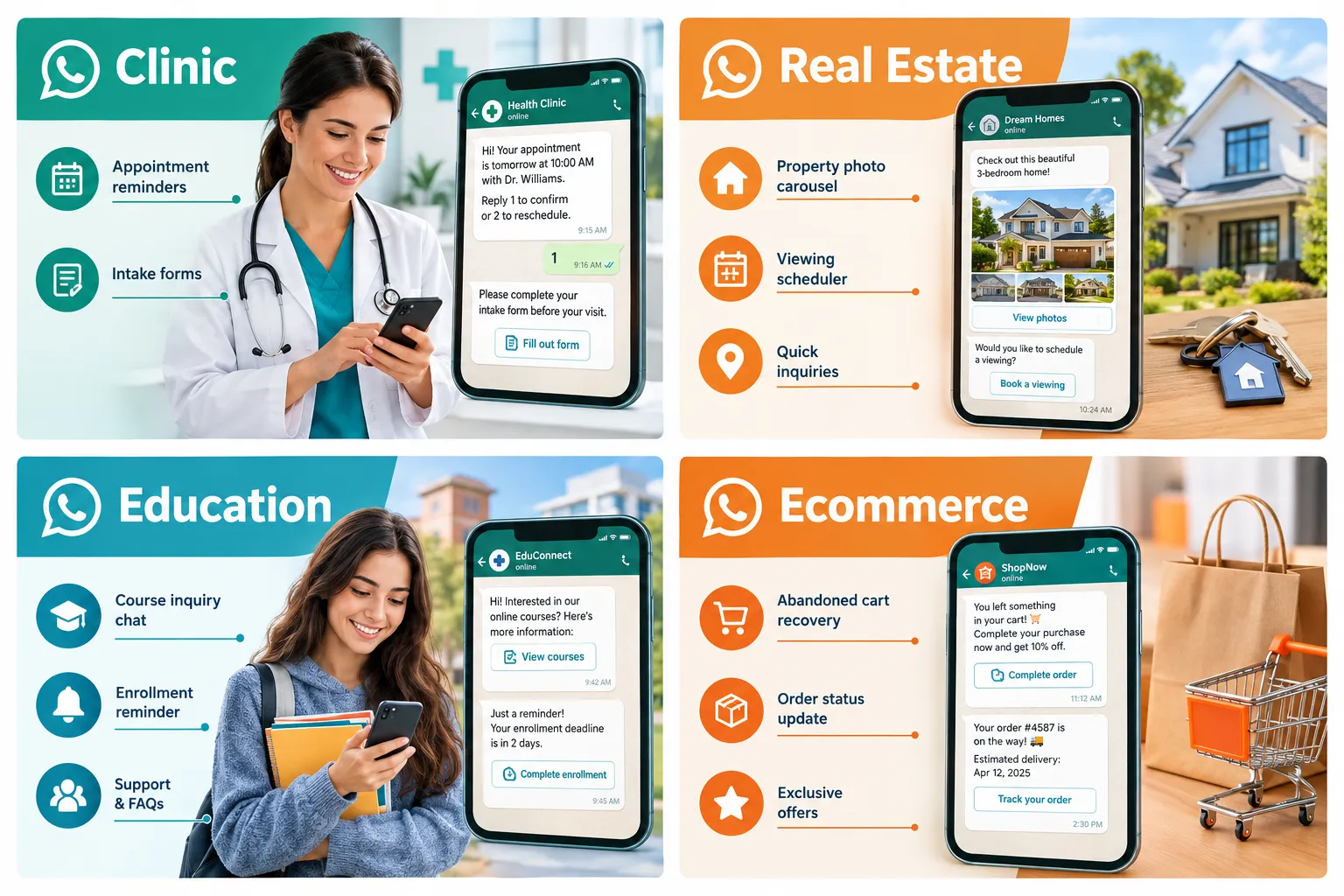
Example by industry:
- Clinic: bot asks symptom type and preferred time slot, books directly into the calendar.
- Real estate: bot asks budget and location preference, sends matching listings, books a viewing.
- Education: bot asks course interest and current level, sends a syllabus, schedules a counseling call.
- Ecommerce: bot answers order status and stock questions instantly, escalates returns to a human.
- Professional services (legal, accounting, consulting): bot captures the nature of the inquiry and urgency, routes to the right specialist.
WhatsApp Marketing Compliance: What’s Legal and What Gets You Banned
WhatsApp marketing compliance centers on three rules: get explicit opt-in before marketing to someone, use approved message templates for anything sent outside an active conversation window, and never deploy a general-purpose AI chatbot on the Business API. Break these and you risk account restriction or an outright ban, not just a warning.
Key compliance points to build into your process:
- Opt-in first, always. Someone messaging you first counts as consent for that conversation; it does not automatically give you permission for ongoing marketing blasts.
- Template approval. Marketing messages sent outside the 24-hour response window must use Meta-approved templates, you can’t just type a promotional message into an old thread.
- No general-purpose AI bots. The policy taking effect January 15, 2026 means your WhatsApp assistant must stay scoped to your business, answering booking, product, or support questions, not acting as an open-ended chatbot [3].
- Data handling. Treat WhatsApp lead data like any other customer data, store it securely and don’t share numbers across unrelated campaigns without consent.
Common mistake: businesses assume because WhatsApp feels personal, the rules are looser than email marketing. They’re actually stricter in some ways, number bans happen fast and recovery is hard.
WhatsApp Marketing vs Email and SMS: Which Channel Wins?
WhatsApp generally beats email and SMS on response speed and open rates for small business lead generation, but it works best alongside them, not as a full replacement. Choose WhatsApp when you need fast, two-way conversation; keep email for detailed content and formal documentation; keep SMS as a backup for time-sensitive alerts when someone doesn’t have WhatsApp.
| Factor | SMS | ||
|---|---|---|---|
| Typical engagement speed | Fast, people check throughout the day | Slower, often delayed | Fast, but one-way |
| Two-way conversation | Yes, native | Possible but clunky | Limited by character count |
| Automation depth | High (flows, bots, CRM sync) | High (established tooling) | Low to moderate |
| Best for | Qualification, booking, support | Nurture sequences, newsletters, receipts | Reminders, OTPs, alerts |
| Setup complexity | Moderate (API + automation) | Low | Low |
Decision rule: if your sales cycle involves back-and-forth questions (pricing, availability, customization), WhatsApp wins. If you’re sending one-way content like a newsletter or a detailed proposal, email still does that job better. For a solid foundation on the email side, see our guide on building a solid email marketing foundation.
WhatsApp Marketing for Ecommerce vs Service Businesses (With Real Examples)
Ecommerce businesses use WhatsApp mainly for cart recovery, order updates, and quick product questions, while service businesses (clinics, real estate, education, consulting) use it for appointment booking, qualification, and ongoing relationship management. The automation setup differs because the buying decision differs, ecommerce is usually a single transaction, services involve a longer conversation before someone commits.
Ecommerce examples that convert:
- An automated message triggers when someone abandons a cart, sent as a WhatsApp template with a direct link back to checkout.
- Order confirmation and shipping updates sent automatically, reducing “where’s my order” support volume.
- A product quiz inside a WhatsApp Flow that recommends items based on answers, replacing a quiz landing page.
Service business examples that convert:
- A clinic’s Click-to-WhatsApp ad opens a chat that immediately asks for symptom and preferred time, booking directly into a calendar.
- A real estate agent’s chatbot sends a short property carousel based on budget, then books a site visit with a human agent.
- A consultant’s WhatsApp flow captures company size and challenge area before a discovery call gets scheduled, so the first human conversation starts already qualified.
- An education provider sends automated reminders for application deadlines and counseling slots, cutting no-shows significantly.
Decision rule: if your product sells itself with a single message (price, availability, link), build light automation. If your sale depends on trust and multiple touchpoints, invest more in qualification flows and human handoff, the bot’s job is to get the lead warm, not close the sale alone. If you want to see how a similar structured approach applies to acquisition strategy more broadly, our piece on demand marketing as a customer acquisition strategy covers the underlying logic.
Common Mistakes That Kill WhatsApp Lead Generation
The single biggest mistake is slow response time, leads that don’t get a reply within minutes cool off fast, and WhatsApp’s instant-messaging nature makes the gap between “fast” and “slow” feel much larger than it does on email. Beyond speed, a few patterns show up again and again.
- Running ads without an automation layer. The ad brings volume; without a bot or routing system, the team drowns and leads go unanswered.
- Using the free app at ad-driven scale. It caps you on team members and automation right when you need both.
- Over-automating the entire conversation. A bot that never hands off to a human frustrates leads who have a real question the flow didn’t anticipate.
- No CRM connection. Conversations happen, but nothing gets logged, tracked, or followed up on days later.
- Ignoring opt-out requests. This isn’t just annoying to leads, it risks your number getting restricted.
- Treating WhatsApp as a broadcast channel. It’s built for conversation. Messages that feel like a mass blast get ignored or reported.
If you’re unsure whether your current setup qualifies as a real system or just manual chatting, ask one question: does a lead that messages you at 11 p.m. get a reply before morning, and is that reply logged anywhere? If the answer is no to either, you’re running manual WhatsApp marketing, not a scalable lead-generation system.
FAQ
Is WhatsApp marketing free for small businesses? The WhatsApp Business App is free, but it lacks automation and team features. The WhatsApp Business API, needed for ads and automation at scale, involves conversation-based fees plus any platform tooling you use [5].
Do I need coding skills to set up WhatsApp automation? No. Most WhatsApp automation platforms offer no-code flow builders for qualification forms, auto-replies, and CRM connections [9].
Can small businesses run Click-to-WhatsApp ads without an agency? Yes, through Meta Ads Manager directly, though pairing the ad with a proper automated inbox matters more than the ad setup itself for actual conversion [1][10].
How fast should a WhatsApp lead get a reply? Within minutes, ideally through an automated first response, since WhatsApp leads expect messaging-app speed, not email-style delay.
Is it legal to message past customers on WhatsApp for marketing? Only if they’ve given explicit consent for marketing messages; a past transaction alone doesn’t count as ongoing opt-in.
What happens if I use a general AI chatbot on WhatsApp Business API? As of January 15, 2026, Meta’s policy bans general-purpose AI chatbots on the Business API; businesses must use scoped, task-specific AI assistants instead [3][6].
Does WhatsApp marketing work for B2B, not just B2C? Yes, particularly for professional services and consulting, where qualification flows capture company size and need before a sales call.
Conclusion
WhatsApp marketing for small business isn’t about sending more messages, it’s about building a chain that doesn’t break: an ad that opens a chat, a flow that qualifies the lead, an AI or human that follows up fast, and a CRM that remembers everything. Miss one link and the whole thing leaks leads, no matter how good your ad creative is.
If you’re starting from scratch, do this in order: connect WhatsApp Business API to your Meta ads, build one qualification flow for your highest-value service, set a reply-time standard your team actually hits, and connect the chat to a CRM so no lead disappears into a phone that someone forgot to check. Get those four pieces working together and WhatsApp stops being a side channel and starts behaving like your best-performing lead source. For help structuring this alongside your broader marketing strategy, feel free to get in touch or browse examples of structured campaign work in our portfolio.
References
[1] Click To Whatsapp Ads – https://setsmart.io/blog/click-to-whatsapp-ads [2] Click To Whatsapp Ads – https://www.spurnow.com/en/blogs/click-to-whatsapp-ads [3] Future Trends Whatsapp Api Improvements – https://www.zoko.io/post/future-trends-whatsapp-api-improvements [4] Click To Whatsapp Ads – https://turbodev.ai/click-to-whatsapp-ads [5] Whatsapp Business App Vs Api – https://m.aisensy.com/blog/whatsapp-business-app-vs-api/ [6] Whatsapp Ai Chatbot For Lead Management – https://respond.io/blog/whatsapp-ai-chatbot-for-lead-management [7] Whatsapp Business Api Integration – https://www.engagelab.com/blog/whatsapp-business-api-integration [8] Whatsapp Business Api Use Cases – https://chatarmin.com/en/blog/whatsapp-business-api-use-cases [9] Marketing Automation – https://www.interakt.shop/marketing-automation/ [10] Create Ads That Click To Whatsapp – https://whatsappbusiness.com/products/create-ads-that-click-to-whatsapp/