

Last updated: October 31, 2026
Quick Answer
Google Ads Performance Max for lead generation works best when you build measurement before you build campaigns. That means setting up the Google tag, mapping your full lead funnel from form fill to closed deal, connecting CRM data, and assigning different conversion values to different lead stages before you ever turn the campaign on. Skip this order and Performance Max’s AI bidding will optimize for the wrong signal, usually quantity of leads instead of quality.
Key Takeaways
- Performance Max is an automated, goal-based campaign type that runs across Search, Display, YouTube, Gmail, Discover, and Maps from one campaign setup.[1]
- Lead-gen success depends more on conversion data quality than on creative assets or budget size.
- Offline conversion imports and CRM connections through Data Manager are now treated as essential for durable lead measurement, not optional extras.[2][3]
- Assign higher conversion values to qualified leads than to raw form fills so the AI chases quality, not volume.[4][5]
- Expect a learning phase of one to two weeks, and up to six weeks for low-volume or complex B2B setups, before judging results.[6]
- Performance Max and “PMax” are the same campaign type; PMax is simply the common shorthand used across the industry.
- Service businesses should use lead form extensions, call tracking, and local inventory signals together for the most reliable local lead data.
What Is Google Ads Performance Max and How Does It Work
Performance Max is a goal-based Google Ads campaign type that uses machine learning to place ads across every Google inventory channel from a single campaign.[1] You give it a conversion goal, some creative assets, and audience signals, and Google’s AI decides where to show your ads and how much to bid.
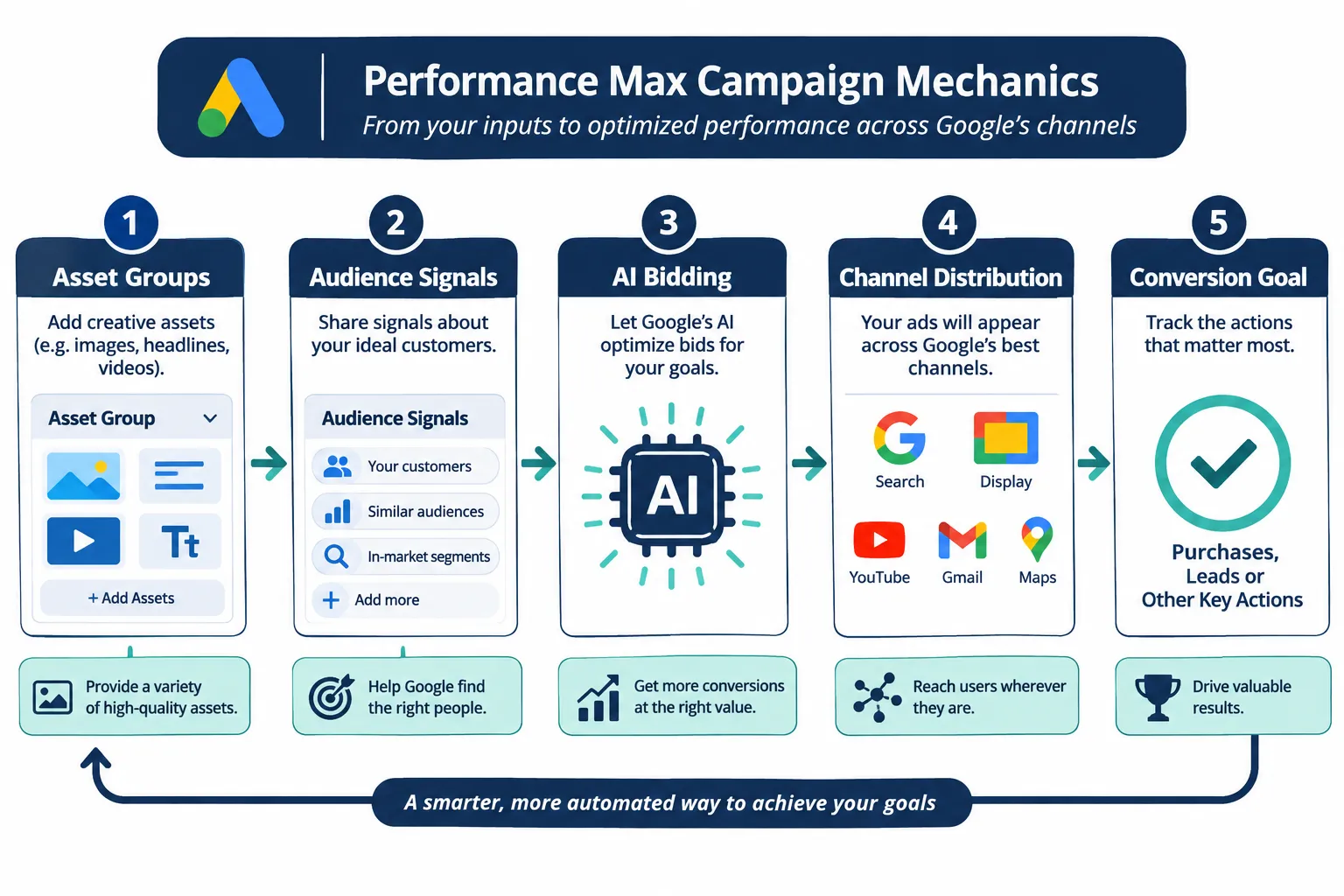
Under the hood, Performance Max runs on asset groups (collections of headlines, images, logos, and videos tied to a theme), audience signals (first-party lists, interests, and custom segments that guide the AI’s early targeting), and automated bidding that adjusts in real time based on your stated conversion goal.
For lead generation specifically, the campaign leans heavily on your conversion actions to decide who is a good prospect. If your conversion setup only tracks “form submitted,” the AI will find more people who submit forms, not more people who become customers. This is why the measurement-first approach in this Google Ads Performance Max for Lead Generation: A Measurement-First Setup Guide matters more than creative polish.
How Is Performance Max Different from Standard Search Ads
Standard Search campaigns give you keyword-level control and manual or semi-automated bidding, while Performance Max removes keyword targeting entirely and lets AI decide placement across six Google channels at once.[1]
The practical difference for someone running lead generation:
- Search campaigns show you exactly which keywords triggered a click, which makes troubleshooting straightforward.
- Performance Max shows aggregated insights instead of a traditional search terms report, though newer search-term insights reports now offer partial visibility.[7]
- Search campaigns suit businesses with well-defined buyer keywords and tight budgets.
- Performance Max suits businesses wanting reach across channels without managing five separate campaign types.
Choose Search if you need granular keyword control and a smaller, tightly managed account. Choose Performance Max if you want channel reach and have enough conversion volume to feed the AI good data.
What Metrics Should I Track to Measure Performance Max Success
Lead quality metrics matter more than raw lead volume when measuring Performance Max for lead generation. Cost per qualified lead, lead-to-sale conversion rate, and offline conversion value should sit above cost per lead and click-through rate in your weekly reporting.
A practical metric stack for service businesses:
| Metric | Why it matters | Data source |
|---|---|---|
| Cost per lead (raw) | Early signal, but can mislead on its own | Google Ads |
| Lead-to-qualified rate | Shows whether traffic quality is improving | CRM |
| Cost per qualified lead | The number that actually matters for budget decisions | CRM + Google Ads import |
| Conversion value per lead | Lets AI bidding prioritize better leads | Enhanced conversions |
| Offline conversion lag | Time between lead and sale, affects reporting windows | CRM |
Build a lead funnel report that follows a lead from click to closed deal, including offline stages recorded in your CRM.[2][7][8] Without this, you’re optimizing on vanity numbers.
What’s the Difference Between Performance Max and PMax Campaigns
There is no functional difference. “PMax” is simply the shorthand term marketers use for Performance Max campaigns. Anyone using the Google Ads Performance Max for Lead Generation: A Measurement-First Setup Guide approach will see both terms used interchangeably in Google’s documentation, agency reports, and community forums.
How Much Does Performance Max Cost and What’s the Pricing Model
Performance Max uses the same auction-based pricing as every other Google Ads campaign type: you set a budget and bid strategy, and cost depends on competition, quality signals, and your target cost per action or cost per lead.[9]
There’s no flat fee or fixed “Performance Max price.” Costs vary by industry, location, and competitiveness. A local plumbing business and a B2B SaaS company will see very different cost-per-lead numbers even with identical budgets, because auction dynamics differ by keyword and audience competitiveness.
Recommendation: start with a budget that can generate at least 30 to 50 conversions in a 30-day window if possible. Lower volume stretches the learning phase and makes the AI’s decisions less reliable.[6]
Why Am I Not Getting Leads from My Performance Max Campaign
The most common cause is a conversion tracking gap, not a targeting problem. If the Google tag isn’t firing correctly on your thank-you page or form confirmation, Performance Max has nothing to learn from and will underperform regardless of budget.[1]
Other frequent causes:
- Asset groups built around generic messaging instead of the specific service or offer
- No audience signals provided, forcing the AI to start from zero
- Conversion goal set to “all conversions” including irrelevant actions like newsletter signups
- Budget too thin to exit the learning phase within a reasonable timeframe
- Landing page mismatch, where the ad promises one thing and the page delivers another
What’s the Best Alternative to Performance Max for Lead Generation
Standard Search campaigns, Local Services Ads, and LinkedIn Ads for B2B are the main alternatives, each suited to different situations. Choose Local Services Ads if you run a local service business and want pay-per-lead pricing with a verified badge. Choose LinkedIn Ads if your buyers are defined by job title and company size rather than search intent. Choose standard Search if you need precise keyword control on a limited budget.
Performance Max still wins when you want channel reach without managing multiple campaign types, provided you have the conversion volume and measurement setup to support it.
Is Performance Max Good for B2B Lead Gen or Just B2C
Performance Max works for B2B lead generation, but it needs stronger audience signals and longer evaluation windows than B2C setups because B2B sales cycles and conversion volumes are typically lower.[6]
For B2B, success depends on feeding the campaign first-party customer lists, matching audiences built from your CRM, and conversion values that reflect deal size rather than just form fills. Readers running longer B2B pipelines should also review a 90-day B2B demand generation plan alongside Performance Max, since paid lead gen alone rarely builds a full pipeline. It’s also worth understanding the difference between leads and pipeline in B2B marketing before setting conversion values.
How Long Does It Take to See Results from Performance Max
Expect one to two weeks for the learning phase in typical setups, extending to four to six weeks for complex or low-volume B2B accounts.[6] Avoid making major changes to budget, assets, or bidding during this window.
A practical rule: if your campaign generates fewer than 15 to 20 conversions a week, give it the full six weeks before judging performance. Constant tweaking during the learning phase resets progress and keeps the AI guessing.
What Are Common Mistakes People Make Setting Up Performance Max
The biggest mistake is launching before conversion tracking and lead-value mapping are complete. Other recurring mistakes include:
- Treating every form fill as equal value instead of weighting qualified leads higher
- Skipping CRM integration, so the campaign never learns which leads actually convert
- Using one broad asset group instead of grouping by service line or product category
- Ignoring negative keywords and audience exclusions, which still influence Performance Max indirectly through signals[7]
- Setting unrealistic target CPA from day one instead of letting the system calibrate
How Do I Set Up Conversion Tracking for Performance Max Leads
Start by implementing the Google tag across your site and configuring conversion actions for every meaningful lead stage, including form submissions, phone calls, and chat starts.[1][2][8]
Step-by-step checklist:
- Install the Google tag and verify it fires on your thank-you or confirmation page.[1]
- Map your lead funnel stages, from first touch to closed deal, including offline stages tracked in your CRM.[2][7][8]
- Connect your CRM or offline conversion data through Data Manager or a direct import.[2][3]
- Turn on enhanced conversions for leads to improve match rates using hashed first-party data.[1][3]
- Assign differentiated conversion values, with qualified or closed leads valued higher than raw form fills.[4][5]
- Launch the campaign with these goals active, then hold for one to two weeks (up to six for complex accounts) before major edits.[6]
This sequence reflects Google’s own measurement foundation guidance for lead-gen Performance Max, which treats CRM connection and lead journey mapping as prerequisites rather than later optimizations.[2][8]
What’s the Minimum Budget to Run Performance Max Effectively
There’s no official minimum, but practical experience across service businesses suggests budgets that generate at least 15 to 20 conversions weekly give the AI enough signal to optimize reliably. Below that, learning phases drag on and results stay noisy.
If your budget can’t support that volume, consider Search campaigns with tighter keyword control instead, since they perform reasonably well even at lower conversion counts.
Can I Use Performance Max for Niche or Local Industries
Yes, Performance Max works for niche and local service industries, but it needs local signals, location targeting, and call tracking set up correctly to avoid wasted spend outside your service area. Local businesses should pair Performance Max with a well-optimized Google Business Profile, since Maps inventory is one of the channels Performance Max draws on.
For hyper-niche B2B or specialized local trades, lower search volume means longer learning phases and a greater need for manually supplied audience signals rather than relying purely on automation.
How Do I Know If Performance Max Is Right for My Business
Performance Max fits businesses that already have reliable conversion tracking, enough monthly conversion volume to feed the AI, and the patience to wait through a learning phase before judging results. It is not the right first step for brand-new accounts with no conversion history or businesses unwilling to connect CRM data.
Decision rule: choose Performance Max if you can commit to the measurement setup described in this guide and have at least a few weeks of patience. Choose a simpler Search campaign if you need fast, controllable results with minimal setup time. For broader context on choosing between automated and manual approaches, see this overview of performance marketing strategy.
FAQ
Does Performance Max replace Search campaigns entirely? No. Many advertisers run both together, using Search for high-intent keywords and Performance Max for broader reach across channels.
Can I see which keywords triggered my Performance Max leads? Partially. Search term insights reports give aggregated themes, not the full keyword-level data available in Search campaigns.[7]
Is enhanced conversions for leads required? It’s strongly recommended, not strictly required, but it improves match rates for offline and CRM-based conversions significantly.[1][3]
How often should I check Performance Max performance? Weekly review is the recommended cadence once the campaign exits the learning phase, based on current SMB lead-gen guidance.[4]
Will adding negative keywords to Performance Max help? Account-level negative keyword lists and exclusions can be applied and do influence delivery, even though Performance Max lacks traditional keyword-level control.[7]
Can small businesses with tight budgets run Performance Max successfully? Yes, but expect a longer learning phase and prioritize a narrower service offering in your asset groups rather than trying to cover everything at once.
Conclusion
Performance Max rewards advertisers who treat measurement as the foundation, not an afterthought. Before writing a single headline, map your lead funnel, connect your CRM, and decide which lead stages deserve higher conversion value. That sequence is the real difference between a campaign that generates cheap form fills and one that generates leads your sales team actually wants.
If you’re building out a broader lead strategy beyond paid ads, review what demand generation marketing actually involves and compare it against growth marketing approaches to see where Performance Max fits into your bigger picture. Start with tracking, give the system time to learn, and adjust based on lead quality data, not just lead count.
References
- Google Ads Help. support.google.com.
- Google Ads Help. support.google.com.
- Google Ads Help. support.google.com.
- Google Ads SMB Lead Gen Guide. services.google.com.
- Multiply Conversions with Performance Max. business.google.com.
- Google Ads Help. support.google.com.
- Google Ads Help. support.google.com.
- Google Ads Help. support.google.com.
- Google Ads Help. support.google.com.