

Last updated: October 20, 2026
A domain that quietly expires can take down your website, your business email, and years of SEO work in one weekend. Most of this damage is avoidable with a two-minute check.
Quick Answer
A free domain expiry checker is an online tool that looks up a domain’s WHOIS or RDAP record and tells you its expiration date, registration status, and lock settings, without needing to log into a registrar account. Tools like Zoho’s checker, Pulsetic, and similar services work for almost any domain, including ones you don’t own, and most give results in under five seconds [1][2]. For domains you actually manage, your registrar dashboard still gives the most accurate renewal and auto-renew details.
Key Takeaways
- A free domain expiry checker pulls live data from WHOIS/RDAP registries to show expiration date, status codes, and registrar name.
- You don’t need to own a domain to check its expiry date, the data is public for most TLDs.
- Registrar dashboards (GoDaddy, Namecheap, Network Solutions) are more accurate for domains you manage because they show auto-renew and billing status too [3].
- Expired domains don’t disappear instantly, they usually pass through a grace period and redemption period before deletion [4][5].
- Free checkers rarely let you renew directly; you’re redirected to the actual registrar.
- Not every checker supports every TLD equally well, since newer or country-specific extensions sometimes use different registry protocols.
- Set renewal reminders at least 30-60 days before expiry, because last-minute renewals (or missed ones) can cost you the domain entirely.
- Different tools can show slightly different dates due to caching delays or registry sync timing, this is normal, not an error.
What Is a Domain Expiry Checker and How Does It Work
A domain expiry checker is a lookup tool that queries the domain’s registry or registrar database (via WHOIS or the newer RDAP protocol) and extracts the expiration date, creation date, and current status codes. It’s essentially a simplified, human-readable window into raw registry data.
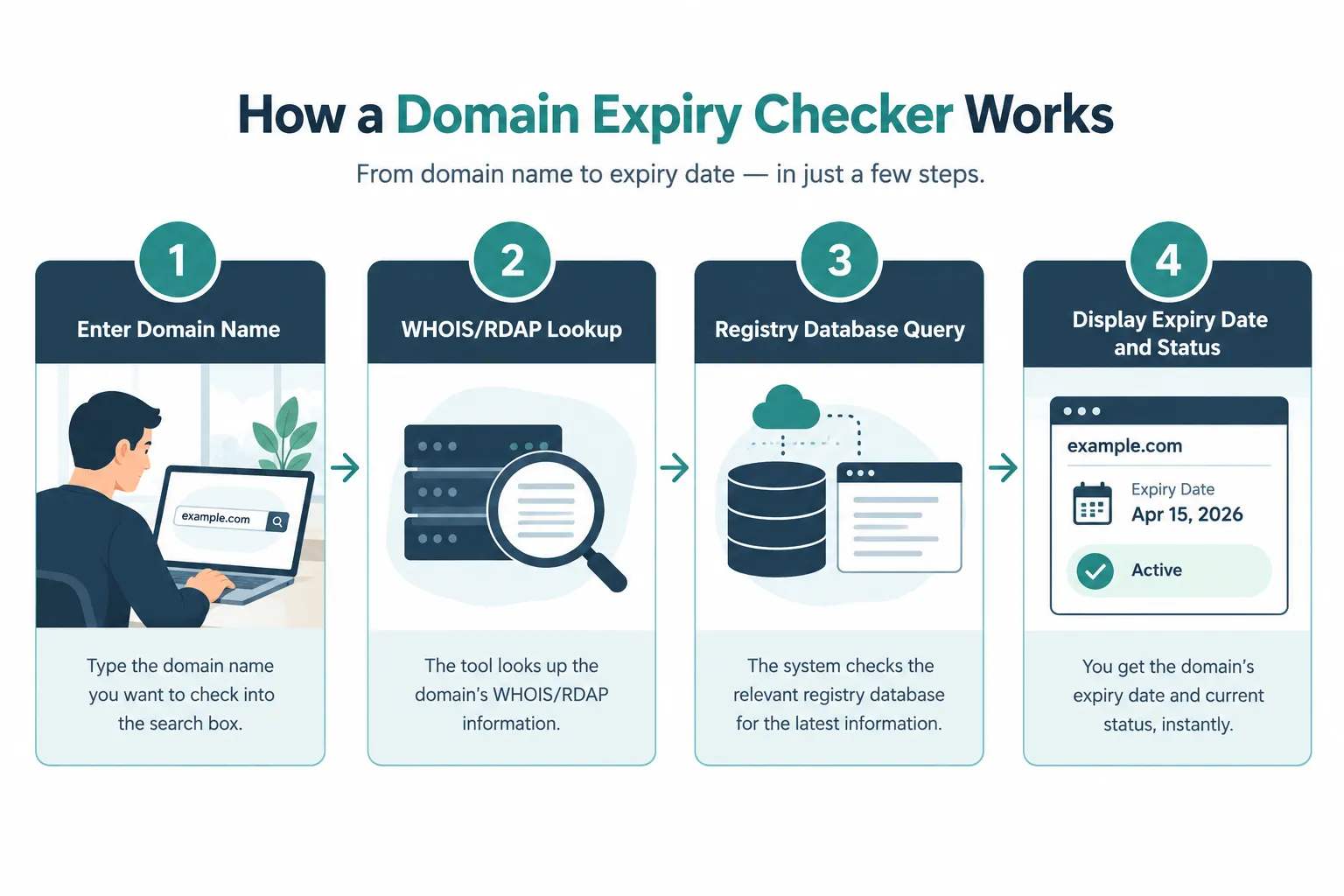
Here’s what happens behind the scenes when you type a domain into a checker:
- The tool sends a request to the relevant WHOIS or RDAP server for that domain’s TLD (.com,.net,.org,.in, and so on).
- The registry or registrar responds with a structured record containing dates, status flags, and nameserver details.
- The checker tool parses this raw text and displays it in a clean format, expiry date, days remaining, and status.
Most modern tools have shifted from legacy WHOIS text parsing to RDAP (Registration Data Access Protocol), which returns structured JSON data instead of messy plain text. This shift, pushed by ICANN’s policy updates, makes results more consistent across different checker tools and reduces parsing errors [1].
Example: If you check “example.com,” a good tool shows something like: registered on a specific date, expires on a specific date, status “clientTransferProhibited,” and the sponsoring registrar’s name, all without you needing any technical background.
Best Free Domain Expiry Checker Tools Available
Several free tools let you check expiry dates without creating an account, and the best ones combine speed with broad TLD coverage. For most casual checks, a simple no-signup tool is enough; for ongoing monitoring, pick one with alert features.
Here’s a quick rundown of commonly used free options:
| Tool | Best For | Notable Feature |
|---|---|---|
| Zoho Domain Expiry Checker | Quick one-off lookups | Simple, no signup required [1] |
| Pulsetic Domain Expiry Checker | Monitoring + uptime combo | Pairs expiry checks with website uptime alerts [2] |
| Karma Domains Checker | Bulk-style quick checks | Clean interface, fast RDAP lookups [6] |
| Query.domains Tool | Developers/technical users | Detailed raw record view [7] |
| Notify.domains | Renewal reminders | Built around alert notifications [8] |
| VisualSentinel | Agencies managing many sites | Dashboard-style monitoring [9] |
| Cruelx Domain Checker | Simple personal use | Lightweight, fast [10] |
Decision rule: Choose a basic checker like Zoho’s if you just need to glance at one domain. Choose Pulsetic or Notify.domains if you want recurring alerts so you never check manually again [2][8].
If you’re building out a portfolio of client sites, this ties closely into broader technical housekeeping, similar to the care needed when fixing a slow WordPress website or monitoring backlinks with proper SEO tools.
How to Check When My Domain Expires
Checking your domain’s expiry date takes less than a minute using either a free checker or your registrar’s control panel. Both methods give you the date, but the registrar dashboard also shows your billing and auto-renew settings.
Step-by-step using a free checker:
- Open a free domain expiry checker (Zoho, Pulsetic, or similar).
- Type your domain name exactly, without “http://” or “www.”
- Click search/check.
- Read the result: expiration date, registrar, and status code.
Step-by-step using your registrar:
- Log into your registrar account (GoDaddy, Namecheap, Network Solutions, Dynadot, etc.).
- Go to the domain management or “My Domains” section.
- Find the expiry date listed next to your domain, along with auto-renew status [3][4][5].
Common mistake: People check the domain expiry date once and forget about it for years. Registries update records in real time, so a date you saw six months ago might not reflect a recent renewal or an approaching lapse.
Can I Check Multiple Domains at Once With a Free Checker
Some free checkers support bulk lookups, but most basic single-search tools only process one domain at a time. If you manage several sites, look specifically for a tool advertising bulk or batch checking, or use a monitoring dashboard built for agencies.
- Single-domain tools (Zoho, Cruelx): fast, but one domain per search.
- Dashboard-style tools (VisualSentinel, Pulsetic): designed to track multiple domains with ongoing alerts rather than one-time bulk entry [2][9].
- Edge case: If you manage 20+ domains across different registrars, a monitoring tool with scheduled alerts saves far more time than manually checking each one weekly.
What Happens When a Domain Expires
When a domain expires, it doesn’t vanish overnight, it moves through a series of defined phases, and what you can still do depends entirely on which phase it’s in. Missing the first phase is recoverable; missing all of them usually isn’t.
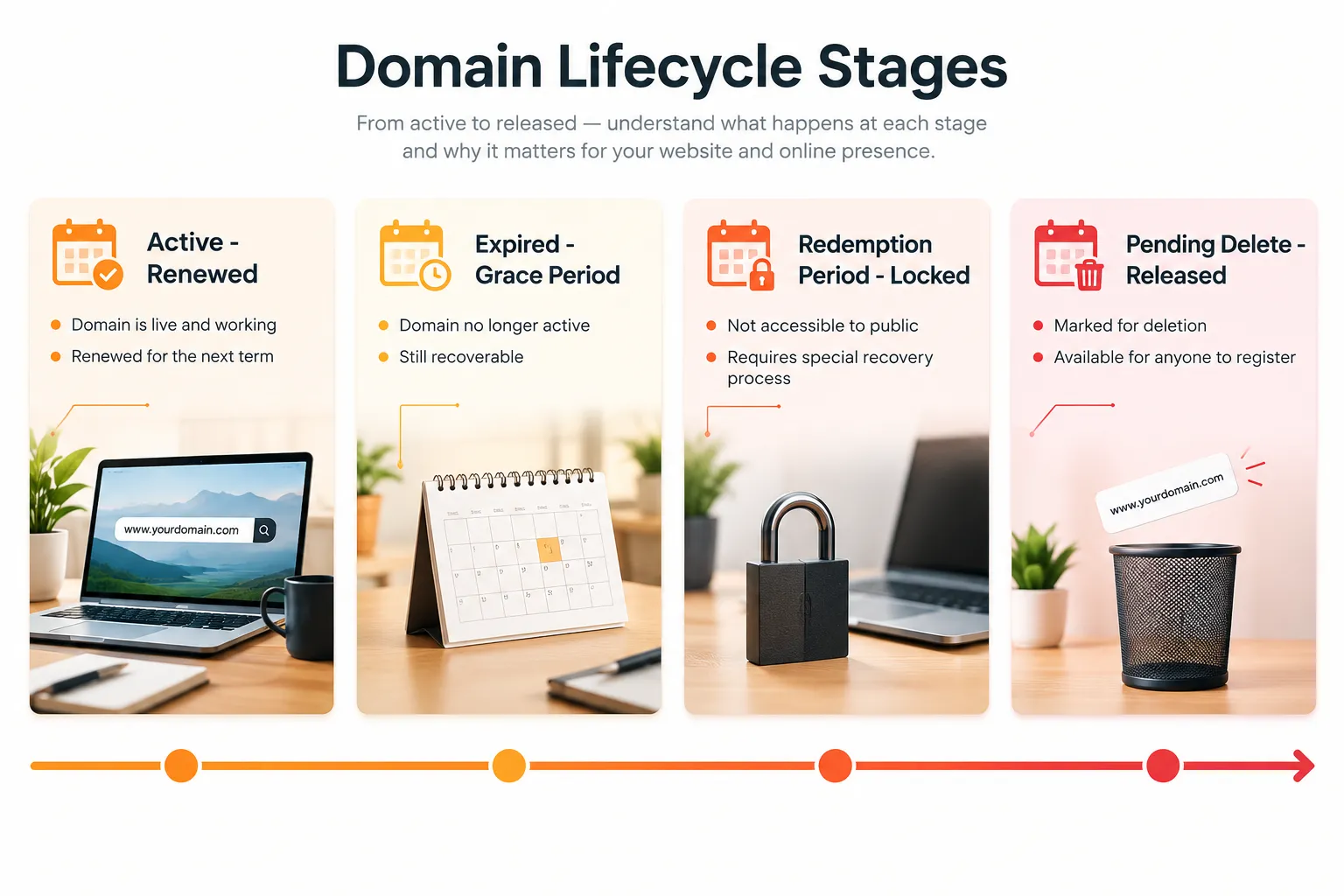
Typical phases after expiry [4][5]:
- Auto-renew grace period: Many registrars attempt automatic renewal for a short window (varies by registrar, often around 0-45 days). You can usually still renew normally here.
- Redemption grace period: The domain is suspended and status may show “redemptionPeriod.” Renewal often involves a higher restoration fee.
- Pending delete: The domain is locked for deletion and cannot be renewed by the original owner.
- Released/Drop: The domain becomes available for anyone to register, sometimes through a drop-catching service.
Real-world scenario: A small business owner forgets to update a card on file. The registrar sends renewal emails that land in spam. Sixty days later, the website and company email both stop working because the domain entered the redemption period and needed a restoration fee to recover.
How to Get Renewal Reminders Before My Domain Expires
The most reliable way to avoid an accidental expiry is stacking two layers of reminders: your registrar’s built-in notifications and a third-party monitoring tool. Relying on just one email alert is risky since inboxes get cluttered or filtered.
Practical setup:
- Turn on auto-renew in your registrar account and keep the payment method current.
- Add a secondary email address to your registrar contact details so reminders don’t rely on one inbox.
- Use a free tool with alert features, such as Notify.domains or Pulsetic, which can ping you independently of the registrar [2][8].
- Put a manual calendar reminder 60 days before expiry as a backup, especially for domains tied to business-critical email or client sites.
Choose auto-renew plus third-party alerts if the domain runs a live business, client site, or email system. A personal hobby blog can get by with just a calendar reminder.
Are Free Domain Expiry Checkers Accurate and Safe to Use
Free domain expiry checkers are generally accurate and safe because they pull directly from public WHOIS/RDAP registry data rather than guessing or scraping unofficial sources. The main limitation is timing: registry data can lag by a few hours after a renewal or transfer.
What makes a checker trustworthy:
- It queries official RDAP/WHOIS servers rather than a private, outdated cache.
- It doesn’t ask for your registrar login or payment details (a legitimate expiry lookup never needs this).
- It clearly displays the data source or last-updated timestamp.
Safety note: Never enter registrar passwords into a third-party “expiry checker.” Legitimate tools only need the domain name itself to pull public record data [1][6][7].
Domain Expiry Checker vs Using My Registrar Dashboard
A free expiry checker is faster for a quick, anonymous glance; your registrar dashboard is more complete because it also shows billing status, auto-renew settings, and payment history tied to your account. Use the checker for speed, use the dashboard for action.
| Factor | Free Expiry Checker | Registrar Dashboard |
|---|---|---|
| Speed | Instant, no login | Requires login |
| Shows auto-renew status | Rarely | Yes |
| Works for domains you don’t own | Yes | No |
| Shows billing/payment info | No | Yes |
| Can renew directly | Rarely | Yes |
Decision rule: Use a free checker when researching a competitor’s domain, verifying a client’s domain health, or doing a quick sanity check. Use your registrar dashboard when you need to actually renew, change auto-renew settings, or update payment details [3][5].
Can I Renew My Domain Directly From an Expiry Checker
Most free domain expiry checkers do not process renewals themselves; they redirect you to the domain’s actual registrar. This separation exists because renewal involves ownership verification and payment, which only the registrar holding the domain can process.
- If a checker shows a “renew now” button, it’s typically linking out to the registrar, not processing payment internally.
- To renew, you need account access at whichever registrar currently holds the domain (shown in the checker’s “registrar” field).
- Common mistake: Assuming a flashy “renew” button on a third-party tool means instant renewal. Always verify you’re on the actual registrar’s site before entering payment details.
What Information Does a Domain Expiry Checker Actually Show
A typical free domain expiry checker displays the expiration date, creation/registration date, sponsoring registrar, and the domain’s current EPP status codes. Some also show nameservers and last-updated date.
Key fields explained in plain language:
- Expiration date: When the current registration period ends.
- Creation date: When the domain was first registered (useful for checking domain age/authority history).
- Registrar: The company managing the domain (not necessarily the registry).
- Status codes (EPP statuses): Technical flags like “clientTransferProhibited” (locked against unauthorized transfer) or “redemptionPeriod” (expired, in recovery window) [4][5].
- Nameservers: Where the domain’s DNS is currently pointed.
Understanding status codes matters more than people assume, a domain showing “pendingDelete” is in a very different situation than one showing “ok” or “active,” even if both display similar expiry dates.
Do Free Domain Checkers Work for All Domain Extensions and TLDs
Most free checkers work well for common TLDs like.com,.net,.org, and major country-code domains, but coverage can be inconsistent for newer or less common extensions. Some registries haven’t fully migrated to RDAP, which can cause gaps or missing fields in certain tools.
- Well-supported:.com,.net,.org,.info, most major ccTLDs.
- Sometimes inconsistent: newer gTLDs or smaller ccTLD registries with limited public RDAP access.
- Edge case: If a checker returns “no data found” for a valid domain, try a second tool before assuming the domain itself has a problem, it’s often a registry support gap, not a real issue.
How Far in Advance Should I Renew My Domain
Renewing 30 to 60 days before expiry gives enough buffer to fix payment issues, verify auto-renew settings, and avoid the grace-period scramble. Waiting until the final week removes your margin for error if a card fails or an email gets missed.
Guidelines by domain importance:
- Business-critical domains (active website, email): renew 60 days ahead, with auto-renew always on.
- Portfolio or backup domains: renew 30 days ahead is usually fine.
- Domains you’re letting go intentionally: no action needed, just confirm you’re okay losing them.
Can I Check Someone Else’s Domain Expiration Date
Yes, WHOIS and RDAP data is public for the vast majority of domains, so free checkers let you look up expiry dates for domains you don’t own, including competitor sites or domains you’re considering buying. Some registrants use privacy protection services that mask contact details, but expiry dates typically still show.
This is useful for research, not just personal domain management, for example, checking when a competitor’s domain expires if you’re interested in acquiring it once it drops, or verifying a vendor’s domain health before signing a long-term contract.
Why Is My Domain Checker Showing Different Dates Than My Registrar
Date mismatches usually come from caching delays, not actual errors. Free checkers sometimes pull from a cached or slightly stale registry snapshot, while your registrar dashboard reads live billing-linked data.
Common causes:
- The domain was just renewed, and the registry hasn’t fully synced with the third-party tool’s cache yet.
- The checker queried an outdated WHOIS mirror instead of the live RDAP endpoint.
- Time zone differences in how “expiration date” gets recorded can shift the displayed date by a day.
If dates differ by more than a few days or the status looks alarming (like “redemptionPeriod” when you know you renewed), trust your registrar dashboard first, then recheck the third-party tool a day later.
Frequently Asked Questions
Is a free domain expiry checker really free with no hidden catch? Yes, most reputable ones (Zoho, Pulsetic, Cruelx) run on public WHOIS/RDAP data and don’t charge for a basic lookup [1][2][10].
Do I need to create an account to check a domain’s expiry date? No. Most free checkers work instantly without signup; accounts are usually only needed for ongoing monitoring and alert features.
Can a domain expiry checker tell me if a domain is for sale? Not directly. It shows status and dates, but you’d need to separately check if the domain is listed on a marketplace or in a drop-catching queue.
What does “clientTransferProhibited” mean in my results? It’s a standard lock status meaning the domain can’t be transferred to another registrar without first being unlocked, this is normal and usually a security feature, not a problem [4].
Will my domain just disappear the day it expires? No. It typically enters a grace period first, giving you time to renew, often followed by a stricter redemption period before final deletion [5].
Can I use a free checker to monitor dozens of domains automatically? Basic checkers handle one domain per search. For ongoing monitoring across many domains, use a tool built for alerts and dashboards, like Pulsetic [2].
Why does one tool show a domain as active while another shows it as expired? This usually comes down to data freshness or which RDAP/WHOIS source each tool queries, recheck using your registrar dashboard as the final authority [3].
Is it safe to enter my domain into a random free checker website? Checking a domain name itself is safe since that data is public. Never enter your registrar password or payment details into a third-party checker tool.
Conclusion
A free domain expiry checker solves one specific, high-stakes problem: knowing exactly when a domain needs renewal before it becomes a crisis. Use a quick tool like Zoho’s or Pulsetic’s for instant checks, but lean on your registrar dashboard for actual renewals, auto-renew settings, and payment management [1][2][3].
If you manage multiple domains for clients or your own projects, set up layered reminders now rather than after a scare. Pair your renewal habit with a broader technical health check, similar to how you’d review SEO mistakes worth fixing or audit why a website isn’t getting indexed. A domain that quietly expires undoes months of SEO and content work in a single day, and a two-minute check today is far cheaper than a redemption fee next month. For more practical, no-fluff guidance on keeping your website and online presence healthy, browse the Sameer Digital blog.
References
- Domain Expiry Checker. zoho.com.
- Domain Expiry Checker. pulsetic.com.
- Check Domain Name Expiration. networksolutions.com.
- How To Determine A Domain’s Expiry Date. support.opensrs.com.
- How to Check Domain Expiry Date. dynadot.com.
- Domain Expiry Checker. karma.domains.
- Domain Expiry Checker. query.domains.
- Domain Expiry Checker. notify.domains.
- Domain Expiry Checker. visualsentinel.com.
- Domain Expiry Checker. cruelx.com.
domain expiry checker, domain expiration date, WHOIS lookup, RDAP, domain renewal, domain status check, website downtime prevention, domain monitoring tools, SEO maintenance, free SEO tools, domain management, registrar dashboard