

Last updated: November 7, 2026
Quick Answer
Google Ads Offline Conversion Tracking for Indian lead-generation businesses means sending data about what happens to a lead after the click, a sales call, a qualified meeting, a closed deal, back into Google Ads so the algorithm can optimize for real business outcomes, not just form fills. The setup involves capturing a GCLID at the point of lead capture, tagging CRM stages like “qualified” or “converted,” and uploading that data through Google’s Data Manager or the enhanced conversions for leads method [1][2].
Key Takeaways
- Offline conversion tracking connects CRM outcomes (qualified lead, sale closed) back to the Google Ads click that caused them.
- Indian lead-gen businesses, real estate, education, insurance, B2B services, benefit most because online form fills rarely equal real revenue.
- Google is migrating classic offline conversion imports toward enhanced conversions for leads and Data Manager, with both methods usable in parallel starting April 2026 [1][3].
- You need a GCLID, consent status, and a timestamp for every lead to make matching work.
- Most tracking failures happen because of missing GCLIDs, wrong time zones, or uploads with no conversion action linked.
- Offline conversions usually show up in Google Ads reports within a few hours to a few days, depending on upload frequency [2].
- Phone call leads can be tracked too, using call tracking numbers combined with CRM tagging.
- There’s no extra Google Ads fee for offline conversion tracking itself, though call tracking software or CRM integrations may cost money.
What Is Offline Conversion Tracking and How Does It Work
Offline conversion tracking is the process of telling Google Ads about actions that happen away from your website, a sales call, a site visit, a signed contract, by matching them back to the original ad click using a unique identifier called a GCLID (Google Click ID) [2][4].
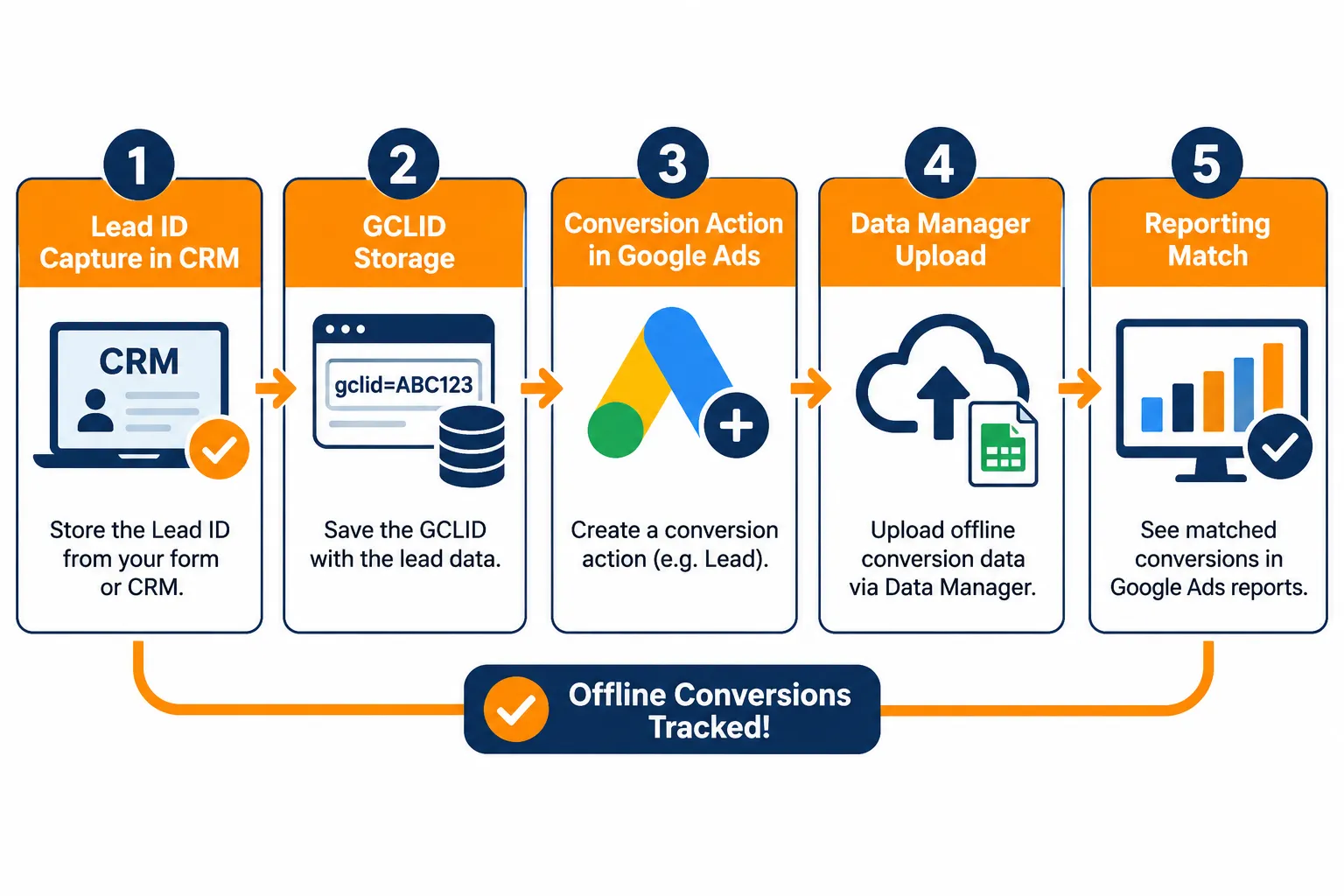
Here’s the mechanism in simple terms:
- Someone clicks your Google ad and lands on a form.
- Your website or CRM captures the GCLID along with the lead’s contact details.
- Your sales team updates the lead status in the CRM (contacted, qualified, converted).
- You upload that status, GCLID, and timestamp to Google Ads using Data Manager, the Google Ads API, or a Google Sheets/CRM integration [1][2].
- Google Ads matches the uploaded data to the original click and attributes the conversion back to the keyword, ad, and campaign that generated it.
This closes the loop between ad spend and actual business value, which matters a lot for anyone running performance marketing for lead generation.
Do I Actually Need Offline Conversion Tracking for My Lead Gen Business
Yes, if your business sells through a sales team rather than an instant checkout, offline conversion tracking is close to mandatory for smarter marketing decisions. Without it, Google Ads only knows that a form was submitted, not whether that lead was genuine, qualified, or paying.
Consider two common Indian scenarios:
- Real estate consultancy: A form fill costs ₹300, but 70% of leads are tyre-kickers. Without offline data, Google keeps optimizing for cheap form fills, not buyers.
- B2B SaaS or IT services firm: Leads go through a 3-week sales cycle. Online tracking alone can’t show which campaigns produce actual deals weeks later.
Choose offline conversion tracking if: your sales cycle is longer than a day, your CRM tracks lead quality stages, and you have at least basic technical capacity (or an agency) to manage GCLID capture.
Skip it for now if: you’re an e-commerce store with instant online purchases, standard online conversion tracking already captures the full value.
What’s the Difference Between Offline and Online Conversion Tracking
Online conversion tracking fires automatically when someone completes an action on your website, like a purchase or form submission, using a pixel or tag. Offline conversion tracking requires you to manually (or via API) upload data about events that happen outside the website, often days or weeks later [4][5].
| Aspect | Online Conversion Tracking | Offline Conversion Tracking |
|---|---|---|
| Trigger | Automatic, on-page event | Manual or scheduled upload |
| Data source | Website tag/pixel | CRM, sales team, call logs |
| Timing | Instant | Hours to days delayed |
| Best for | E-commerce, instant signups | Lead gen, sales-assisted deals |
| Setup complexity | Low | Moderate to high |
How Do I Set Up Offline Conversion Tracking on Google Ads Step by Step
Setting up offline conversion tracking involves five core steps: capturing the GCLID, creating a conversion action in Google Ads, connecting your CRM or Data Manager, uploading lead stage data, and verifying the match rate [1][2].
Here’s the practical workflow for an Indian lead-gen business:
- Capture the GCLID on your lead form. Add a hidden field that stores the GCLID from the URL parameter when someone clicks a Google ad and lands on your page.
- Store the GCLID in your CRM against each lead record, along with the timestamp and consent status.
- Create a conversion action in Google Ads under Tools and Settings > Conversions. Choose “Import” and select the offline or enhanced conversions for leads option [3].
- Connect through Data Manager, which Google is positioning as the primary upload interface for offline and lead conversions going forward [1]. You can also use Google Sheets, Zapier-style integrations, or the API [6].
- Tag conversion values by CRM stage. Assign values like “Qualified Lead” or “Converted/Closed Lead” so Google Ads can weight them differently.
- Upload regularly, daily uploads give the algorithm fresher signals than weekly batch uploads.
- Check the conversion action’s status in the Google Ads UI to confirm successful matches.
This setup mirrors what’s covered in Google’s own guidance for the Indian market through its Accelerate program, which has pushed enhanced conversions for leads as the recommended path for 2026 implementations [1].
For businesses also running demand generation campaigns alongside lead gen, it helps to understand how demand generation marketing fits into the funnel before layering offline tracking on top.
Why Aren’t My Offline Conversions Showing Up in Google Ads
The most common reason offline conversions don’t appear is a missing or mismatched GCLID, if the click ID wasn’t captured at lead submission, Google Ads has nothing to match the CRM data against.
Other frequent causes:
- Conversion action not linked properly to the import source.
- Time zone mismatches between your CRM timestamp and the Google Ads account setting.
- Consent mode issues, if consent wasn’t recorded correctly, Google may restrict matching [7].
- Click-to-conversion window exceeded, Google only matches within a defined lookback window, typically up to 90 days depending on settings [8].
- File formatting errors in CSV or Sheets uploads, like incorrect headers or currency formatting.
Quick troubleshooting rule: if match rate is below 50%, check GCLID capture first. That’s where most Indian lead-gen setups fail.
How Long Does It Take for Offline Conversions to Appear in My Reports
Offline conversions typically appear in Google Ads reports within a few hours to a few days after upload, though Google explicitly notes that conversion data can take up to 24 hours or more to process depending on the upload method [2].
Practical expectations:
- API or Data Manager uploads: usually visible within a day.
- Manual CSV uploads: can take 1-3 days to fully reflect in campaign reports.
- Attribution models may continue adjusting conversion credit for up to several days after upload.
Edge case: if you upload a lead marked “converted” 45 days after the click, it will still attribute correctly as long as it’s within the conversion lookback window you set in the conversion action.
Can I Track Phone Call Leads as Offline Conversions
Yes, phone call leads can be tracked as offline conversions by combining call tracking numbers with CRM outcome tagging, then matching the call record back to the original GCLID or call details reported by Google [9].
Two practical approaches:
- Call tracking software assigns a unique number per campaign or keyword, logs the call, and lets you tag outcomes (interested, not interested, booked).
- Website call extensions in Google Ads already report call-through conversions natively, but pairing them with CRM data lets you track whether the call actually turned into a sale.
For real estate and education businesses, where a large share of leads come through phone enquiries rather than forms, this is often the single most valuable tracking layer to set up.
What Customer Data Do I Need to Upload for Offline Conversion Tracking
You need, at minimum, a GCLID (or Google Ads enhanced conversions hashed identifiers like email or phone), a conversion action name, a timestamp, and a conversion value or stage label [1][5].
A typical upload row includes:
- GCLID or hashed contact identifier
- Conversion action name (e.g., “Qualified Lead”)
- Conversion date and time
- Conversion value (optional but recommended)
- Currency code
With enhanced conversions for leads, Google also accepts hashed email and phone number as a fallback matching method when GCLID data is incomplete, useful for Indian businesses where leads often come through WhatsApp or phone calls rather than clean web forms [1]. If WhatsApp is part of your lead funnel, it’s worth reviewing WhatsApp marketing for small business practices to keep that channel’s data consistent too.
Does Offline Conversion Tracking Cost Extra Money
No, Google Ads does not charge a separate fee for setting up or using offline conversion tracking, it’s a built-in feature of the platform [2][3]. Costs can arise indirectly from CRM integrations, call tracking software, or developer time needed to build the GCLID capture and upload pipeline.
Budget-wise, expect to spend on:
- CRM customization (if GCLID fields don’t exist yet)
- Call tracking numbers (monthly subscription, usually per-number pricing)
- Developer or agency hours for the initial Data Manager integration
What Are the Most Common Mistakes People Make With Offline Conversion Tracking
The biggest mistake is treating offline conversion tracking as a one-time setup instead of an ongoing data discipline that needs regular checks on match rates and lead quality tagging.
Other common mistakes:
- Uploading every lead as “converted” regardless of real quality, which teaches Google Ads the wrong signal.
- Forgetting to update conversion values when deal sizes change.
- Not segmenting conversion actions by lead quality stage (treating “contacted” the same as “closed-won”).
- Ignoring consent requirements, which can break matching under privacy rules [7].
- Running duplicate uploads from both classic import and enhanced conversions without reconciling them.
How Do I Know if My Offline Conversion Tracking Is Actually Working
You’ll know it’s working when the conversion action in Google Ads shows a consistent match rate above roughly 50-70%, and campaign optimization visibly shifts toward keywords and audiences that produce higher-quality leads over a few weeks.
Checks to run monthly:
- Compare uploaded lead counts in your CRM against matched conversions in Google Ads.
- Review Smart Bidding performance, if cost-per-qualified-lead is dropping, the signal is reaching the algorithm.
- Audit a sample of 20 leads manually to confirm GCLID and stage data matched correctly.
Which Types of Google Ads Campaigns Support Offline Conversion Tracking
Search, Performance Max, and Display campaigns all support offline conversion tracking, since they rely on click-based attribution that a GCLID can capture [4][5]. YouTube and Demand Gen campaigns can also use offline conversions when enhanced conversions or Data Manager integrations are set up correctly.
Decision rule: if a campaign type generates a clickable GCLID, it can support offline conversion import. Pure brand-awareness formats without click tracking are less reliable for this.
Are There Better Alternatives to Google Ads Offline Conversion Tracking
Offline conversion tracking is generally the most direct way to connect ad spend to CRM outcomes within Google Ads itself, but server-side CRM-to-platform integrations (via CDPs or custom APIs) can offer more flexibility for businesses running Meta Ads and Google Ads side by side.
Alternatives worth considering:
- Google Analytics 4 with CRM import, useful for broader funnel visibility but weaker at feeding Smart Bidding directly.
- Third-party attribution tools (CDPs), good for multi-platform businesses but add cost and complexity.
- Manual call log review, works for very small operations but doesn’t scale and gives Google Ads no optimization signal.
For most Indian lead-gen businesses, native offline conversion tracking inside Google Ads remains the simplest path because it directly feeds the bidding algorithm.
How Do I Match Customer Data From Phone Calls to My Ads
Matching phone call leads to ads requires either a call tracking number tied to a specific campaign or capturing the GCLID on the web form before the customer calls, then tagging the CRM record with the call outcome [9].
Practical matching methods:
- Dynamic number insertion: shows a unique tracking number per visitor, logging the session’s GCLID automatically.
- Form-to-call handoff: capture GCLID on a lead form, then log the follow-up call outcome against that same lead ID in the CRM.
- Hashed contact matching: upload hashed phone numbers through enhanced conversions as a backup when GCLID data is missing [1].
Best Practices for High-Quality Leads in the Indian Market
Google’s own guidance for Indian advertisers recommends tightening lead qualification criteria before uploading data, rather than sending every form fill as a conversion signal [10]. This keeps the Smart Bidding algorithm focused on patterns that actually produce sales, not just cheap clicks.
Practical recommendations:
- Define “qualified” clearly in your CRM (budget confirmed, timeline confirmed, contact reachable).
- Separate “converted/closed lead” as its own conversion action with a higher assigned value.
- Review lead quality trends monthly and adjust what counts as a qualified conversion if sales feedback changes.
- Keep consent records clean, this protects matching accuracy as privacy rules tighten [7][8].
If your lead quality issues stem from mismatched targeting rather than tracking gaps, it may help to revisit B2B marketing leads versus pipeline thinking before blaming the tracking setup.
Near-Term Outlook (Estimate, Not Official Guidance)
Based on the direction Google has signaled, offline conversion tracking will likely consolidate further around Data Manager and enhanced conversions for leads through 2026 and beyond, with classic offline import methods eventually phased down [1][3]. This is an informed estimate based on published migration timelines, not an official Google roadmap commitment, businesses should keep checking Google’s support pages for confirmed deadlines.
Conclusion
Offline conversion tracking is one of the most practical digital marketing tips any Indian lead-generation business can act on this year, because it stops Google Ads from optimizing blindly toward cheap form fills and starts optimizing toward real sales outcomes. The setup takes some technical coordination between your CRM and Google Ads, but it’s a one-time investment that pays off every month afterward through better lead quality and lower cost per qualified lead.
Start small: pick one conversion action (say, “Qualified Lead”), get GCLID capture working cleanly on one form, and run it for 30 days before expanding to full CRM-to-Google Ads sync. That’s the fastest way to learn by doing and build confidence before scaling the setup across every campaign.
References
- Enhanced Conversions Leads. business.google.com.
- Upload Offline. developers.google.com.
- Answer. support.google.com.
- Overview. developers.google.com.
- Categories. developers.google.com.
- Zapier Google Ads Oct Sales Enablement 4 Pager. services.google.com.
- Answer. support.google.com.
- Answer. support.google.com.
- Answer. support.google.com.
- Best Practices for Generating High Quality Leads. business.google.com.