

Last updated: November 6, 2026
Quick Answer
Brevo and Zoho Campaigns suit small businesses on a tight budget, Mailchimp and Constant Contact work best for teams that want simple, ready-to-use templates, and HubSpot or ActiveCampaign fit businesses that need CRM-driven automation as they scale.[1][2][3] There is no single “best” platform. The right choice depends on your contact list size, how much automation you actually need, and whether you want email tied to a full CRM.
Key Takeaways
- Mailchimp’s free plan works for very small lists but caps features and support, so budget for a paid tier once your list grows.[3]
- Brevo is rated highly for affordability and is often called “Best for SMBs on a Budget.”[2]
- HubSpot does offer a free email marketing plan, but its real strength shows up once you add CRM-based personalization.[4]
- ActiveCampaign leans toward businesses ready to scale automation, not absolute beginners.[2]
- Zoho Campaigns is one of the cheapest full-featured options, starting around $4 a month for ten users.[1]
- Deliverability issues with Mailchimp are usually about list hygiene and sender reputation, not the platform itself.
- Migrating away from Mailchimp is possible but needs planning around templates, automations, and tags.
- Most small businesses in India and similar markets should also check WhatsApp integration options before committing to one tool.
What Should You Look for When Choosing Email Marketing Software
The right email marketing software for a small business balances price, ease of use, deliverability, and room to grow. Before you compare brand names, decide what actually matters for your business size.
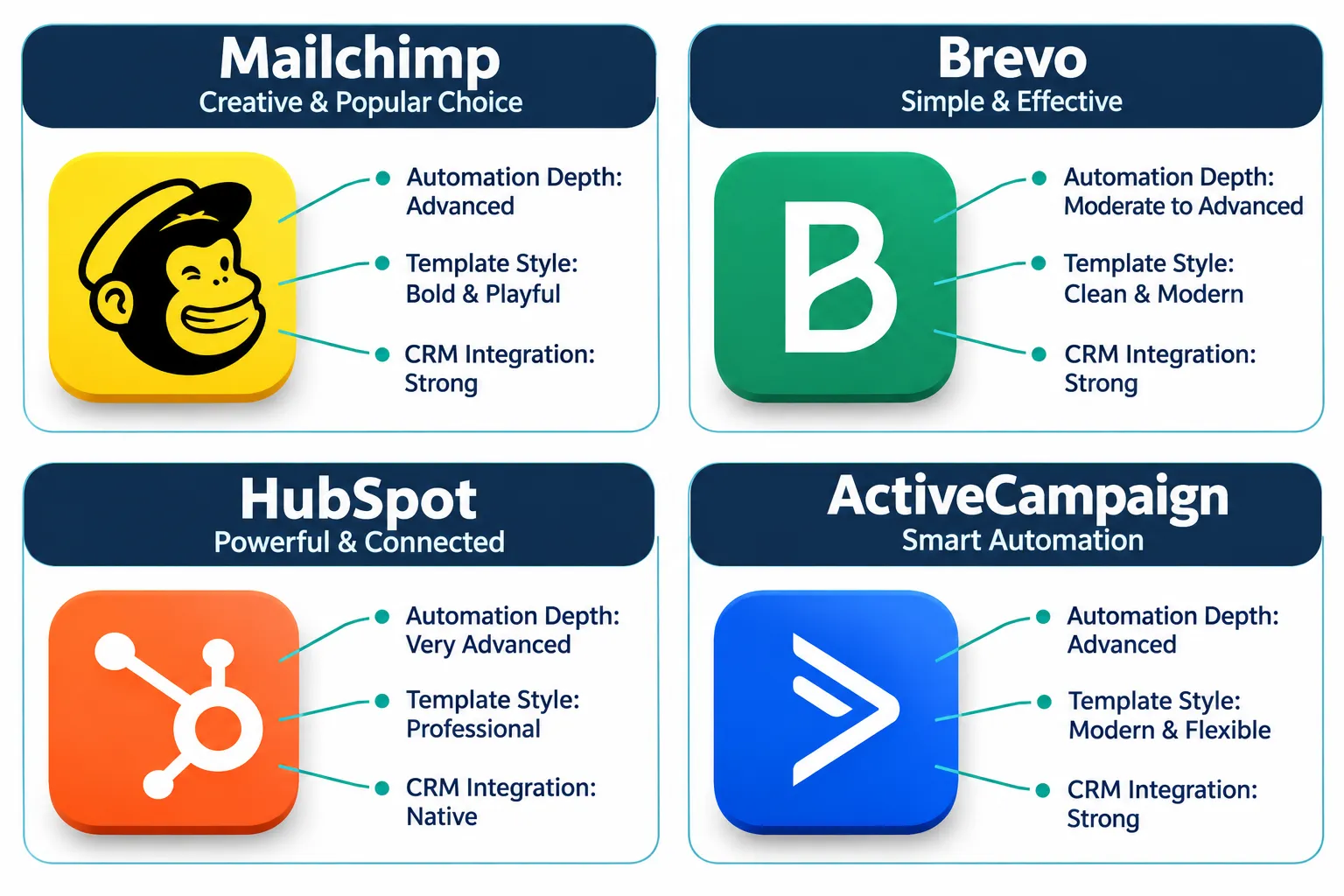
Here is a practical checklist:
- Contact-based pricing: Most tools charge by list size, so check what happens when you cross 500, 2,500, or 10,000 contacts.
- Template quality: Can you build a professional-looking email without hiring a designer?
- Automation depth: Do you need simple welcome emails, or multi-step behavior-based journeys?
- Deliverability reputation: Some providers have stronger sender reputation infrastructure than others.
- CRM integration: If you already use a CRM, does the email tool sync contacts and activity both ways?
- WhatsApp or SMS compatibility: Many small businesses in India now combine email with WhatsApp marketing for small business for better open rates.
- Regional suitability: Check support hours, currency, and compliance rules (like India’s data rules or EU’s CNIL consent requirements) relevant to your market.
Choose a platform with strong templates and a free tier if you are just starting out. Choose one with deep automation and CRM sync if you already have a defined customer journey. Getting your email marketing foundation right before picking a tool saves you from switching platforms twice in a year.
Mailchimp vs Brevo: Which One Is Better for Small Business
Brevo generally wins on price for small lists, while Mailchimp wins on brand recognition and template variety. PCMag rates Brevo 4.0 out of 5, calling it “Best for SMBs on a Budget,” which reflects its lower cost at similar contact volumes compared to Mailchimp.[2]
Mailchimp positions itself as an all-in-one platform that bundles email, SMS, social posting, basic ad tools, and automation under one account, which appeals to businesses that want everything in one dashboard rather than juggling multiple apps.[1] Brevo, on the other hand, has been actively expanding features through 2026, including the ability to host multiple landing pages on one domain and connect databases like Snowflake or PostgreSQL directly into contact lists.[5]
Choose Brevo if your main concern is monthly cost and you send a moderate volume of transactional or marketing email. Choose Mailchimp if you want a slightly more polished design experience and plan to use multiple marketing channels from one login.
How Much Does Mailchimp Cost Per Month
Mailchimp’s 2026 pricing runs free at the entry level, then roughly $13 a month for Essentials, $20 a month for Standard, and up to $350 a month for Premium, with the exact amount depending on your contact count.[3] These tiers are not flat fees; Mailchimp recalculates pricing as your list grows, so a 500-contact account and a 10,000-contact account on the same plan name pay very different amounts.
A common mistake is signing up on the free plan, growing the list past the limit, and getting hit with an unexpected jump to a higher tier. Budget for growth before you commit, not after.
Is Mailchimp Free and What Are the Limits
Yes, Mailchimp offers a genuine $0 free plan, but it comes with contact caps, limited automation, and reduced support compared to paid tiers.[3] The free plan suits a solo freelancer or a very early-stage business sending occasional newsletters.
Limits to know:
- Lower monthly send allowance
- Basic templates only, fewer customization options
- No priority or live chat support on the free tier
- Automation features are capped compared to Essentials and above
If you are testing email marketing for the first time, the free plan is a reasonable starting point. Once you need segmentation or A/B testing on subject lines, you will likely need to upgrade.
Does HubSpot Have a Free Email Marketing Plan
Yes, HubSpot’s Marketing Hub includes a free email tool with a drag-and-drop editor and basic templates, and paid plans start around $15 per seat per month for more advanced features.[4] The free plan is useful, but HubSpot’s real advantage is CRM-native personalization: emails can pull directly from your contact records to tailor subject lines and content based on actual customer behavior.[6]
HubSpot also added an AI Email Writer and Marketing Email GPT tool through 2026, aimed specifically at small businesses that want AI-generated subject lines and body copy without hiring a copywriter, built with A/B testing included.[6][7] This matters for solo founders and small teams who don’t have time to write five email variations manually.
Choose HubSpot’s free plan if you’re already using HubSpot CRM. Choose a dedicated email tool like Brevo or Mailchimp if you don’t need a full CRM and just want to send campaigns.
Best Email Marketing Alternatives to Mailchimp
Constant Contact, Brevo, Zoho Campaigns, and Instantly are the most commonly recommended alternatives to Mailchimp for small businesses, according to G2’s 2026 small-business rankings.[8] Each one targets a slightly different need.
| Alternative | Best for | Standout strength |
|---|---|---|
| Constant Contact | Small teams | Simple setup, straightforward automation[1] |
| Brevo | Budget-conscious SMBs | Low cost at scale, strong compliance updates[2][5] |
| Zoho Campaigns | SMBs on a budget | Very low starting cost for ten users[1] |
| ActiveCampaign | Scaling businesses | Deeper automation and CRM features[2] |
| HubSpot | CRM-driven teams | Native CRM personalization[4][6] |
If your biggest frustration with Mailchimp is rising cost as your list grows, Zoho Campaigns or Brevo are the most direct downgrades in price without losing core email features.
Is Mailchimp Good for Beginners With No Experience
Yes, Mailchimp is widely considered beginner-friendly because of its visual editor, pre-built templates, and guided campaign setup, though its growing feature set can feel cluttered once you explore automation and reporting.[3] For someone who has never sent a marketing email before, Mailchimp’s drag-and-drop builder and campaign checklist reduce the guesswork.
A common beginner mistake is skipping list segmentation entirely and sending every email to the full list. This hurts both engagement and deliverability over time. Start with at least two segments: active subscribers and new subscribers, before sending your first few campaigns.
Why Is My Mailchimp Email Not Being Delivered
Most Mailchimp delivery problems come from poor list hygiene, missing domain authentication, or spam-trigger content, not a fault in the platform itself. Before assuming the tool is broken, check these in order:
- Confirm your sending domain has SPF, DKIM, and DMARC records set up correctly.
- Remove bounced and inactive contacts regularly; old lists hurt sender reputation.
- Avoid spam-trigger words and excessive capitalization or exclamation marks in subject lines.
- Check your sender score through a tool like Google Postmaster Tools.
- Warm up a new sending domain gradually instead of blasting a full list on day one.
Edge case: if you recently imported a purchased or scraped list, expect delivery problems regardless of platform. No email tool fixes a bad list.
Mailchimp vs ActiveCampaign Feature Comparison
Mailchimp is easier to learn, while ActiveCampaign offers deeper automation logic, making it better suited for businesses ready to build multi-step customer journeys.[2] Mailchimp’s automation is mostly template-based (welcome series, abandoned cart), while ActiveCampaign allows conditional branching based on specific user actions across email, site visits, and CRM data.
Choose Mailchimp if you want to launch quickly with minimal setup. Choose ActiveCampaign if you’re already mapping out a detailed customer journey and need the automation logic to match it, especially for ecommerce or service businesses with repeat purchase cycles.
What Email Marketing Software Do Ecommerce Stores Use
Ecommerce stores commonly choose Mailchimp, HubSpot, or ActiveCampaign because these platforms support abandoned-cart emails, product recommendations, and purchase-triggered automation out of the box.[2][4] HubSpot’s ecommerce guidance highlights free and paid plans starting around $15 per seat, aimed at B2C stores that want email tied to actual purchase data.[4]
For a small Shopify or WooCommerce store, the decision usually comes down to how many automated flows you need. A store running only a welcome series and cart recovery can manage fine on Mailchimp’s mid-tier plan. A store running loyalty tiers, win-back campaigns, and personalized product feeds will outgrow basic tools faster and should consider ActiveCampaign or HubSpot sooner.
Common Mistakes People Make With Email Marketing Campaigns
The most common mistake is sending every email to the entire list without segmentation, which tanks open rates and increases unsubscribes over time. Other frequent mistakes include:
- Writing vague subject lines that don’t create curiosity or urgency
- Ignoring mobile formatting, even though most opens happen on phones
- Sending at inconsistent times with no testing of send windows
- Never cleaning the list, letting dead contacts drag down deliverability
- Treating email as a one-way broadcast instead of part of a multi-channel marketing strategy
A real-world example: a local business sends a monthly newsletter to its full list with no segmentation and sees open rates drop every quarter. Splitting the list into “recent customers” and “cold leads,” then writing separate subject lines for each, usually recovers some of that engagement within a couple of campaigns.
Can I Migrate From Mailchimp to Another Platform Easily
Yes, migrating from Mailchimp is possible on most platforms through CSV export and import tools, but automations, tags, and segment logic usually need to be rebuilt manually. Contacts and basic lists transfer cleanly. Complex automation sequences, custom fields, and historical engagement scores typically do not transfer one-to-one.
Checklist before migrating:
- Export all contact lists with tags and custom fields intact.
- Document your current automations step by step.
- Check if the new platform offers a native Mailchimp import tool (Brevo and ActiveCampaign both do).
- Re-test automation triggers after rebuilding them on the new platform.
- Run a short overlap period where both platforms are active before fully switching.
Best Email Marketing Tool for Under $50 a Month
Zoho Campaigns, Brevo, and Mailchimp’s lower tiers all fit comfortably under $50 a month for small lists, with Zoho Campaigns being the cheapest starting option at roughly $4 a month for ten users.[1] Brevo’s budget positioning makes it the stronger pick once your list grows past a few thousand contacts, since its pricing model tends to scale more gently than Mailchimp’s.[2]
Choose Zoho Campaigns if you’re an extremely budget-conscious startup. Choose Brevo if you want a slightly more capable automation builder while still staying under $50 a month through your first growth phase.
How to Improve Email Open Rates and Click Through Rates
Open rates improve most reliably through better subject lines, cleaner sender reputation, and smarter send timing, while click rates improve through relevant segmentation and clear calls to action. Platforms like Mailchimp and HubSpot now offer AI-driven content suggestions and benchmark comparisons that can speed up this process.[3][6]
Practical steps:
- A/B test two subject line styles on a small portion of your list before sending to everyone
- Segment by engagement level, not just demographics
- Use one clear call-to-action per email instead of five competing links
- Send during times your audience is actually active, based on past open data, not guesswork
- Review click maps (available in Mailchimp’s reporting) to see exactly where readers click, then adjust layout accordingly[3]
FAQ
Is Brevo better than Mailchimp for a small business? Brevo is generally more affordable at similar contact volumes and is rated “Best for SMBs on a Budget” by PCMag, while Mailchimp offers more polished templates and broader multi-channel features.[2]
Does HubSpot replace the need for a separate email tool? For small businesses already using HubSpot CRM, yes, since its email tool is built into the same system and personalizes using CRM data directly.[4]
What is the cheapest full-featured email marketing tool? Zoho Campaigns, starting at roughly $4 a month for ten users with unlimited emails, is among the cheapest options with real feature depth.[1]
Can I use Mailchimp for free forever? Yes, but the free plan has contact caps and reduced automation, so most growing businesses eventually move to a paid tier.[3]
Why do my Mailchimp emails land in spam? Usually due to missing domain authentication (SPF, DKIM, DMARC), poor list hygiene, or spam-trigger subject lines, not a platform fault.
Is ActiveCampaign good for beginners? Not ideally. It’s built for businesses ready to use advanced automation, so total beginners often find Mailchimp or Constant Contact easier to start with.[2]
Conclusion
There’s no universal winner in the Best Email Marketing Software for Small Businesses: Mailchimp, Brevo, HubSpot and Alternatives Compared debate, because the right tool depends on your list size, budget, and how deep your automation needs go. Start by mapping your actual requirements: contact count, automation complexity, and whether CRM integration matters to your sales process.
If you’re just starting, test Mailchimp’s free plan or Brevo’s budget tier for a month before committing to anything paid. If you already run a CRM-driven sales process, HubSpot’s free email tool is worth trying first. And if cost is the deciding factor as your list scales, keep Zoho Campaigns and Brevo on your shortlist.
For more practical digital marketing tips on building your campaign strategy before choosing software, and guidance on connecting email with other channels like performance marketing or AI marketing automation, explore more resources on Sameer Digital to make smarter marketing decisions for your business.
References
- Best Email Marketing Software. forbes.com.
- The Best Email Marketing Software. pcmag.com.
- Email Marketing Reporting. hubspot.com.
- Email. hubspot.com.
- Releases Main Page. brevo.com.
- AI Email Marketing Tools. hubspot.com.
- Marketing Email Gpt. hubspot.com.
- G2 Best Email Marketing Software for Small Business. g2.com.