

Last updated: October 27, 2026
Quick Answer
A technical SEO audit checklist covers 40 checks across seven areas: discovery and crawlability, rendering, indexation, internal linking, Core Web Vitals, structured data, and security plus international setup. Run through robots.txt, sitemaps, Search Console coverage reports, page speed data, schema validation and HTTPS status to find what’s blocking Google from crawling, understanding and ranking your pages. Most small sites can complete a basic version in a day using free tools like Google Search Console and PageSpeed Insights.
Key Takeaways
- A technical SEO audit checks whether search engines can crawl, render, index and rank your website, separate from content or backlink work.
- The 40-check framework groups into discovery, rendering, indexation, internal linking, speed, structured data, and security/international SEO.
- Run a full audit every quarter, and a quick health check monthly if you publish often.
- Google Search Console is the primary free source of truth for crawl and index status [1].
- Core Web Vitals and TTFB now carry real weight in audits, not just lab scores [2].
- Structured data checks increasingly tie into rich results and AI-driven search surfaces [3].
- Beginners can run a basic audit themselves; complex sites with JavaScript frameworks often need an expert.
- Fixing issues without prioritization wastes time, rank problems by traffic impact first.
What is a technical SEO audit and why do I need one
A technical SEO audit is a structured review of how well search engines can access, render and index your website. You need one because content and backlinks mean nothing if Google can’t crawl your pages or if slow load times push you out of rankings.
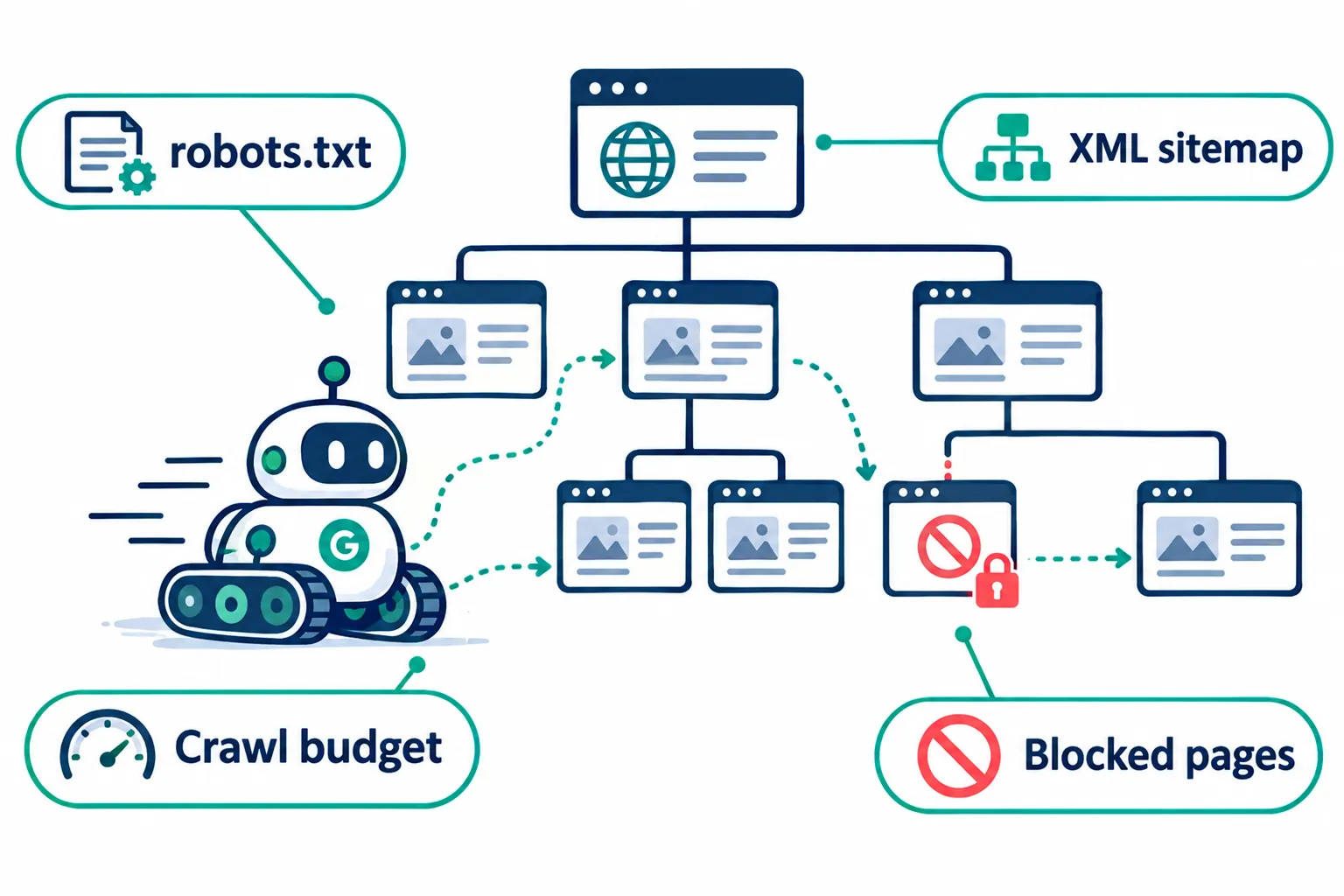
Think of it as a health checkup for your site’s foundation. Content is what you say; technical SEO is whether anyone, human or crawler, can actually reach it.
Modern checklists cluster technical checks into clear groups instead of one long list, usually covering crawlability, indexability, performance, structure, rendering and international setup [4][5]. This grouping makes audits easier to prioritize and easier to assign to a team member or freelancer.
Decision rule: if your organic traffic is flat or falling despite steady content output, run a technical audit before writing more articles. The problem is often structural, not editorial.
How often should I run a technical SEO audit
Run a full technical SEO audit every quarter, and do a lighter monthly check if your site publishes content regularly or runs on WordPress with frequent plugin updates.
Here’s a practical cadence:
- Monthly: Check Search Console coverage report, crawl stats, and any new 404s or redirect chains.
- Quarterly: Full 40-point review including Core Web Vitals, schema validation and internal linking structure.
- After major changes: Any time you migrate domains, change CMS, or redesign, audit immediately, not later.
Common mistake: teams audit once a year and miss slow-building issues like orphan pages or crawl budget waste that pile up over months. Sites with thousands of pages especially need server log analysis more often, since crawl budget problems compound [4].
What’s the difference between on-page SEO and technical SEO
On-page SEO focuses on content elements within a page, titles, headings, keyword use, internal links in the body text. Technical SEO focuses on how the site itself functions: crawlability, server response, rendering, security and structured markup.
A simple way to separate them:
| Aspect | On-page SEO | Technical SEO |
|---|---|---|
| Focus | Content quality, keywords, headings | Site infrastructure, crawl/index health |
| Example tasks | Writing meta descriptions, adding internal links | Fixing robots.txt, improving TTFB |
| Tools | Content editors, keyword tools | Search Console, Sitebulb, Screaming Frog |
| Who owns it | Content/SEO writers | Developers, SEO technical leads |
If you’re learning SEO made simple, understand that both layers need attention, strong content on a broken technical foundation rarely ranks well.
Best tools for running a technical SEO audit
Google Search Console is the primary free tool for technical SEO audits because it shows exactly how Google sees your site, including coverage, crawl stats and Core Web Vitals data pulled from real users [1].
Other tools worth adding to your stack:
- Screaming Frog or Sitebulb for crawling your own site like a bot would, flagging broken links and duplicate titles [6].
- PageSpeed Insights or GTmetrix for Core Web Vitals and TTFB diagnostics.
- Schema.org markup validators or Google’s Rich Results Test for structured data checks.
- Server log analyzers for larger sites to see exactly what Googlebot crawls and ignores [4].
For honest tool reviews on backlink monitoring that pairs well with technical audits, check our guide on top SEO tools for monitoring backlinks.
How do I fix crawlability errors on my website
Fix crawlability errors by checking your robots.txt file for accidental blocks, submitting a clean XML sitemap, and fixing broken internal links that lead crawlers to dead ends.
Step-by-step approach:
- Open robots.txt and confirm you’re not blocking CSS, JS, or important folders by mistake.
- Submit your sitemap.xml in Search Console and check for errors.
- Run a crawl with Screaming Frog to find 404s, redirect loops and orphan pages.
- Check crawl stats in Search Console for sudden drops in pages crawled per day.
- For large sites, review server logs to see which pages Googlebot actually visits versus ignores [4].
Edge case: e-commerce sites with faceted navigation often generate thousands of near-duplicate URLs that waste crawl budget. Use canonical tags or noindex on filtered pages to fix this.
What does indexing mean and how do I know if my pages are indexed
Indexing means Google has stored a copy of your page in its database so it can appear in search results. You can check indexing status directly in the Coverage report inside Google Search Console.
Search Console’s Coverage and newer multimodal/image-based reports show exactly which pages are indexed, excluded, or have errors [1][2]. Pages marked “Crawled, currently not indexed” usually suffer from thin content, duplication, or low internal link equity.
Quick example: if you publish a blog post and it doesn’t show up after two weeks, check the URL Inspection tool first. It tells you whether Google crawled it, why it might be excluded, and lets you request indexing directly.
Our article on why websites don’t get indexed covers this problem in more depth if you’re dealing with persistent indexing failures.
Why is site speed important for SEO rankings
Site speed matters for SEO because Google uses Core Web Vitals as a ranking signal, and slow pages also lose visitors before they even see your content.
Performance audits now center on three metrics plus server response time:
- Largest Contentful Paint (LCP): how fast the main content loads.
- Interaction to Next Paint (INP): how responsive the page feels to clicks and taps.
- Cumulative Layout Shift (CLS): how much the page jumps around while loading.
- Time to First Byte (TTFB): how fast your server starts responding at all.
Audits increasingly pull from real-user data rather than lab tests alone, since lab scores don’t always match what actual visitors experience [2].
If your WordPress site feels sluggish, our guide on fixing a slow WordPress website walks through practical fixes like image compression, caching and hosting upgrades.
What is schema markup and structured data for SEO
Schema markup is a standardized code vocabulary you add to your pages so search engines understand what the content means, not just what it says. Structured data is the broader term for this organized, machine-readable information.
Common schema types worth adding:
- Article schema for blog posts
- FAQ schema for question-and-answer content
- Product schema for e-commerce listings
- LocalBusiness schema for location-based pages
- Review schema for star ratings
Structured data checks now tie directly into rich results eligibility and visibility on AI-driven search surfaces, not just classic blue-link results [3]. If you’re exploring how AI search changes visibility, read our breakdown of SEO vs GEO vs AEO in 2026.
Decision rule: add FAQ schema if your page genuinely answers distinct questions readers search for separately, don’t force it onto pages that don’t fit.
How much does a professional technical SEO audit cost
Professional technical SEO audit costs vary widely by site size and auditor experience, typically ranging from a few hundred dollars for small sites to several thousand for enterprise audits with custom crawl analysis.
Factors that affect pricing:
- Number of pages and site complexity
- Whether server log analysis is included
- JavaScript rendering depth required
- Follow-up implementation support versus audit-only reporting
If you’re deciding whether to hire outside help, our guide on how to outsource your SEO marketing explains what to look for in a vendor and how to evaluate pricing fairly.
Can I do a technical SEO audit myself without hiring someone
Yes, you can do a basic technical SEO audit yourself using free tools, especially if your site is under a few hundred pages and doesn’t rely heavily on complex JavaScript frameworks.
Self-audit works well for:
- Small blogs and local business sites
- WordPress sites using standard themes and plugins
- Freelancers and students practicing real-world SEO skills (this is genuinely learn by doing)
Hire a specialist when:
- Your site uses React, Vue, or Angular with client-side rendering
- You manage an e-commerce catalog with thousands of SKUs
- You’ve already tried fixes and rankings haven’t recovered
Content parity and JavaScript rendering checks have moved from “advanced” to core requirements in modern audits, which is exactly where DIY efforts often fall short [5].
Common technical SEO mistakes that hurt your rankings
The most damaging technical SEO mistakes are blocking important pages in robots.txt by accident, ignoring mobile Core Web Vitals, and leaving duplicate content unresolved with missing canonical tags.
Other frequent mistakes:
- Returning soft 404s instead of proper HTTP status codes
- Using 503 status codes incorrectly during maintenance windows, which can hurt rankings if left too long [4]
- Orphan pages with zero internal links pointing to them
- Mixed HTTP and HTTPS content causing security warnings
- Missing or broken hreflang tags on international sites
For a broader view of practices to avoid entirely, see our piece on SEO and black hat tactics that can get sites penalized.
Do small websites and blogs need technical SEO audits
Yes, small websites and blogs need technical SEO audits too, because crawl errors, slow speed, and missing structured data affect sites of every size, not just large enterprises.
A small blog with 50 posts can still suffer from:
- Broken internal links after old posts get deleted
- Missing alt text hurting image search visibility (see our guide on alt text for people and search engines)
- Slow shared hosting dragging down Core Web Vitals
- No schema markup on recipe, review or FAQ content
Example: a student blogger running a side hustle site can complete a simplified 10-point version of this checklist in under two hours using Search Console alone.
How long does it take to complete a full technical SEO audit
A full 40-point technical SEO audit typically takes one to three days for a small to mid-size site, and one to two weeks for enterprise sites requiring server log analysis and extensive JavaScript rendering checks.
Timeframes depend on:
- Site size (pages, subdomains, languages)
- Access to server logs and analytics
- Whether rendering issues require developer collaboration
- Depth of structured data and international SEO review
Many practitioners use a tiered approach: a “top 10” quick check for speed, and the full 40+ list for depth when time allows [5][7].
What should I do after finding issues in my technical audit
After finding issues, prioritize fixes by potential traffic impact first, then by how quickly each fix can realistically be implemented.
A practical prioritization framework:
- Fix indexing blockers immediately (robots.txt errors, noindex tags on important pages).
- Fix Core Web Vitals failures on high-traffic pages next.
- Resolve structured data errors flagged in Search Console’s Rich Results report.
- Clean up internal linking and orphan pages over following weeks.
- Schedule security and international SEO fixes (hreflang, HTTPS mixed content) based on audience reach.
Document every fix with before-and-after screenshots from Search Console so you can measure impact over the following month. This habit builds real skills and career growth for anyone working toward SEO as a profession.
Conclusion
A technical SEO audit checklist with 40 checks across crawlability, indexing, speed and structured data gives you a repeatable system instead of guesswork. Start with Search Console, fix what’s blocking crawlers first, then move to speed and schema. Small sites can handle this with free tools and a few focused hours; bigger or JavaScript-heavy sites often benefit from bringing in a specialist.
Next step: pick five checks from this list that apply most to your current traffic problem, fix those this week, and track the change in Search Console over the next 30 days. That one habit, repeated quarterly, improves your website more reliably than any single content push.
References
- Feed. developers.google.com.
- Greenlane Index September 2026. greenlanemarketing.com.
- Technical SEO Audit Checklist. getairefs.com.
- Technical SEO Audit Checklist. webenture.com.
- Technical SEO Audit Checklist. scalarly.com.
- Audit Checklist. sitebulb.com.
- Technical SEO Checklist. seomatic.ai.
technical SEO audit, crawlability checks, indexing issues, Core Web Vitals, structured data, schema markup, site speed optimization, Google Search Console, SEO checklist, website audit, on-page vs technical SEO, international SEO