

Last updated: October 23, 2026
Quick Answer
Most websites should stay opted in to Google’s AI Overviews and AI Mode because opting out removes your links from these features entirely, cutting you off from a growing share of search impressions. Opt out only if your content is highly sensitive, proprietary, or if you have a strong reason to keep traffic flowing exclusively through traditional blue links. Google now gives site owners a dedicated control in Search Console to make this choice at the site level [1].
Key Takeaways
- AI Overviews are a built-in part of Google Search that most users cannot fully turn off, while AI Mode is a separate, optional search experience [2][3].
- Google launched a site-level setting in Search Console that lets you opt in or out of having your content used in generative AI search features [1].
- Opting out removes your site from AI Overviews, AI Mode, and Discover’s AI features completely, including any links back to your pages [1][4].
- This opt-out setting does not affect your regular, classic Search rankings [1][5].
- If you do nothing, your site stays opted in by default, since that is the default state [1].
- AI Mode still shows ads and sponsored placements, so it is not an ad-free zone [6].
- Search Console’s AI Performance report helps you see how AI Overviews and AI Mode are already affecting your visibility before you decide.
- There is a real difference between your content being used to ground an AI answer and your link actually appearing inside that answer [4][5].
What’s the Difference Between AI Overviews and AI Mode in Google Search
AI Overviews are short, AI-written summaries that appear above or within regular Google Search results for many queries, while AI Mode is a separate, chat-style search experience you choose to open in its own tab. AI Overviews show up automatically as part of standard search behavior, but AI Mode requires the user to actively select it [2][3].
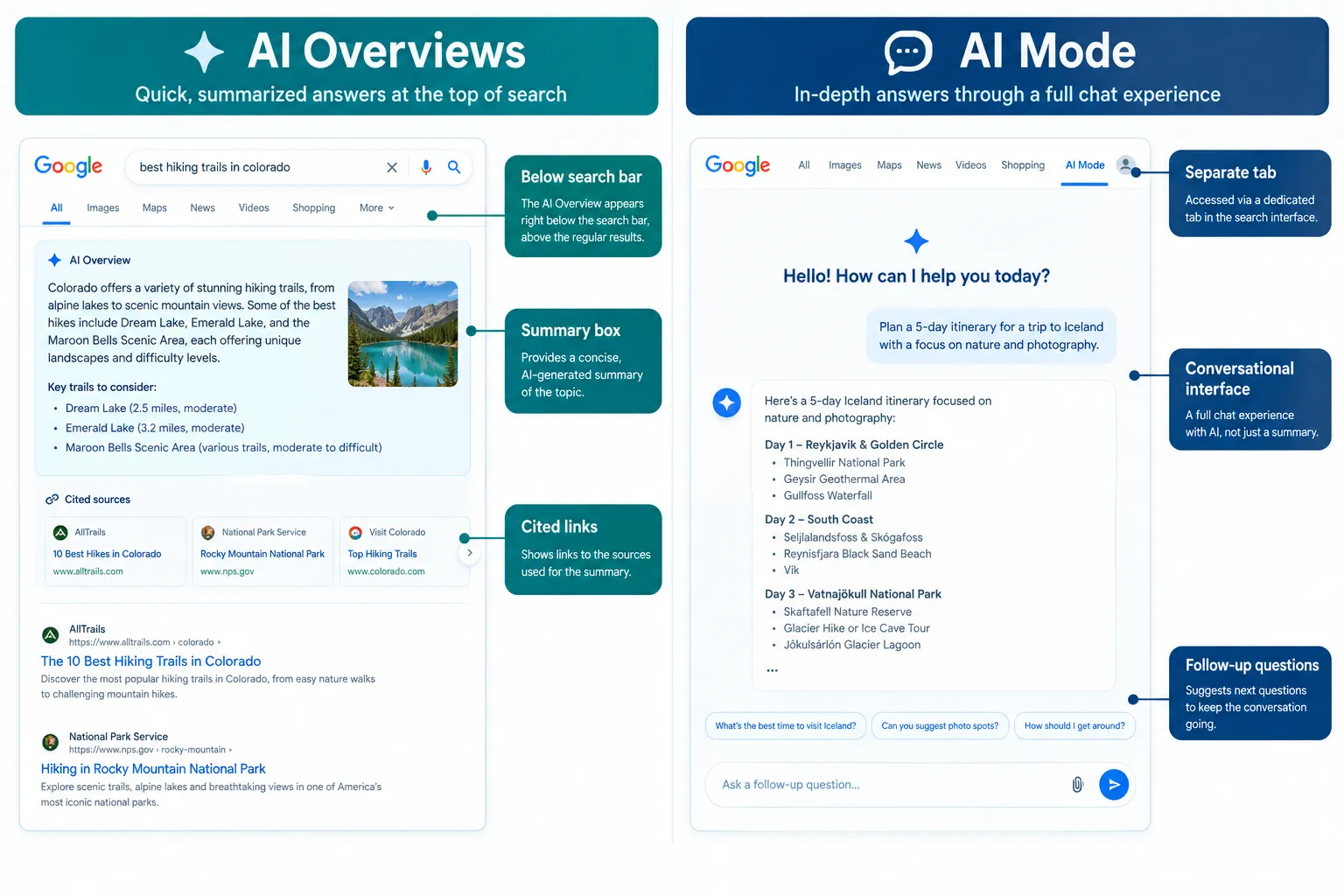
Think of it this way:
- AI Overviews: Appears inline on the normal search results page, mixed with blue links, images, and ads.
- AI Mode: Opens as a distinct interface where you can ask follow-up questions in a back-and-forth conversation, similar to chatting with an assistant.
For a side-by-side breakdown of how these two features behave differently in terms of query types, link placement, and user intent, check this detailed comparison of Google AI Mode vs AI Overviews.
Decision rule: If you are trying to understand why your traffic patterns changed, check both features separately in your analytics, since they pull from your content differently and affect click behavior in different ways.
How Do I Turn Off AI Overviews for My Website
As a website owner, you cannot fully block AI Overviews from Google Search for all users through old-style robots.txt tricks alone; you need Google’s dedicated Search Console control to formally opt your site out of generative AI features [1][7]. This is a site-level decision, not a page-by-page toggle in most cases.
Steps to use the control:
- Open Google Search Console for your verified property.
- Locate the generative AI features control (rolled out as part of Google’s new controls for website owners) [1].
- Choose to opt in (default) or opt out of having your content appear in AI Overviews, AI Mode, and Discover’s AI features.
- Save your preference and monitor changes through the Google Search Console’s AI Performance report.
Common mistake: Confusing this with blocking crawlers entirely. Blocking Googlebot stops indexing altogether, which hurts your classic Search presence too. The AI opt-out setting is narrower and only affects generative features [7].
Does Opting Out of AI Hurt My Organic Search Traffic
Opting out of AI features does not change your ranking in traditional Search results, but it does remove any chance of getting impressions or clicks from AI Overviews, AI Mode, or Discover’s AI surfaces [1][5]. So the effect on total traffic depends on how much of your current traffic already comes from those AI surfaces.
- If AI Overviews rarely trigger for your target keywords, opting out has minimal downside.
- If AI Overviews frequently summarize your content with cited links, opting out could cost you real referral clicks.
- Check your Google Search Console’s AI Performance report before deciding, since it shows how often your pages already appear in these features.
Edge case: A site that ranks well in classic Search but gets its content pulled into AI Overviews without a clickable link might see some clicks already. Opting out would remove that scraps-of-traffic scenario entirely.
Should I Use AI Mode for Research or Just Quick Answers
AI Mode works best for multi-step research tasks where you need follow-up questions answered in context, while a quick AI Overview is better suited for fast, single-fact lookups. This distinction matters for both searchers and site owners trying to predict where their content gets used.
- Use AI Mode for: comparing products, planning trips, working through technical troubleshooting, or any task needing several related questions answered in sequence.
- Use a quick search or AI Overview for: simple definitions, conversions, store hours, or one-off facts.
If you write long-form, comparison-style, or how-to content, you’re more likely to get surfaced inside AI Mode conversations because the format rewards depth. This matters when deciding your site’s AI visibility strategy, and you can learn more in this guide on Google AI Mode SEO and how to get cited.
What Are the Downsides of Google AI Overviews
The biggest downside of Google AI Overviews for website owners is reduced click-through, since users often get their answer directly on the results page without visiting the source site [4]. For searchers, the downside is sometimes an oversimplified summary that skips nuance found in the original article.
Other concerns worth noting:
- Publishers report that getting indexed no longer guarantees getting visited, because AI summaries can satisfy the query before a click happens [4].
- Smaller or newer sites may get used for grounding an answer without receiving a visible citation link, limiting brand recognition even when their content contributes to the answer [4][5].
- There’s no way for a single page to opt out separately from the rest of the site in most implementations right now [1].
How Do I Opt In to AI Mode in Google Search
Opting in to AI Mode as a searcher simply means accessing it through Google’s app or desktop interface, since it already comes available to most signed-in users without a special setting [3]. For website owners, there is no separate “opt in” switch beyond the same Search Console generative AI control used for AI Overviews, opting in (or staying opted in, since it’s the default) applies across AI Overviews, AI Mode, and Discover together [1].
Quick example: A small business blog that wants more visibility in AI Mode’s conversational answers does not need extra technical setup beyond staying opted in and writing content that directly answers specific, detailed questions, the kind AI Mode handles well.
Can I Exclude Just My Site From Appearing in AI Overviews
No single setting lets you block only AI Overviews while staying visible in AI Mode and Discover; Google’s current control applies across all generative AI search features together [1]. This is an important limitation if you only have concerns about one specific feature.
- The opt-out is an all-or-nothing choice for generative AI features as a group, not feature-by-feature [1].
- You can, however, still appear fully in classic Search results while opted out of all AI features [1][5].
- If your main worry is AI Overviews specifically, weigh whether losing AI Mode and Discover AI visibility too is an acceptable trade-off.
What Happens If I Don’t Choose to Opt In or Out
If you take no action, your site remains opted in by default, meaning your content can continue to be used and linked inside AI Overviews, AI Mode, and Discover’s generative features [1]. This default setting reflects Google’s existing behavior before the new control was introduced, so most sites won’t notice a change unless they actively switch it off.
Decision rule: Choose to leave it as default (opted in) if you have no strong objection to AI usage of your content and you want every possible traffic channel active. Choose to opt out only after reviewing your AI Performance data and deciding the trade-off is worth it.
Do AI Overviews Replace Regular Search Results Completely
No, AI Overviews appear alongside traditional search results rather than replacing them, and classic blue links, images, videos, and ads still show up below or beside the AI-generated summary [2]. Users can still scroll past the AI Overview to see standard organic results.
That said, for many informational queries, the AI Overview appears prominently enough that some users never scroll further, which is the real practical concern for publishers rather than literal replacement [4].
Why Would a Website Want to Disable AI Overviews
A website might disable AI Overviews participation if it relies heavily on direct page visits for ad revenue, affiliate commissions, or lead generation, and sees evidence that AI summaries are satisfying user intent before a click happens [4]. Content creators with highly original research, proprietary data, or subscription-gated material may also prefer to keep that content out of free AI summaries.
- Choose to opt out if: your revenue model depends on on-page engagement (ads, affiliate links) and your AI Performance report shows AI surfaces pulling significant impressions without matching clicks.
- Choose to stay opted in if: your goal is brand visibility, top-of-funnel awareness, or you’re a local business wanting to appear in conversational, question-based searches.
Does Google AI Mode Still Show Ads and Sponsored Results
Yes, Google has confirmed AI Mode includes ads and sponsored results alongside AI-generated answers, similar to how ads appear in regular search results [6]. This means AI Mode is not purely an ad-free research tool, and businesses running paid search campaigns should expect their ads to potentially surface there too.
For advertisers, this changes how you think about budget allocation, since impressions and clicks from AI Mode may behave differently than traditional search ad placements.
Which Types of Websites Benefit Most From AI Overviews
Websites with clear, well-structured factual content, strong local business listings, and authoritative how-to or comparison content tend to benefit most from AI Overviews because their information is easy for the AI to extract and cite. Businesses with optimized local profiles have a particular advantage here.
| Website Type | Benefit Level | Why |
|---|---|---|
| Local businesses | High | Appear in conversational “near me” and service queries |
| How-to and tutorial blogs | High | Step-based content fits AI summary formats well |
| News and reference sites | Medium-High | Frequently cited for factual grounding |
| E-commerce product pages | Medium | Benefit from comparison-style AI answers |
| Opinion or personal blogs | Low | Harder for AI to summarize as factual answers |
If you run a local business, improving your profile data directly affects how often you show up here. See this Google Business Profile optimization guide for AI search for practical steps.
Are There Search Engines Without AI Mode as an Alternative
Yes, several search engines still operate primarily on traditional, non-AI-summarized results, though most major players are adding some form of AI summary feature. If you want to avoid AI-generated answers as a searcher, you can adjust Search Labs settings or try search engines that haven’t rolled out generative features as aggressively [8][9].
Within Google itself, there are limited Labs-based controls that let some users reduce AI Overviews exposure, though these don’t guarantee complete removal for every query type [8][9].
What’s the Best Way to Decide Whether to Opt In or Out
The best approach is to review your actual AI Performance data in Search Console, weigh it against your revenue model, and remember that opting out affects visibility, not rankings. Most publishers do better staying opted in unless they have a specific, data-backed reason to exit.
A simple checklist before deciding:
- Pull your AI Performance report and check current AI Overview and AI Mode impressions.
- Compare click-through rates from AI surfaces versus classic organic listings.
- Consider your content type, informational content tends to benefit more from staying opted in than gated or highly monetized content.
- Decide based on data, not fear, since this setting is reversible [1].
- Re-check your AI Performance report a few weeks after any change.
If your site struggles with basic visibility issues before even reaching this decision, first make sure your pages are properly indexed. Review why websites don’t get indexed and check technical basics like page speed on WordPress sites and image alt text practices, since AI features can’t surface content that search engines can’t properly crawl.
For a broader strategic view of how generative engine optimization differs from answer engine optimization and classic SEO, read this comparison of GEO vs AI search optimization vs AEO.
FAQ
Does the Search Console AI opt-out setting affect my regular Google ranking? No. It only controls generative AI feature participation, not classic Search ranking [1][5].
Can I opt out of AI Mode but stay opted in to AI Overviews? No, the current control applies to generative AI features as a group, not individually [1].
Is opting out permanent? No, you can change the setting again later through Search Console [1].
Will opting out stop Google from crawling my site? No, crawling and indexing for regular Search continue as normal; only generative AI usage changes [1][7].
Does AI Mode show sponsored ads like regular search? Yes, ads and sponsored results appear in AI Mode too [6].
Do small websites get cited less often in AI Overviews? Smaller sites can get used to ground an answer without always receiving a visible link, which limits brand exposure even when contributing content [4][5].
Is there a way to block AI use for just one page? Most current controls apply at the site level, not individual pages [1].
Conclusion
Here’s the practical takeaway: staying opted in to AI Overviews and AI Mode is the safer default for most websites, especially if your goal is growing your online presence and capturing new forms of search visibility. Opting out makes sense only when your AI Performance data shows AI surfaces are costing you real clicks without matching value.
Before making any decision, pull your Search Console data, review how often your content already appears in these generative features, and weigh that against your business model. Then revisit the setting periodically, since this entire feature set is still changing. Treat this as part of your ongoing SEO made simple approach: test, measure, and adjust rather than guessing.
References
- New Controls Website Owners. google.
- Answer. support.google.com.
- Answer. support.google.com.
- Getting Indexed No Longer Means Getting Visited. searchenginejournal.com.
- What Opting Out of Googles AI Search Features Means Now. searchenginejournal.com.
- Answer. support.google.com.
- Control What You Share. developers.google.com.
- Turn Off AI on Google Search. support.google.com.
- Answer. support.google.com.