

Last updated: November 8, 2026
Quick Answer
The best landing page builders for Google Ads in 2026 are Unbounce and Instapage, both built specifically for paid traffic rather than general website design. Unbounce leads on AI-driven conversion optimization and pricing flexibility, while Instapage targets agencies and larger teams that need advanced personalization and reporting [1][2]. Smaller advertisers on a tight budget can start with free-tier tools or WordPress page builders before upgrading.
Key Takeaways
- Landing page builders made for Google Ads focus on speed, message match, and conversion tracking, not general website features.
- Unbounce’s AI Hybrid Builder and Smart Traffic feature claim 20-30% average conversion lifts by routing visitors to the best-performing variant automatically [3][4].
- Instapage’s entry plan sits around $99/month as of late 2026, positioning it as the premium option for serious ad spenders [1][5].
- Dynamic Text Replacement (DTR) is a must-have feature if you run several ad groups with different keywords [2].
- WordPress can work for landing pages, but dedicated builders are faster to launch and easier to A/B test.
- Shopify can double as a landing page builder for ads if you simplify the page and remove navigation distractions.
- Conversion tracking must be set up correctly in Google Ads and on the page itself, or your campaign data will mislead you.
- Mobile optimization is not optional. Most Google Ads clicks now come from mobile devices, so page speed and thumb-friendly design decide conversions.
What Makes a Good Landing Page for Google Ads Campaigns
A good landing page for Google Ads matches the ad’s message exactly, loads fast, and asks for only one action. Anything that distracts from that single goal, extra navigation links, unrelated offers, long forms, pulls down your Quality Score and your conversion rate.
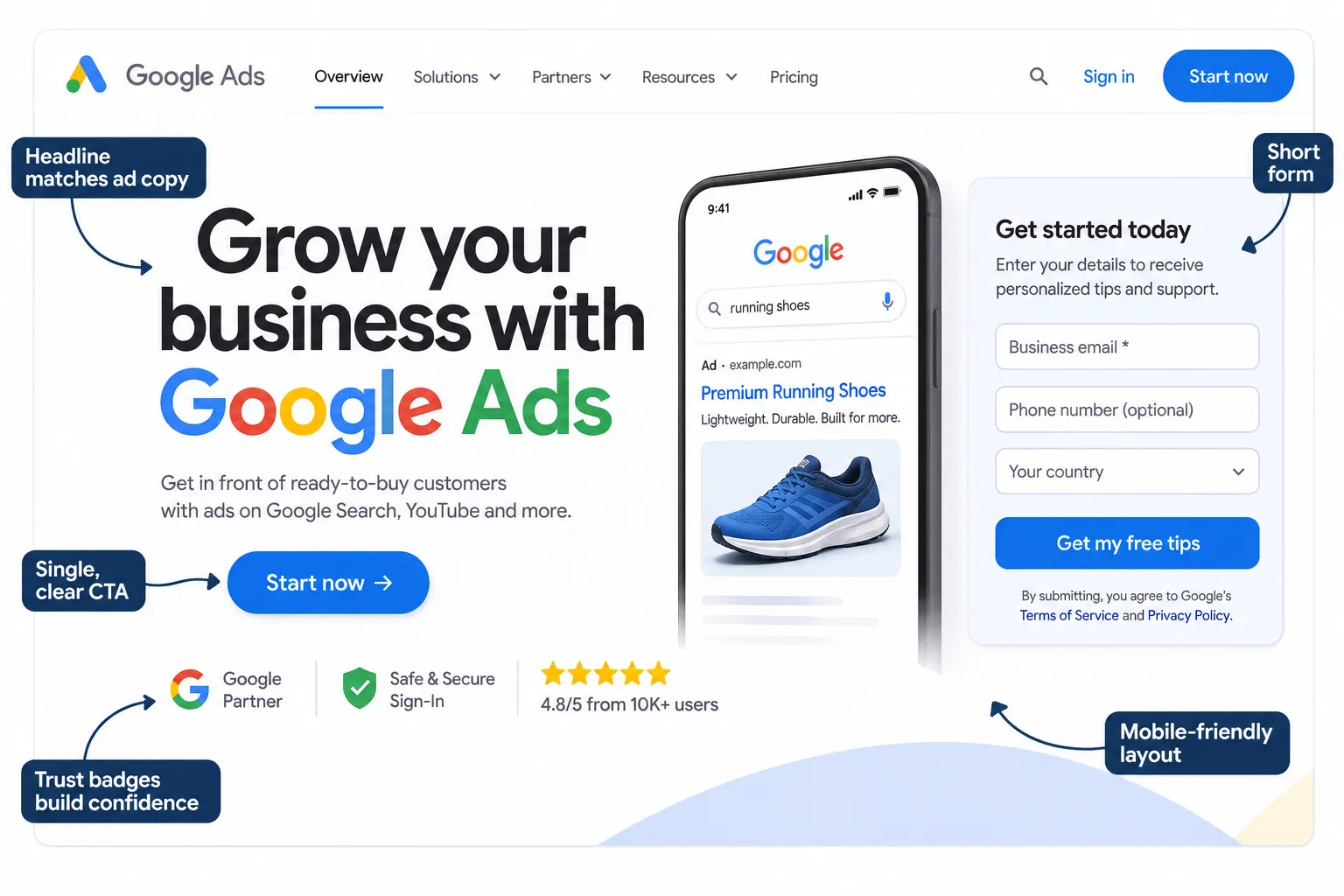
The core ingredients that actually move the needle:
- Message match: the headline on the page should echo the exact phrase used in the ad copy.
- One clear call-to-action: a single button or form, not three competing options.
- Fast load time: Google rewards pages that load in under 2-3 seconds with better Quality Scores and lower cost-per-click.
- Trust signals: reviews, client logos, or certifications placed near the CTA.
- No site navigation: a true landing page removes the top menu so visitors can’t wander off.
Choose a template-based builder if you want these elements pre-structured. Choose a custom-coded page only if you have design and development resources to spare.
How Do Landing Page Builders Integrate With Google Ads
Landing page builders integrate with Google Ads mainly through conversion tracking tags, UTM parameters, and in some cases direct campaign-level analytics dashboards. This connection lets you see which landing page variant actually drives sign-ups or sales, not just clicks.
Most builders let you:
- Paste a Google Ads conversion tag directly into page settings, no developer needed.
- Pass UTM parameters automatically so you know which keyword or ad group sent the visitor.
- View conversion data inside the builder’s own analytics panel, alongside Google Analytics.
Unbounce, for example, ties its goal-tracking and analytics features directly into this workflow, so marketers running paid campaigns can see page-level performance without jumping between five different tools [2][6]. This kind of integration is exactly why many agencies choose a dedicated builder over a general website platform. For a deeper look at how paid platforms compare on cost and intent, see our comparison of Microsoft Ads vs Google Ads for Indian SMBs.
Cheapest Landing Page Builder for Running Google Ads
The cheapest realistic option is a free-tier builder or a basic WordPress page builder plugin, though both come with trade-offs in testing and analytics depth. If your budget is tight, start free and upgrade once your ad spend justifies the cost.
Here’s a quick comparison of common starting points:
| Builder Type | Typical Starting Cost | Best For | Main Limitation |
|---|---|---|---|
| Unbounce free trial / entry tier | Free trial, paid plans scale up | Testing message match and AI optimization | Limited pages on lower tiers [7] |
| WordPress + page builder plugin | Low cost (hosting + plugin) | Owners already on WordPress | Slower setup, more manual tracking |
| Instapage entry plan | Around $99/month [1] | Teams needing advanced personalization | Not ideal for very small budgets |
| Shopify (repurposed) | Existing store subscription | E-commerce advertisers | Not built as a true standalone builder |
Choose the free or low-cost route if you’re testing a new offer and don’t yet know if paid traffic will convert. Upgrade to a paid builder if you’re running consistent monthly ad spend and need split testing or dynamic text replacement.
Best Landing Page Builders for Small Business Advertising
Small businesses advertising on Google Ads generally get the best value from Unbounce’s lower tiers or a well-optimized WordPress setup, because both balance cost with enough conversion tools to matter.
What small business owners should prioritize:
- Templates built for lead generation, not just brand storytelling.
- Simple drag-and-drop editing so you’re not dependent on a developer every time you tweak copy.
- Built-in analytics so you can see conversions without connecting five separate tools.
- Support for Dynamic Text Replacement if you run multiple ad groups with different keywords.
A common mistake small advertisers make is picking a builder based only on template looks, then discovering it has no proper conversion tracking. Always check the tracking and analytics features before you commit a plan.
Landing Page Builders vs WordPress: Which Is Better for Ads
Dedicated landing page builders are generally better for ad campaigns because they launch faster and come with built-in testing tools, while WordPress wins on long-term flexibility and content ownership.
| Factor | Dedicated Builder | WordPress |
|---|---|---|
| Setup speed | Minutes to hours | Hours to days |
| Split testing | Usually built-in | Needs a plugin |
| Design flexibility | Template-based, fast | Fully customizable, slower |
| Long-term cost | Monthly subscription | Hosting + plugin costs |
| Best for | Pure ad campaigns | Businesses blending SEO and ads |
Decision rule: if you’re running Google Ads as a standalone campaign with a short lifespan, use a dedicated builder. If the landing page is part of a larger content and SEO strategy, WordPress makes more sense. If you’re growing your overall website presence through blogging and content, our guide on improving page rank with blogging is worth reading alongside this decision.
Why Is My Google Ads Landing Page Not Converting
A landing page usually fails to convert because of message mismatch, slow load speed, or a confusing call-to-action, not because the product or offer is bad. Fix the page mechanics before blaming the ad or the market.
Common culprits, in order of how often they show up:
- Headline doesn’t match the ad, visitors feel tricked and bounce.
- Page takes too long to load, especially on mobile data.
- Too many choices on the page (multiple CTAs, extra links).
- Form asks for too much information upfront.
- No trust signals near the action button.
Edge case: sometimes the page itself is fine, but the traffic is wrong, broad match keywords sending unqualified clicks will tank conversion rate no matter how good the page is. Check your Google Ads search terms report before assuming the page is at fault.
How to Set Up Conversion Tracking on Landing Pages
Setting up conversion tracking means placing a Google Ads conversion tag on your “thank you” or confirmation page, then confirming it fires correctly before you scale ad spend. Skipping this step means you’re optimizing campaigns blind.
Basic steps:
- Create a conversion action inside Google Ads (lead form, purchase, or call).
- Copy the generated tag or use Google Tag Manager to deploy it.
- Paste the tag into your landing page builder’s tracking settings or confirmation page.
- Test the conversion by completing the form or purchase yourself.
- Check Google Ads’ “Tag Diagnostics” to confirm the tag fired.
If you want a wider view of how to audit tracking and indexing issues beyond Ads, our Google Search Console SEO guide covers diagnostic steps that apply to overall site health too.
What Features Matter Most for Ad Landing Pages
The features that matter most are Dynamic Text Replacement, built-in A/B testing, fast-loading templates, and direct analytics integration with Google Ads. Everything else, fancy animations, unlimited design freedom, matters less for conversion.
Feature priority list:
- Dynamic Text Replacement (DTR): swaps headline text to match the exact keyword that triggered the ad, boosting relevance [2].
- Split testing / experimentation tools: lets you compare page variants without guesswork.
- Form handling: native integrations with CRM or email tools so leads don’t get lost.
- Agency workflow support: client collaboration, approval flows, and multi-account management if you manage several campaigns.
- Analytics dashboard: page-level conversion data tied back to ad spend.
Unbounce’s AI Hybrid Builder combines design, copy suggestions, and traffic routing in one no-code workspace, drawing on a dataset the company says spans 2.5 billion conversions [4][8]. That scale of data is the main argument for choosing an AI-assisted builder over a manual template editor.
Can I Use Shopify as a Landing Page Builder for Ads
Yes, Shopify can work as a landing page for Google Ads if you strip the page down to a single product or offer and remove the standard navigation and footer links. It’s not purpose-built for ads, so you’ll need workarounds.
Practical tips:
- Use a dedicated “landing” page template app rather than your default product page.
- Hide the header menu and footer links to keep visitors focused.
- Add urgency elements (stock count, limited offer) since Shopify templates aren’t built around AI conversion testing like Unbounce or Instapage.
- Track conversions through Shopify’s native Google Ads integration rather than a generic pixel.
Choose Shopify as your landing page if you’re already running an e-commerce store and don’t want a second platform. Choose a dedicated builder if conversion testing and message match matter more than convenience.
Landing Page Builders’ Mobile Optimization for Google Ads
Mobile optimization is not a bonus feature, it’s the baseline requirement, since most Google Ads clicks arrive on phones. A builder that doesn’t auto-optimize for mobile will cost you conversions no matter how good the desktop design looks.
What to check before choosing a builder:
- Does it generate a separate mobile layout automatically, or do you need to design it manually?
- Are images compressed automatically for faster mobile load?
- Are buttons sized for thumbs, not mouse clicks?
- Does the form shrink to fewer fields on small screens?
Quick example: a page that loads in 1.8 seconds on desktop but takes 6 seconds on 4G mobile will quietly leak conversions even if your ad copy and offer are strong.
Common Mistakes People Make With Landing Page Builders
The most common mistake is treating the landing page builder as a website builder, adding navigation menus, blog links, and extra pages that pull attention away from the conversion goal.
Other recurring mistakes:
- Not testing the page on actual mobile devices before launching ads.
- Forgetting to connect conversion tracking before spending budget.
- Using stock templates without adjusting headline copy to match the ad.
- Running ads to the homepage instead of a dedicated landing page.
- Never running a split test, so you never know if a different headline or CTA would perform better.
If you’re also managing a broader digital presence, our piece on digital marketing for builders touches on related website and lead-generation mistakes worth avoiding.
How to Split Test Landing Pages for Google Ads
Split testing means running two or more page variants simultaneously and letting real ad traffic decide which version converts better, instead of guessing. Most dedicated builders include this natively; WordPress usually needs a plugin.
Steps to run a proper test:
- Change only one element at a time (headline, CTA color, form length).
- Split traffic evenly using the builder’s native testing tool.
- Run the test long enough to gather a meaningful number of conversions, not just a day or two.
- Pick the winner based on conversion rate, not just clicks.
- Apply the winning version, then test the next variable.
Unbounce’s Smart Traffic feature automates part of this by routing visitors to whichever variant is performing best in real time, which the company reports delivers an average 20-30% conversion lift over even traffic split [3][4]. That’s a meaningful edge if you’re running Google Ads at scale and don’t have time to manually analyze every test.
Do I Need a Landing Page Builder or Can I Use My Website
You need a dedicated landing page if your website has navigation, multiple offers, or content that could distract a paid visitor from converting. If your website already has a clean, focused page with no distractions, you may not need a separate builder.
Decision rule: use your existing website page if it’s already stripped of navigation and focused on one offer. Use a dedicated builder if your site is a general business website with menus, blog links, and multiple calls-to-action competing for attention.
Best Free Landing Page Builders for Google Ads
Free landing page builders exist mainly as trial tiers of paid tools or basic plugins, and they work fine for testing an offer before committing budget. Don’t expect advanced split testing or AI optimization on free plans.
What to expect from free tiers:
- Limited number of published pages.
- Basic templates without advanced personalization.
- Watermarks or branding on some free plans.
- No access to premium features like Dynamic Text Replacement or AI traffic routing.
Free tiers are a smart starting point if you’re a student, freelancer, or small business testing your first Google Ads campaign before scaling spend.
FAQ
What is the best landing page builder for Google Ads in 2026? Unbounce and Instapage are the two most recommended options, with Unbounce leading on AI-driven optimization and Instapage positioned as the premium choice for agencies and larger teams [1][8].
How much does Instapage cost? Instapage’s entry plan runs around $99/month as of late 2026, with higher tiers unlocking advanced personalization and reporting features [1].
Does Unbounce have a free plan? Unbounce offers a free trial period rather than a permanent free tier, letting you test its builder and AI features before committing to a paid plan [7].
What is Dynamic Text Replacement? Dynamic Text Replacement automatically swaps headline or body text on a landing page to match the exact keyword a visitor searched, improving message match and relevance [2].
Can I run Google Ads to my homepage instead of a landing page? You can, but it usually performs worse because homepages have navigation and multiple offers that distract visitors from the single action you want them to take.
Is WordPress good enough for Google Ads landing pages? WordPress works well if you pair it with a proper page builder plugin and remove navigation, but it’s typically slower to set up and test than dedicated builders.
How long should I run a split test before picking a winner? Run it until you have enough conversions to be statistically meaningful, not just a fixed number of days. A test with only a handful of conversions on each side isn’t reliable.
Do landing page builders help with Google Ads Quality Score? Yes, indirectly. Faster load times and better message match, both core features of dedicated builders, improve the page experience signals Google uses for Quality Score.
Conclusion
If you’re spending real money on Google Ads, the landing page you send traffic to matters as much as the ad copy itself. Unbounce and Instapage currently lead the dedicated builder space, with Unbounce’s AI Hybrid Builder and Smart Traffic offering a strong case for advertisers who want conversion lift without manual guesswork, and Instapage serving teams that need deeper personalization and agency-level controls [1][4][8].
Start small: test your offer with a free tier or a simple WordPress page, track conversions properly from day one, and only upgrade to a premium builder once your ad spend justifies the monthly cost. Whichever tool you choose, keep the page focused on one message, one action, and a fast load time, that combination does more for conversions than any single feature on a pricing page.
For more practical guidance on connecting your paid campaigns with broader SEO and visibility strategy, explore our related resources on Google AI Mode SEO and B2B demand generation strategy.
References
- Plans. instapage.com.
- Features. unbounce.com.
- Updates. unbounce.com.
- AI Marketing Tools. unbounce.com.
- Instapage. toolsgavel.com.
- Track and improve page performance in the AI Hybrid Builder. documentation.unbounce.com.
- unbounce.com.
- Unbounce Launches New AI Powered Landing Page Builder Built on 25 Billion Conversions. morningstar.com.
landing page builders, google ads, conversion rate optimization, unbounce, instapage, PPC landing pages, dynamic text replacement, split testing, conversion tracking, small business advertising, paid search marketing, WordPress vs landing page builder