
Last updated: November 18, 2026
On November 10, 2026, OpenAI quietly flipped a switch that changes how small businesses, ecommerce brands, and local shops show up in AI answers. ChatGPT now lets eligible businesses claim a profile, verify ownership, and manage how they appear when nearly 1.2 billion weekly users ask about them [1]. If you run a business and haven’t heard about this yet, you’re not late, but you should move now.
This guide from the Sameer Digital desk walks through exactly how to claim business in ChatGPT, step by step, with the eligibility rules, verification options, and visibility tips you actually need.
Quick Answer
Claiming your business in ChatGPT means verifying ownership of your business profile inside OpenAI’s new Business Hub, so you control the details ChatGPT shows and gain access to mention and click insights. It’s free at launch, open to eligible businesses wherever ChatGPT is available, and takes minutes to a few days depending on your verification method [2][3].
Key Takeaways
- Businesses in ChatGPT launched in beta on November 10, 2026, built around Business Hub [1].
- Claiming is free; there’s no cost to verify or manage your profile today [2].
- You can verify via business phone, business email, website domain, or a Shopify store [4].
- Business Agents (automated storefront-style chat agents) are limited to eligible US ecommerce and online-service businesses right now [2][4].
- Local stores and restaurants outside the US can’t claim yet, only existing US listings qualify today [2].
- Business Hub shows insights for the past 28 days: mentions, profile views, and website clicks, not competitor data or the prompts behind mentions [3].
- This is different from the “ChatGPT Business” team workspace plan, don’t confuse the two.
- Indian businesses can claim a profile today but can’t access Business Agents yet.
What Is Businesses in ChatGPT?
Businesses in ChatGPT is OpenAI’s new system letting companies claim, verify, and manage how their business appears inside ChatGPT conversations. It launched in beta on November 10, 2026, and lives inside a dashboard called Business Hub [1][5].
Think of it as a business profile layer sitting underneath ChatGPT’s answers. When someone asks ChatGPT about a restaurant, a software tool, or an online store, ChatGPT may already be referencing that business from public web data. Claiming the profile gives the business owner a say in what details are shown, hours, website, product information, instead of leaving it entirely to whatever ChatGPT pulls from the open web.
This is not the same product as “ChatGPT Business,” which is OpenAI’s paid team workspace plan for employee seats. Business Hub is a discovery and management layer, not a subscription tier. You don’t need an Enterprise agreement or an ads account to claim an eligible listing [3].
What You Can Do in Business Hub
Business Hub lets a verified business owner update profile details, connect a product feed, and view a 28-day engagement snapshot, all without extra cost at launch. It’s the central control panel for how your business shows up inside ChatGPT [3][4].
Inside the hub, you can:
- Edit business name, address, website, and category details
- Connect a product feed with pricing and availability (Shopify integration is the fastest path) [2]
- View insights: mentions, profile views, and website clicks over the trailing 28 days [3]
- Preview and publish an optional Business Agent, if your business qualifies [2]
- Manage who on your team has admin access to the profile
What Business Hub does not show: the actual prompts people typed before your business got mentioned, and no competitor comparison data. OpenAI has kept this layer deliberately limited for privacy reasons [3].
For context on how AI systems pull and cite business information more broadly, our guide on how to get your website cited in Google AI Overviews, ChatGPT and Gemini covers the underlying mechanics.
How to Claim Your Business in ChatGPT (Step-by-Step)
Claiming your business in ChatGPT takes five steps: open Business Hub, select your listing, pick a verification method, verify ownership, then manage your profile. Most claims finish in minutes if you use phone or email verification [3][4].
Here’s the exact walkthrough:
Open Business Hub. Sign in to ChatGPT on the web and open Business Hub from the sidebar. Search your business by name. Use the ChatGPT account you intend to use for ongoing management, the claim ties to that account [3][4].
Select the correct listing. Confirm the business name, website, and address match your actual business before proceeding. If multiple businesses share a similar name, double-check carefully, picking the wrong listing wastes your verification attempt [3].
Choose an available verification method. Depending on your business, Business Hub may offer business phone, business email, website domain, or a connected Shopify store. Not every method appears for every listing [4].
Verify ownership. For phone, choose SMS or an automated call, request a code, and enter it. For email, request a code sent to your business email address and type it into ChatGPT. For domain verification, copy the TXT record ChatGPT gives you into your domain’s DNS settings exactly as shown (type, host, value), wait for Google verifying request able continue, a few seconds refresh page may be needed for DNS propagation, then return to Business Hub and select Verify domain [4].
Manage and update your profile. Once verified, update your business details, connect a product feed if relevant, and check your insights panel after a few days of activity.
How Long Does It Take to Verify My Business on ChatGPT?
Phone and email verification usually finish in minutes once you enter the code. Domain verification can take longer, sometimes up to 24-48 hours, because DNS changes need time to propagate before ChatGPT can confirm the TXT record [4].
If your DNS verification doesn’t go through immediately, don’t panic. Double-check the exact record values, wait a bit longer, and retry. This mirrors the patience needed for Google Search Console domain verification, something we cover in our Google Search Console SEO guide.
Is Businesses in ChatGPT Free?
Yes. Business Hub and Business Agents are free at launch, there’s no fee to claim, verify, or manage your business profile [2][3]. OpenAI hasn’t announced future pricing changes as of November 18, 2026.
That said, “free” doesn’t mean unlimited forever. OpenAI has said it plans to expand eligibility and features over time, and pricing, availability of certain tools, and feature sets could shift as the product matures [1]. If you’re budgeting digital marketing spend for 2026, treat this as a zero-cost channel worth claiming now, while keeping an eye on future announcements.
What Information Do I Need to Claim My Business?
You’ll need accurate business details and access to at least one verification channel: a business phone number, a business email address, your website’s DNS settings, or a connected Shopify account [4]. Having these ready before you start speeds up the whole claim business in ChatGPT process considerably.
Specifically, gather:
- Legal or trading business name
- Business address (for local listings)
- Website URL
- Access to your domain’s DNS panel, if using domain verification
- A business phone or email you control
- Shopify admin access, if you sell through Shopify
Can I Claim Someone Else’s Business Listing in ChatGPT?
No. You must own the business or be formally authorized to represent it. OpenAI’s November 10 policy explicitly bans fake, duplicate, misleading, or impersonating profile claims, and can remove profiles for safety or policy violations [6].
This matters for agencies and marketers managing multiple client accounts: always claim on behalf of a client with written authorization, using their verified phone, email, or domain, not your own.
What Happens if Someone Else Claims My Business First?
If another person or an automated system claims your listing before you, you’ll need to go through Business Hub’s dispute or re-verification flow tied to ownership proof. OpenAI requires the claimant to prove ownership, so a legitimate owner typically has a path to reclaim the listing by verifying through official business channels [6].
Common mistake: waiting too long to claim. If a bad actor or a confused employee claims your profile first, resolving it takes more time than claiming correctly the first time. Claim early, especially if you’re a known local brand or ecommerce name.
How Is Claiming on ChatGPT Different from Google Business Profile?
Claiming in ChatGPT verifies your business inside OpenAI’s conversational answers, while Google Business Profile controls your presence in Google Search and Maps. They’re parallel systems, you need both, and one doesn’t update the other automatically [2].
If you haven’t optimized your Google listing yet, our Google Business Profile optimization guide is a good companion read before you tackle ChatGPT.
What Are Business Agents?
Business Agents are automated, chat-based storefront experiences inside ChatGPT that let eligible businesses answer customer questions, surface products, and guide purchases directly within a conversation. They’re currently limited to eligible US ecommerce and online-service businesses with a website [2][4].
Shopify merchants get the smoothest path: connecting a store from Shopify Admin or Business Hub automatically shares catalog data like product details, pricing, and availability, and then lets the merchant preview and publish a Business Agent [2]. If you run an ecommerce online store outside Shopify, you can still claim your profile, but Business Agent access depends on OpenAI’s eligibility checks.
Decision rule: choose to pursue a Business Agent if you’re a US-based ecommerce or online-service business with product feeds ready to sync. Skip it for now if you’re a local restaurant, a service-based brick-and-mortar shop, or based outside the US, claim the basic profile instead and wait for expansion.
What Types of Businesses Can Claim on ChatGPT?
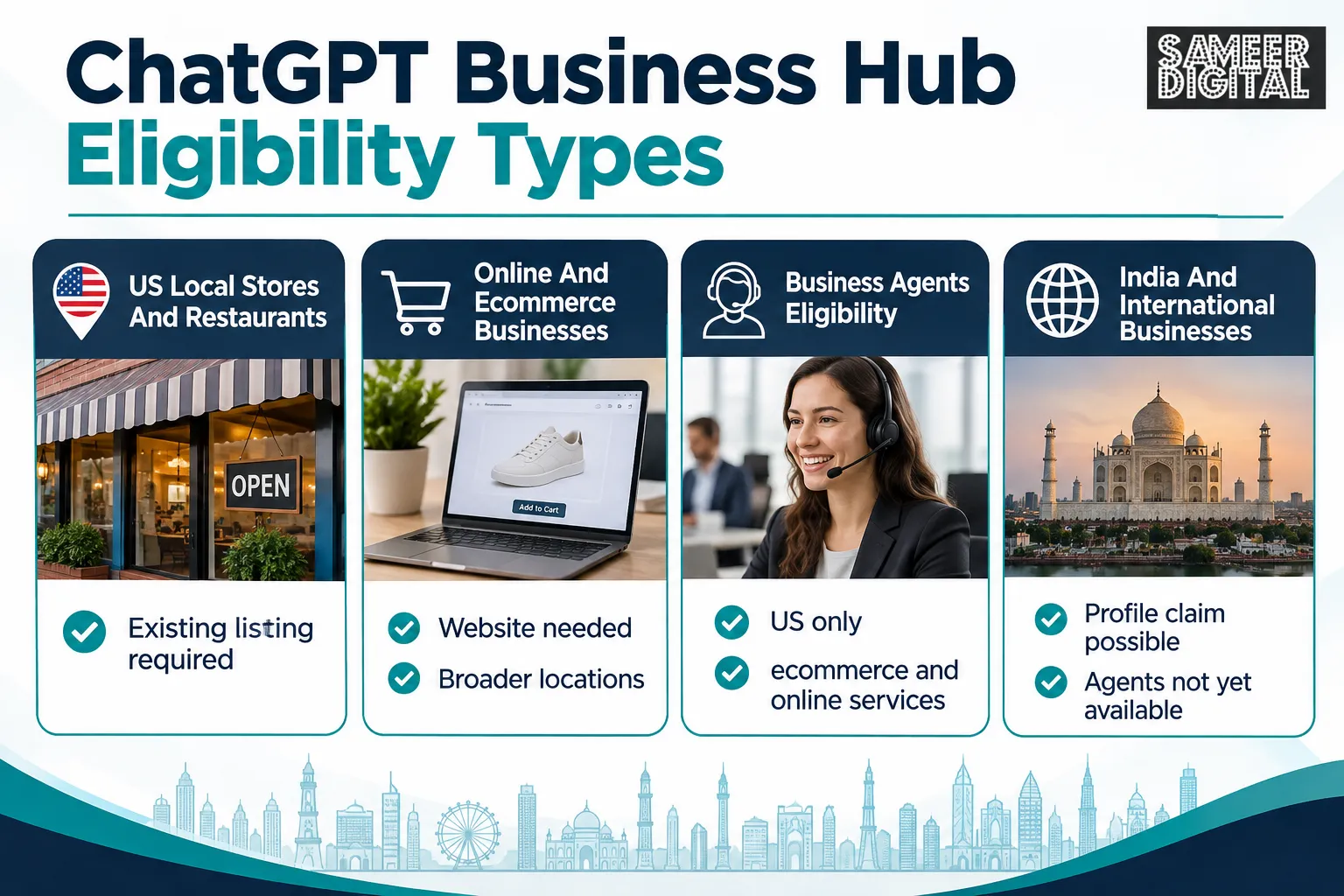
Any eligible business in a location where ChatGPT operates can claim a basic profile, but local stores and restaurants can currently claim only an existing US listing, while online businesses can claim more broadly [2]. This two-tier structure is the most misunderstood part of the whole rollout.
Breaking it down:
- US local stores and restaurants: can claim an existing listing today.
- Online and ecommerce businesses: can claim wherever ChatGPT is available, subject to verification and policy checks [2].
- Business Agents: restricted to eligible US ecommerce and online-service businesses only [4].
Can Indian Businesses Claim Their Business in ChatGPT?
Yes, Indian online businesses and ecommerce brands can generally claim a basic Business Hub profile if ChatGPT operates in India, but Business Agents remain US-only for now. Indian businesses should focus on claiming the profile and keeping details accurate while waiting for Business Agents to expand internationally [1][2].
Indian local businesses, restaurants, salons, retail shops, currently fall outside the local-claim eligibility window, since that’s restricted to existing US listings [2]. If you run a service business in India, claiming the online/ecommerce path (if you sell through a website) is your best current option.
Do I Need a Website to Claim My Business in ChatGPT?
You don’t strictly need a website to claim a basic local listing if you’re an eligible US business, but you do need a website for domain-based verification and for any Business Agent eligibility. Online and ecommerce businesses need a website by definition, since that’s how ChatGPT verifies and syncs product details [2][4].
If you’re building out your site specifically to support this kind of verification, our piece on improving your page rank with blogging and our breakdown of SEO vs GEO vs AEO in 2026 explain how a stronger website also helps your visibility across AI search tools generally, not just ChatGPT.
Privacy: What Businesses Can and Cannot See
Businesses that claim a profile can see mentions, profile views, and website clicks from the past 28 days, but they cannot see the actual chat conversations or prompts that led to those mentions. This privacy boundary is one of OpenAI’s firmer design choices in the November 10 launch [3].
Can Businesses Read My ChatGPT Chats?
No. Businesses cannot read your ChatGPT chats, see your exact prompts, or access any personally identifying conversation data. They only see aggregated numbers like total mentions and click counts over a 28-day window [3].
This matters for consumer trust: a business owner checking their Business Hub dashboard sees “42 mentions this month,” not the actual questions customers asked. That’s a deliberate privacy design, similar in spirit to how Google Analytics aggregates search data without exposing individual queries.
Common Mistakes People Make When Claiming Their Business
The most common mistake is claiming the wrong listing by rushing past the name-and-address confirmation step, followed closely by using a personal ChatGPT account instead of a dedicated business account. Both mistakes cost time to fix later [3].
Other mistakes worth avoiding:
- Trying domain verification without DNS panel access, then giving up instead of asking a developer for help
- Assuming Business Agent eligibility applies to local or non-US businesses
- Letting product feed pricing and availability data go stale after the initial Shopify sync
- Forgetting to check insights regularly, mentions, profile views, and website clicks tell you whether the claim is working
Can I Update My Business Info After Claiming It?
Yes, you can update business details, product feeds, and profile information anytime after claiming through Business Hub. There’s no waiting period between updates, though changes may take a short time to reflect in ChatGPT’s answers [3].
Treat your Business Hub profile the way you’d treat a Google Business Profile or social media bio: review it quarterly, update pricing and availability whenever it changes, and refresh your description if your offerings shift.
What if My Business Doesn’t Verify Properly?
If verification fails, double-check the exact details entered, phone number format, email address, or DNS record values, and retry, since most failures come from small data-entry mismatches rather than real eligibility problems [4]. If repeated attempts fail, the business may not yet be eligible under OpenAI’s current rollout criteria.
Common verification failure causes:
- DNS TXT record copied with extra spaces or wrong host field
- Business phone number not matching the number on file publicly
- Business category or location falling outside current eligibility rules
- Shopify account not properly linked before attempting the claim
How to Show Up Better in ChatGPT Answers
Showing up well in ChatGPT answers depends on having accurate, consistent business information across your website, product feeds, and claimed profile, plus genuine mentions across the open web that ChatGPT can reference. Claiming your profile is necessary but not sufficient on its own [2][5].
Practical steps that help:
- Keep your website’s business details (name, address, hours, pricing) consistent everywhere
- Publish clear, well-structured product and service pages, this helps both traditional SEO and AI answer generation
- Maintain an active content presence; our Generative Engine Optimization guide explains how AI systems pull and weigh web content
- Sync your product feed regularly if you’re on Shopify or another ecommerce platform
- Don’t expect claiming alone to boost recommendations, see the FAQ below
For small businesses layering AI visibility on top of customer service, pairing this with a strong support setup matters too; see our review of AI customer service platforms for small business.
Frequently Asked Questions
Is Businesses in ChatGPT free?
Yes, claiming, verifying, and managing your business profile in Business Hub is free at launch, with no announced plans to charge for the basic claim as of November 2026 [2][3].
Can Indian businesses claim their business in ChatGPT?
Indian online and ecommerce businesses can generally claim a basic Business Hub profile, but Business Agents are currently limited to eligible US ecommerce and online-service businesses only [1][2].
Will claiming my business make ChatGPT recommend it more?
Claiming gives you control over your profile details and insights, but it does not guarantee more mentions or higher recommendation frequency, since ChatGPT’s answer generation depends on broader web content and relevance signals [2][5].
Can businesses read my ChatGPT chats?
No, businesses only see aggregated insights like mentions, profile views, and website clicks from the past 28 days, never individual chat content or prompts [3].
What’s the difference between Business Hub and the ChatGPT Business plan?
Business Hub is a free profile-claiming and management tool for how your business appears in ChatGPT, while ChatGPT Business is a separate paid workspace subscription for team seats, they are unrelated products [3].
Do local businesses outside the US qualify yet?
Not yet. Local stores and restaurants can currently claim only existing US listings; OpenAI has said it plans wider expansion but hasn’t set a firm date [1][2].
The Bottom Line
Claiming your business in ChatGPT is a low-risk, zero-cost move you should make now if you’re eligible, and a “watch and prepare” situation if you’re not. OpenAI’s November 10, 2026 rollout of Business Hub is still a beta, with Business Agents limited to US ecommerce and online-service brands, and local claiming restricted to US listings today [1][2].
If you’re an eligible business, claim your profile this week: gather your verification details, pick the fastest method available (phone or email beats DNS for speed), and set a calendar reminder to check your insights after 28 days. If you’re not eligible yet, say, a local shop outside the US, focus your energy on strengthening your website and content now, so you’re ready the moment OpenAI expands access.
This is one more channel in a widening set of AI-driven discovery tools, alongside Google AI Overviews and Gemini. For a broader view of how businesses should adapt their marketing stack for this shift, our guide on the best AI SEO tools for 2026 is a solid next stop.
References
- Introducing Businesses Chatgpt. openai.com.
- Businesses in Chatgpt. openai.com.
- Articles. help.openai.com.
- 20001635 Setting Up Your Business on Chatgpt. help.openai.com.
- Businesses in Chatgpt. sanity.io.
- Businesses in Chatgpt. openai.com.